

に比べ ショートカットアイコン しかし Windows XP、上のもの Windows Vista それらははるかに大きくなり、ファイル/フォルダーのショートカットを示す矢印がより見やすくなります。多くのユーザーにとって、この矢印はあまり快適な外観ではないため、矢印と拡張子を削除したいと考えています。 「~ショートカット」 ファイル名から。

外観は次のとおりです ショートカットのデフォルト Windows Vista の「ネットワーク接続」:

...そしてショートカット 矢がなければ デフォルト :

ショートカット アイコンの矢印を取り除く最も簡単なオプションは、ミニ ソフトウェアを作成することです。 フレームワークx。すぐにインストールでき、使いやすい非常に小さなソフトウェアです。
Vista ショートカット オーバーレイ マネージャー。
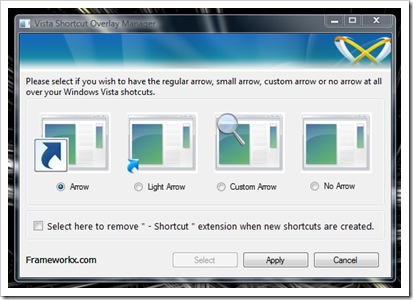
このソフトウェアでは、ショートカット アイコンに表示される記号を削除または選択することができます。再起動とか、 ログオフ 「Vista ショートカット オーバーレイ マネージャー」(FxVisor) で行われた変更が表示されることを確認します。
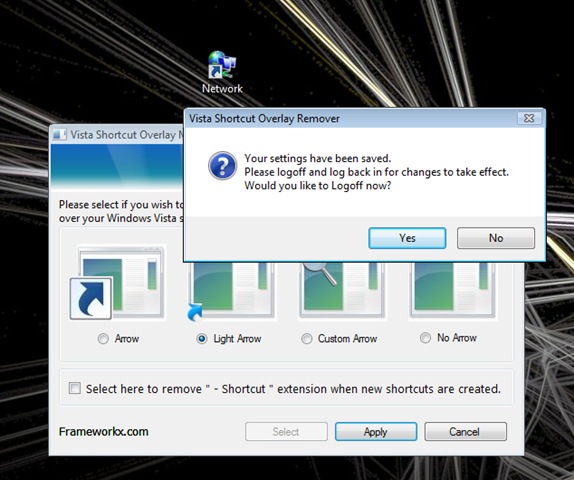
Windows Vista ショートカット オーバーレイ リムーバー (別名 FxVisor) を使用すると、ショートカット オーバーレイ矢印を削除したり、Windows Vista でカスタマイズしたりすることができます。そのため、それを実行できるようにする Vista ショートカット オーバーレイ リムーバー ユーティリティを作成しました。
バージョン2.0:
以前の Vista ショートカット オーバーレイ リムーバーは現在 Vista ショートカット マネージャーと呼ばれており、次のような多くの新しい歓迎機能が追加されました: カスタム オーバーレイ アイコン、有効化/無効化 “-ショートカット” 拡張機能、x64 プラットフォームの完全サポート、バージョン 1.3 からの直接アップグレード。
魚 160万 ダウンロード数は、このソフトウェアについて多くを物語る数字です。
ダウンロード: Vista ショートカット マネージャー – DL


あなたも興味があるかもしれません...

についての2つの考え “ショートカット オーバーレイ矢印を削除する [Windows Vista]”