


Am meisten CMS-s, einschließlich WordPress, muss als Mindestinstallationsanforderung eine neuere Version von haben PHP 5.1.x pe Webserver. Im folgenden Tutorial zeigen wir Ihnen einige einfache Schritte, die Sie ausführen können das Upgrade von PHP Version 5.1.x auf PHP 5.3 pe Linux CentOS 5.6.
1. Zunächst einmal müssen wir aufhören Apache Webserver. (httpd-Dienst)
service httpd stop2. Wir löschen die auf dem Server installierten PHP 5.1.x-Pakete.
yum remove php php-*3. Nachdem wir die Bestätigung erhalten haben, dass die PHP-Pakete vom Server gelöscht wurden, fahren wir mit der Installation der Pakete fort PHP 5.3.
yum install php53.i386
yum install php53-bcmath.i386
yum install php53-cli.i386
yum install php53-common.i386
yum install php53-dba.i386
yum install php53-devel.i386
yum install php53-gd.i386
yum install php53-imap.i386
yum install php53-intl.i386
yum install php53-ldap.i386
yum install php53-mbstring.i386
yum install php53-mysql.i386
yum install php53-odbc.i386
yum install php53-pdo.i386
yum install php53-pgsql.i386
yum install php53-process.i386
yum install php53-pspell.i386
yum install php53-snmp.i386
yum install php53-soap.i386
yum install php53-xml.i386
yum install php53-xmlrpc.i386
Oder noch einfacher: Installieren Sie alle PHP53*-Pakete.
yum install php53*4. Starten Sie den Apache-Webserver
service httpd startPakete php53-birneAnwesend php53-mcryptAnwesend php53-mhashAnwesend php53-pdoAnwesend php53-pecl-apc und php53-pecl-memcache Sie sind für CentOS 5.6 nicht verfügbar.
Überprüfen Sie abschließend, ob die PHP5.3-Version erfolgreich installiert wurde. Erstellen Sie eine .php-Datei (z. B. info.php), in der Sie Folgendes haben:
<?php

phpinfo();

phpinfo(INFO_MODULES);

?>
Urcati fisierul pe serveri si accesati adresa lui cu Firefox, Internet ExplorerAnwesend Chrom oder ein anderer Webbrowser. Das Ergebnis sollte sein:

Mit der Befehlszeile können Sie sehen, welche PHP-Version auf dem Server installiert ist: php -v oder mit “leckere Liste installiert | grep php” (Es werden alle installierten PHP-Pakete angezeigt).
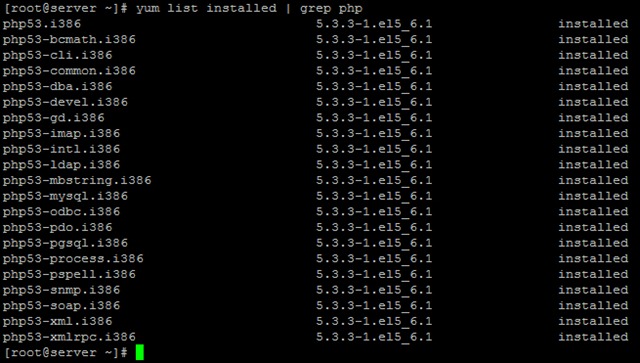
Stealth Settings – Aktualisieren / installieren Sie PHP 5.3 auf CentOS 5.6.


Vielleicht interessieren Sie sich auch für...
