


O rezolvare simpla a erorii 80072f94 raportata de Microsoft Download Manager atunci cand dorim sa-l punem la treaba.
In configuratie default, Gestionnaire de téléchargement Microsoft vine cu setari de procuration putin ciudate – “Use browser settings“. Pentru a inlatura erorile care apar atunci cand dorim sa pornim un télécharger, trebuie sa mergem la Paramètres > LANGUETTE Procuration > bifata optiunea “Pas de proxy“.
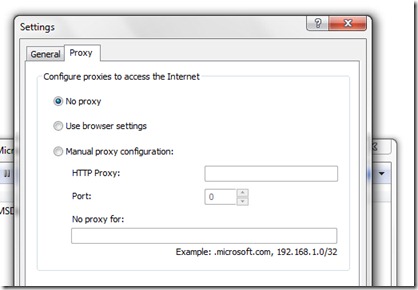
Gestionnaire de téléchargement Microsoft (téléchargement & Revoir) .


Vous pourriez également être intéressé par...

Augmentez la vitesse de téléchargement dans Firefox avec DownThemAll
Si vous n'êtes pas un utilisateur fréquent de BitTorrent/uTorrent et préférez effectuer vos téléchargements quotidiens via le navigateur...
2 réflexions sur “Correction d'erreur Microsoft Download Manager (sans répondre)”