


O rezolvare simpla a erorii 80072f94 raportata de Microsoft Download Manager atunci cand dorim sa-l punem la treaba.
In configuratie default, Microsoft Download Manager vine cu setari de proxy putin ciudate – „Use browser settings„. Pentru a inlatura erorile care apar atunci cand dorim sa pornim un download, trebuie sa mergem la Settings > tab-ul Proxy > bifata optiunea „No proxy„.
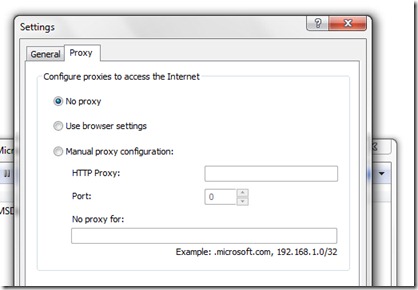
Microsoft Download Manager (Download & Review) .


Te-ar putea interesa și...

Mariti viteza de Download in Firefox cu DownThemAll
Daca nu sunteti un utilizator frecvent al BitTorrent/uTorrent si preferati sa faceti downloadurile zilnice prin intermediul browserului...
2 thoughts on “Fix Error Microsoft Download Manager (Not Responding)”