
Daca obisnuiti sa lucrati frecvent cu folderele de sistem (My Computer, My Documents, personal folder, Downloads, My Music etc) atunci cel mai probabil folositi קיצור דרך-אורי catre acestea aflate pe שולחן עבודהו
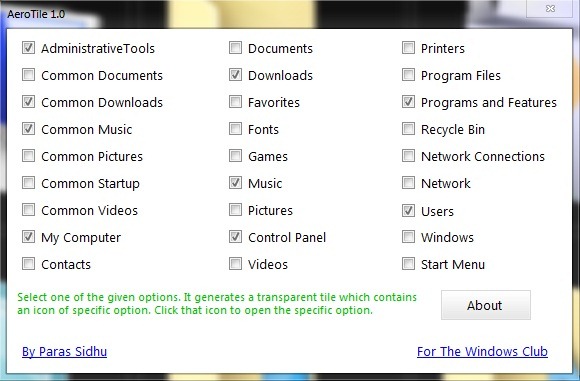
AeroTile זה o יישום Freeware מה שמאפשר utilizatorilor Windows 7 sa afiseze pe desktop אתרי אריחים pentru cele mai comune foldere de sistem. Pentru a afisa tile-urile, deschideti aplicatia si bifati folderele de sistem catre care doriti sa creati shortcut-uri.
Diferenta dintre un simplu shortcut si tile-urile folosite de AeroTile este ca acestea din urma sunt de dimensiuni mai mari si au background-ul glossy, dand desktopului un aspect Aero Style, iar imaginea de fundal este vizibila in continuare dupa afisarea tile-urilor datorita transparentei לָהֶם.
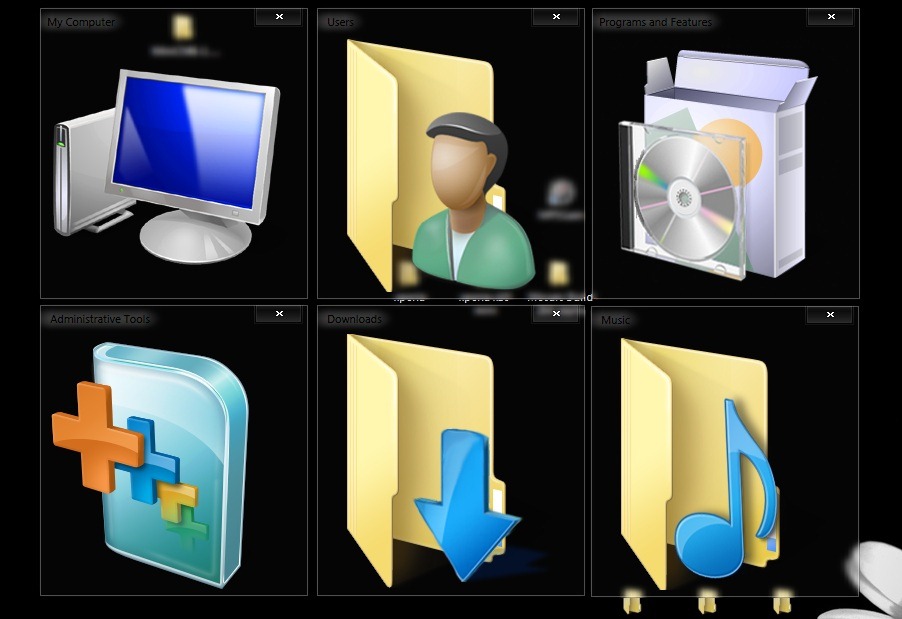
In plus, shortcut-urile AeroTile pot fi inchise atunci cand nu ne mai sunt de folos sau cand ne impiedicam de ele pe desktop (putand fi afisate din nou cu ajutorul aplicatiei).
Nota: Aplicatia nu necesita instalare si este compatibila cu Windows Vista si Windows 7.
הגדרות התגנבות – Add System Folders Shortcuts on Desktop with AeroTile


