


계좌를 개설하신 분들 Gmail 오늘 아마 그 메시지를 봤을 거야 “Gmail의 새로운 모습” 그리고 그들은 Gmail의 새로운 변화를 알게 되었습니다.
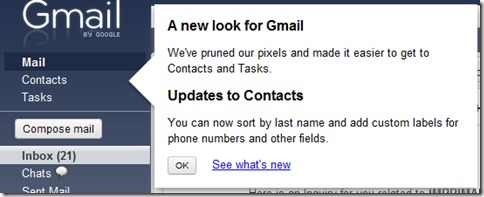
링크울 “메일 작성” 로 변형되었습니다. 단추 (링크보다 훨씬 눈에 띕니다.”, 다시 “콘택트 렌즈” 그리고 “작업” 사이드바 상단 버튼 이전으로 이동되었습니다. “구성하다” 그리고 “받은편지함“.
로그인 후 첫 페이지에 표시되는 이러한 변경 사항 외에도 Gmail은 연락처 관리에 중요한 변경 사항을 적용했습니다.
연락처 업데이트
또한 연락처에 대한 대대적인 점검을 수행하여 요청한 여러 기능을 추가하고 연락처를 더 쉽게 사용할 수 있도록 했습니다.
- 연락처는 Mai와 훨씬 유사하게 작동합니다.엘. 키보드 단축키는 이제 연락처에서도 작동하며 이메일 선택 및 라벨 지정과 마찬가지로 연락처 선택 및 그룹화 기능을 강화했습니다.
- 성순으로 연락처 정렬. 아래를 보세요추가 작업 이 옵션의 경우.
- 전화번호 및 기타 필드에 맞춤 라벨 사용. 예를 들어 전화번호에 '별장'이라는 라벨을 지정할 수 있습니다. iPhone 및 Blackberry Sync용 ActiveSync는 아직 맞춤 라벨을 지원하지 않으므로 라벨이 붙은 번호/이메일 등을 맞춤 설정하세요. 휴대전화에는 표시되지 않을 수 있습니다.
- 끄르다. 이제 연락처를 변경할 때 최근 변경 사항을 취소할 수 있습니다.
- 자동저장. 더 이상 "편집" 모드나 "보기" 모드에 대해 걱정할 필요가 없습니다. — 그냥 편집하면 Gmail이 변경 사항을 저장합니다.
- 구조화된 이름 필드. 이제 이름 구성 요소(예: 제목, 이름, 중간, 성 및 접미사)를 명시적으로 설정하거나 덜 구조화된 접근 방식을 선호하는 경우 이름 필드를 자유 형식 영역으로 계속 사용할 수 있습니다.
- 수동 및 대량 연락처 병합. 이제 다음에서 연락처를 병합할 수 있습니다.추가 작업메뉴. 병합하려는 연락처를 선택하고 선택하세요.연락처 병합 아래에서추가 작업 메뉴. 또는 병합할 연락처에 대한 제안 목록을 얻으려면중복 항목 찾기 및 병합.
공식 블로그에서 Gmail에 대한 자세한 소식을 확인하실 수 있습니다. gmailblog.blogspot.com.


당신은 또한에 관심이있을 수 있습니다 ...

Pagespeed Insights "등대 반환 오류 : 무언가 잘못되었습니다"
"Lighthouse가 오류를 반환했습니다: 문제가 발생했습니다"라는 오류는 웹페이지의 성능을 찾으려고 할 때 Google PageSpeed Insights에 표시됩니다.
크롬 깃발 – Google Chrome의 숨겨진 기능 [Dark Mode]를 어떻게 활성화 할 수 있습니까?
Inaintea de lansarea unor caracteristici, Google adauga in Chrome asa zisele "flags". Acestea sunt caracteristicile ascunse ale Google ...
Google은 혼합 내용 (혼합 콘텐츠)으로 웹 페이지를 차단합니다.
최근 몇 년간 인터넷 사용자의 급격한 증가로 인해 자동적으로 개인의 관심이 더 커졌습니다.
요일과 달 (달력의 날짜)이 몇 일에 걸렸거나 며칠 동안 신속하게 계산할 수 있습니까?
Majoritatea utilizatorilor, cand aud cuvantul "Google" se gandesc in primul rand la motorul de cautare (Google Search), la servic...
Google은 PR (PageRank) 도구 모음을 철수했습니다 – 웹 페이지의 분류
지난 15년 동안 PageRank는 웹페이지 분류에 대한 벤치마크인 웹페이지의 많은 소유자 또는 관리자를 위한 것이었습니다.
새로운 프로그래밍 언어 인 Swift는 Android의 기반에 있습니다.
구글은 미래에는 새로운 프로그래밍 언어인 스위프트(Swift)가 안드로이드의 기반이 될 것으로 보고 있다. 좀 더 구체적으로 무슨 뜻인지...
Google Chrome 42는 영구적으로 활성화되는 푸시 알림 시스템을 제공합니다.
최신 버전의 Google Chrome 브라우저는 개발에 도움을 줄 수 있는 흥미로운 옵션을 구현합니다.
iOS 8.3, Apple 기기의 마지막 최소 업데이트
마지막으로 Apple은 iOS 업데이트가 모든 사용자에게 제공되기 전에 테스트할 수 있는 기회를 제공합니다.
Google+는 소셜 네트워크에서 실명을 사용하는 규칙을 포기합니다.
4년 전에 출시된 Google+ 소셜 네트워크는 다양한 제한을 사용하여 사용자에게 특정 표준을 부과하려고 했습니다.
Gmail에서 이미지의 자동 표시를 어떻게 차단할 수 있습니까?
현재 거의 모든 이메일 서비스는 기본적으로 다음을 통해 액세스할 수 있는 이미지 및 데이터의 자동 표시를 차단합니다.
가장 널리 사용되는 인터넷 브라우저인 Google Chrome 21의 최신 버전이 출시되었습니다.
Google은 인터넷에서 가장 인기 있는 인터넷 브라우저의 상위권에 도달한 후 Chrome 브라우저의 새 버전을 출시합니다.
Google은 2012 년 3 월 1 일부터 기밀성 정책을 변경합니다
얼마 전 Google은 다음과 같은 데이터의 저장 및 사용에 관한 개인 정보 보호 정책을 변경할 것이라고 발표했습니다.
2개의 생각 “Gmail 계정의 새로운 변경사항 – Gmail의 새로운 모습.”