

Wenn wir installieren Anwendungen pe Android AUS Google Play Store, sie fügen automatisch hinzu Verknüpfung pe Startbildschirm-ul das Gerät, auf dem sie installiert sind. Dies erleichtert zwar das Auffinden und Zugreifen auf die entsprechenden Anwendungen, kann jedoch mit der Zeit dazu führen, dass der Startbildschirm unübersichtlich wird und unordentlich aussieht. Darüber hinaus sind die meisten Benutzer Android lieber zugreifen installierte Anwendungen auf Geräten ausgestattet mit App-Schublade.
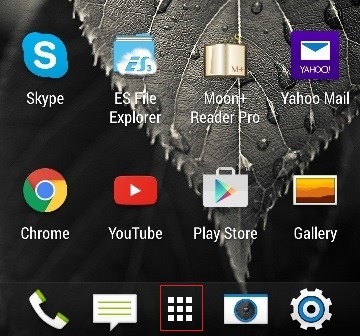
Für den Fall, dass Sie von allem müde sind Verknüpfungen löschen Aber Android-Anwendungen vom Startbildschirm entfernt haben und verhindern möchten, dass sie nach jeder Installation hinzugefügt werden, befolgen Sie die nachstehenden Anweisungen.
Wie verhindern wir, dass aus dem Google Play Store installierte Anwendungen automatisch Verknüpfungen zum Startbildschirm des Android-Geräts hinzufügen?
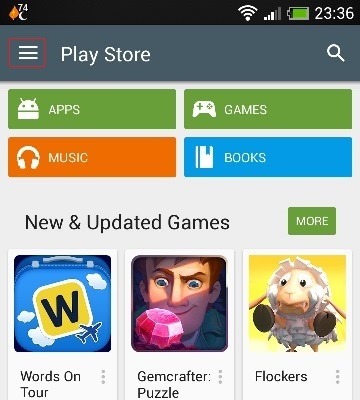
- Öffnen Sie die Anwendung Play Store und tippen Sie auf die Menütaste wird in der oberen linken Ecke angezeigt (vor dem Play Store)
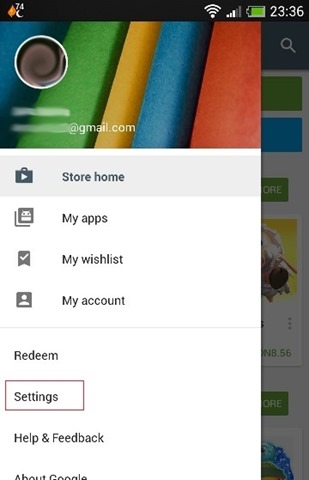
- Wählen Sie im angezeigten Menü aus Einstellungen
- dann im Abschnitt Allgemein, Deaktivieren OPTION Symbol zum Startbildschirm hinzufügen (für neue Apps)
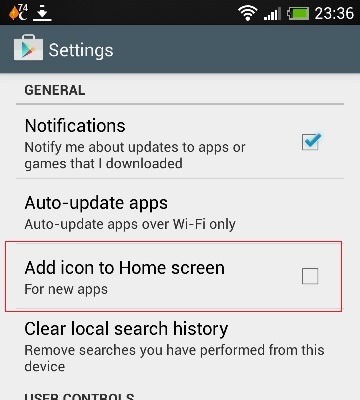
Und das ist es. After you make this setting, Über den Play Store installierte Android-Anwendungen fügen keine Verknüpfungen mehr zum Startbildschirm hinzudas Gerät.
Stealth -Einstellungen – So verhindern Sie, dass Android-Apps automatisch Verknüpfungen zum Startbildschirm hinzufügen


Vielleicht interessieren Sie sich auch für...
