


Nicht wenige sind süchtig danach mail-ur, und das beliebteste Client-Desktop für E-Mail ist Microsoft Outlook / Office oder Äußern.
Jemand fragte mich, ob es eine Option gäbe Microsoft Outlook Office 2007, um es ihm zu erlauben automatisches Öffnen beim Starten des Computers.
Es gibt keine Option dazu Start-up in MS Office Outlook, aber Sie können die Verknüpfung der ausführbaren Outlook-Startdatei einfügen.
So starten Sie MS Office Outlook automatisch beim Öffnen des Computers.
1. Zunächst einmal müssen Sie Creme eine Abkürzung der ausführbaren Datei von Microsoft Office Outlook. Dazu gehen wir zum Startmenü -> Suche in der Liste der installierten Programme, MS Outlook -> Rechtsklick auf MS Outlook -> Senden an -> Klicken Sie auf PE “Desktop (Verknüpfung erstellen)“.
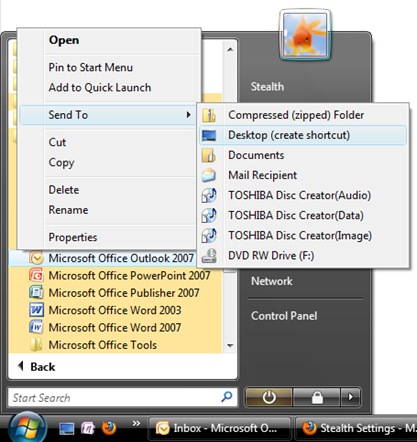
2. Kopieren/verschieben Sie die MS Outlook-Verknüpfung vom Desktop in den Ordner:
C:BenutzerBenutzerAppDataRoamingMicrosoftWindowsStartmenüProgrammeStartup
C: = Systempartition.
Benutzer = Ihr Ordner
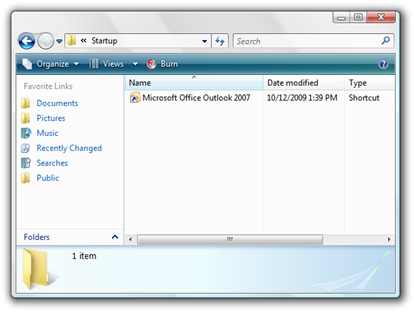
Nach dem Neustart öffnet sich automatisch Microsoft Office Outlook 2007.
Das Starten von Microsoft Outlook oder einer anderen Software ist nicht unbedingt angezeigt. Dadurch wird ein Großteil davon reduziert Systemladegeschwindigkeit Betrieb.
Tutorial getestet mit Microsoft Office Outlook 2007 pe Windows Vista Home Premium.
Stealth Settings – Sitemap.


Vielleicht interessieren Sie sich auch für...
