


Pocos de ustedes saben que Microsoft reservado para el sistema operativo Windows XP, o ancho de banda de internet (ancho de banda) de 20%, para ciertos servicios del sistema. Actualización de Windows, Informe de errores del sistema, etc. servicios como
Usando una pequeña configuración del sistema, en Política de grupo, podemos asignar menos ancho de banda de Internet para estos servicios.
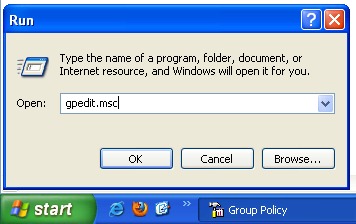
Primero, necesitamos abrir XP. Editor de políticas grupales.
Comenzar -> Correr -> Gpedit.msc -> DE ACUERDO o Ingresar.
En Política de grupo, vamos al menú de la izquierda a Política de equipo local –> Configuración de computadora -> Plantillas administrativas -> Red -> Programador de paquetes QOS. Seleccionar Programador de paquetes QOS, y el panel de la derecha estamos buscando: Limitar el ancho de banda reservable.
Haga doble clic para abrir Limitar ancho de banda reservable y luego marque la casilla a la derecha. “Permitir“, para permitirnos establecer el porcentaje de ancho de banda de Internet que queremos reservar para los servicios del sistema.
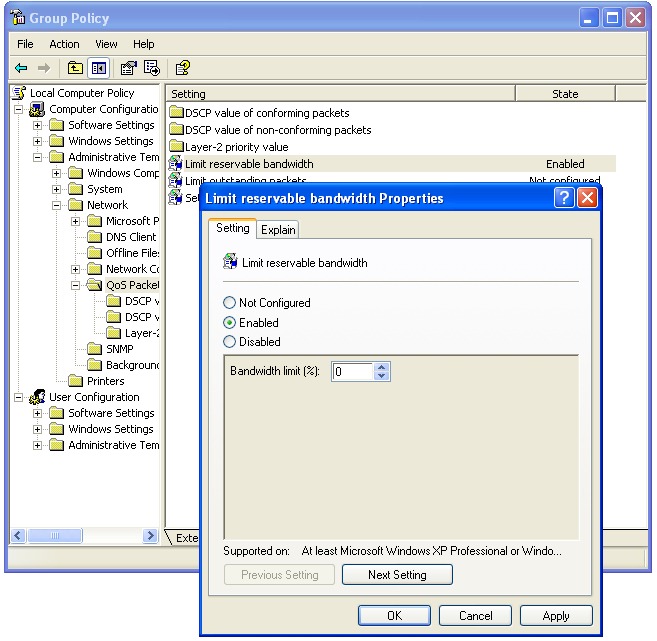
De forma predeterminada, este límite está establecido en 20%, pero podemos destinar el 0% para beneficiarnos de todo velocidad de descarga.
Limitar el ancho de banda reservable – Explicar :
Determina el porcentaje de ancho de banda de conexión que el sistema puede reservar. Este valor limita las reservas combinadas de ancho de banda de todos los programas que se ejecutan en el sistema. Por defecto, el Packet Scheduler limita el sistema al 20 por ciento del ancho de banda de una conexión, pero puedes usar esto configuración para anular el valor predeterminado. Si habilita esta configuración, puede utilizar el “Límite de ancho de banda” para ajustar la cantidad de ancho de banda que el sistema puede reservar. Si desactiva esta configuración o no la configura, el sistema utiliza el valor predeterminado del 20 por ciento de la conexión.


También te puede interesar...

26 pensamientos sobre “Aumenta un 20% de velocidad de descarga (ancho de banda de red) en Windows XP”