


Tikai daži no jums to zina Microsoft rezervēta operētājsistēmai Windows XP, O interneta joslas platums (joslas platums) no 20%, noteiktiem sistēmas pakalpojumiem. Windows atjauninājums, Sistēmas kļūdu ziņojumsuc pakalpojumi, piemēram
Izmantojot nelielu sistēmas iestatījumu, in Grupas politika, mēs šiem pakalpojumiem varam atvēlēt mazāk interneta joslas platuma.
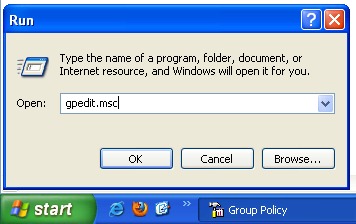
Pirmkārt, mums ir jāatver XP Grupas politikas redaktorsApvidū
Sākums -> Izkropļot -> Gpedit.msc -> Labi vai Ievadiet.
Grupas politikā mēs ejam uz izvēlni pa kreisi uz Vietējo datoru politiku -> Datora konfigurācija -> Administratīvās veidnes -> Tīkls -> QOS pakešu plānotājs. Izvēlieties QOS pakešu plānotājs, un panelis labajā pusē, ko mēs meklējam: Ierobežojiet rezervējamo joslas platumuApvidū
Veiciet dubultklikšķi, lai atvērtu Limit Reservable Bandwidth, pēc tam atzīmējiet izvēles rūtiņu labajā pusē “Dot iespēju“, lai mēs varētu iestatīt interneta joslas platuma procentuālo daļu, ko vēlamies rezervēt sistēmas pakalpojumiem.
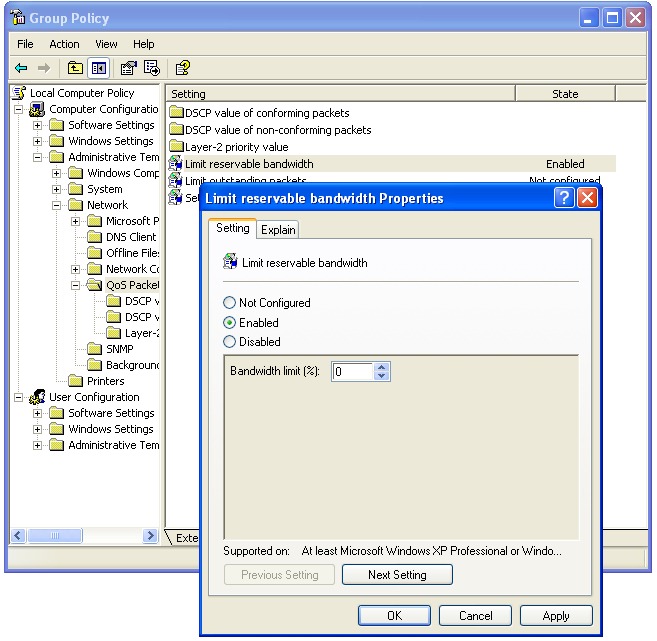
Pēc noklusējuma šis ierobežojums ir iestatīts uz 20%, bet mēs varam atvēlēt 0%, lai no tā visa gūtu labumu lejupielādes ātrumsApvidū
Ierobežojiet rezervējamo joslas platumu – Paskaidrojiet :
Nosaka savienojuma joslas platuma procentuālo daļu, ko sistēma var rezervēt. Šī vērtība ierobežo visu sistēmā darbojošos programmu kombinētās joslas platuma rezervācijas. Pēc noklusējuma Pakešu plānotājs ierobežo sistēmu līdz 20 procentiem no savienojuma joslas platuma, bet jūs varat to izmantot iestatījumu, lai ignorētu noklusējuma iestatījumu. Ja iespējojat šo iestatījumu, varat izmantot “Joslas platuma ierobežojums” lodziņu, lai pielāgotu joslas platumu, ko sistēma var rezervēt. Ja atspējojat šo iestatījumu vai nekonfigurējat to, sistēma izmanto noklusējuma vērtību 20 procenti no savienojuma.


Iespējams, jūs interesē arī...

26 domas par “Palielinās par 20% lejupielādes ātrumu (tīkla joslas platums) Windows XP”