


Putini dintre dvs. stiu ca マイクロソフト a rezervat pentru sistemul de operare Windows XP、o banda de Internet (bandwidth) de 20%, pentru anumite servicii ale sistemului. Windows Update、 System Error Report, etc servicii gen.
Folosind o mica setare de system, in グループポリシー, putem aloca mai putina banda de Internet pentru aceste servicii.
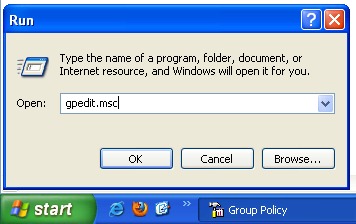
In primul rand, trebuie sa deschidem XP グループポリシーエディター。
始める - > 走る - > gpedit.msc - > わかりました または「入力」します。
In Group Policy, mergem in meniul din partea stanga la Local Computer Policy -> コンピューター構成 - > 管理テンプレート - > ネットワーク - > QOS Packet Scheduler. Selectam QOS Packet Scheduler, iar panoul din partea dreapta cautam: Limit Reservable Bandwidth。
Dublu-click pentru a deschide Limit Reservable Bandwidth, apoi bifam casuta din dreptul “有効にする“, pentru a ne permite sa setam cat la suta din banda de Internet dorim sa o rezervam serviciilor de sistem.
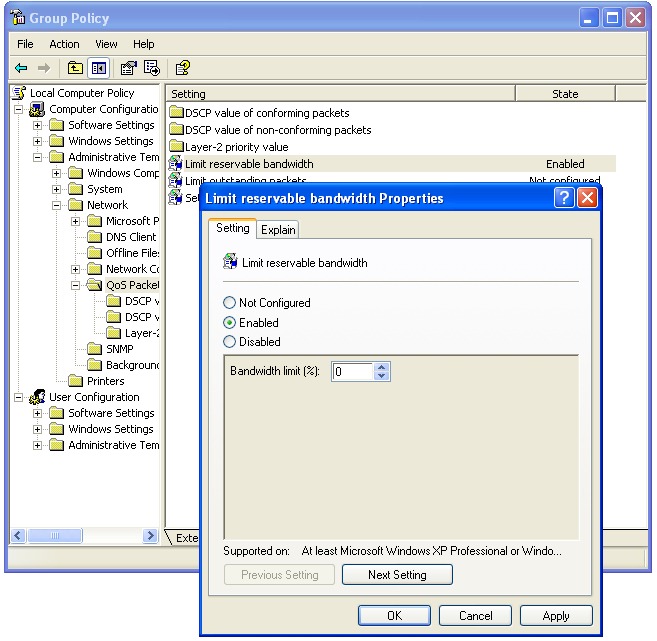
デフォルトでは、この制限は次のように設定されています 20%、ただし、そのすべてから利益を得るために 0% を割り当てることもできます。 ダウンロード速度。
Limit Reservable Bandwidth – 説明する :
システムが予約できる接続帯域幅の割合を決定します。この値は、システム上で実行されているすべてのプログラムの合計帯域幅予約を制限します。デフォルトでは、 パケット スケジューラは、システムを接続帯域幅の 20 パーセントに制限します、しかし、これを使用できます デフォルトを上書きする設定。この設定を有効にすると、 “帯域幅制限” ボックスを使用して、システムが予約できる帯域幅の量を調整します。この設定を無効にした場合、または構成しなかった場合、システムは接続のデフォルト値である 20 パーセントを使用します。


あなたも興味があるかもしれません...

に関する26件の感想 “Windows XPのダウンロード速度(ネットワーク帯域幅)を20%増加させる”