

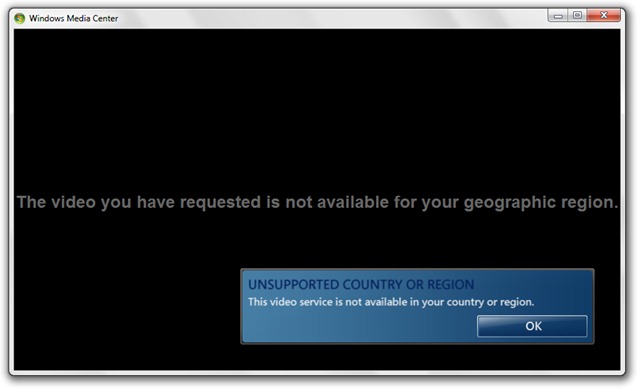
Ilma üheta Sülearvutisse installitud TV-tuuner, Windows Media Center see pole eriti kasulik. Proovisin mõnele juurde pääseda Interneti-spordi- ja uudisteajakirjad (Interneti-TV), aga mul ei vedanud.
Teie soovitud video pole teie geograafilises piirkonnas saadaval.
Failide jaoks video jah heli arvutisse salvestatud on erinevad MÄNGIJAD mis tarbivad vähem ressursse ja teevad oma tööd palju paremini kui Windows Media Center. Ma ei taha sellele funktsioonile halba reklaami teha Windows 7, aga minu arust iTunes see on tõsine alternatiiv (ma ei ole iTunesi fänn).
Eemaldama & Desinstallige Windows Media Center (WMC) opsüsteemis Windows 7.
Kasutajatele Windows 7 Ultimate, saab Windows Media Centeri desinstallida väga lihtsalt Windowsi funktsioonid.
1. Avage Windowsi funktsioonid.
Juhtpaneel > Programmid > Lülitage Windowsi funktsioonid sisse või välja .

2. sisse Windowsi funktsioonid avatud Meedia funktsioonid seejärel klõpsame märke eemaldamiseks Windows Media Center. Kinnitamiseks klõpsake nuppu Jah.
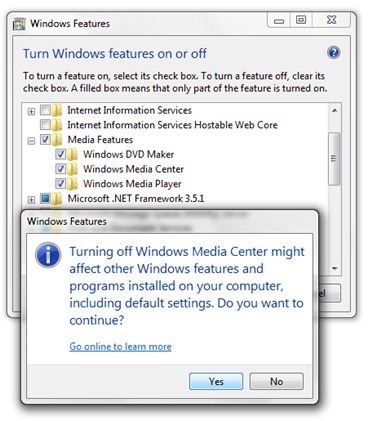
3. Klõpsake nuppu OK ja oodake, kuni desinstallimine on lõppenud.
4. Nende muudatuste rakendamiseks peate arvuti taaskäivitama. Taaskäivitage kohe.


Samuti võite olla huvitatud...

2 mõtet “Windows 7 -s Windows Media Center desinstallimine / eemaldamine”
kuidas meediumikeskust blokeerida.
kuidas eemaldada Windows Media Center Windows 7-st