

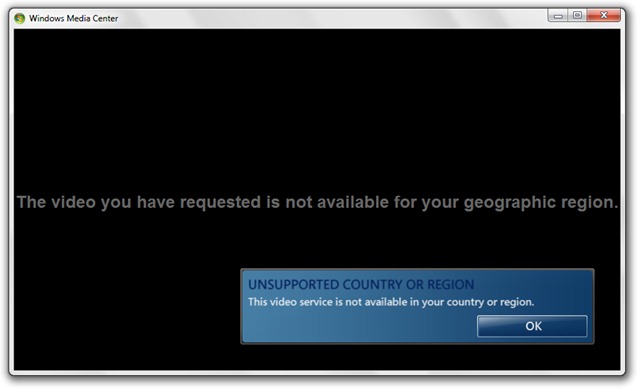
하나도 없이 노트북에 TV 튜너가 설치되어 있습니다., Windows Media Center 별로 유용하지 않습니다. 일부에 액세스하려고 시도했습니다. 온라인 스포츠 및 뉴스 잡지 (인터넷 TV) 그런데 운이 없었어요.
요청하신 동영상은 귀하의 지역에서는 볼 수 없습니다.
파일의 경우 비디오 예 오디오 컴퓨터에 저장된 내용이 다릅니다 플레이어 Windows Media Center보다 더 적은 리소스를 소비하고 작업을 훨씬 더 잘 수행합니다. 이 기능에 대해 나쁜 광고를 하고 싶지 않습니다. Windows 7, 하지만 내 생각에는 iTunes 그것은 진지한 대안입니다(저는 iTunes 팬이 아닙니다).
제거하다 & Windows 7에서 Windows Media Center(WMC)를 제거합니다.
사용자를 위해 Windows 7 Ultimate, Windows Media Center는 다음에서 매우 간단하게 제거할 수 있습니다. Windows 기능.
1. Windows 기능을 엽니다.
제어판 > 프로그램 > Windows 기능을 켜거나 끕니다 .

2 Windows 기능 열려 있는 미디어 기능 그런 다음 클릭하여 선택을 취소합니다. Windows Media Center. 확인하려면 예를 클릭하세요.
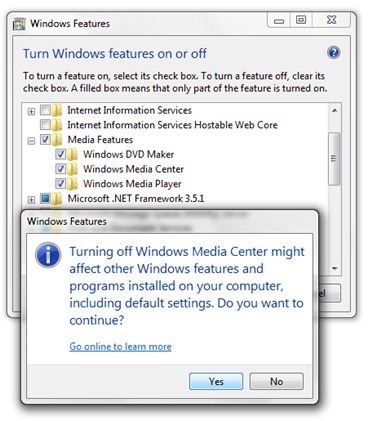
3. 확인을 클릭하고 제거가 완료될 때까지 기다립니다.
4. 이러한 변경 사항을 적용하려면 컴퓨터를 다시 시작해야 합니다. 지금 다시 시작하십시오.


당신은 또한에 관심이있을 수 있습니다 ...

Microsoft VA 소개 데스크탑 앱 폴더 PE Windows 11 23H2
Microsoft는 올 가을에 출시될 예정인 Windows 11의 주요 업데이트에 새로운 기능을 준비하고 있습니다.
Windows 10에서 텍스트 커서의 색상과 크기를 변경하는 방법
2020년 5월 Windows 10 업데이트가 출시되자마자 사용자는 새로운 흥미로운 기능을 마음껏 사용할 수 있습니다. ...
Windows Defender Application Guard (설치 & 방법)
Windows Defender Application Guard는 Windows 기능을 통해 사용자가 사용할 수 있는 Windows 10의 모듈 기능입니다.
Windows Modules Installer Worker (Tiworker.exe) High CPU를 수정하십시오 & 디스크 사용
팬(팬/냉각기)이 높은 회전 속도에 도달하여 소음을 내기 시작하면 프로세스를 냉각시키려는 시도입니다...
Windows에서 원격 데스크톱을 활성화하는 방법
원격 데스크톱 기능은 Windows 운영 체제의 표준 사용자들 사이에서는 그다지 인기가 없지만...
Windows 방화벽을 기본 설정으로 어떻게 재설정 할 수 있습니까?
수년 동안 Windows 운영 체제 보안의 일부였지만 대부분의 사용자는 Fi가 무엇인지 모릅니다.
Windows에 설치된 응용프로그램이 최대화/최소화된 창에서만 열리도록 하려면 어떻게 해야 합니까?
다른 운영 체제(Linux 또는 OS X)보다 Windows 시스템의 고급 기능 중 하나는 창 관리입니다.
Windows 8.1에서 복원 지점을 만드는 방법
아마도 Windows 운영 체제에서 사용할 수 있는 가장 중요한 보안 기능은 다음 기능을 제공하는 시스템 복원일 것입니다.
Windows 8.1의 성인 콘텐츠 사이트에 대한 액세스를 어떻게 차단할 수 있습니까?
자녀가 Windows 8.1 컴퓨터에 액세스할 수 있는 경우 다음과 같은 사이트에 대한 액세스를 제한하고 싶을 것입니다.
긴급한 창문을 다시 시작하거나 닫을 수 있습니까?
때로는 Windows 시스템을 즉시 닫거나 다시 시작해야 하는 상황에 처할 수도 있습니다. 또한 ...
하드 디스크 공간 삭제 Windows 업데이트 파일을 출시합니다
Windows가 시스템/보안 업데이트를 할 때마다 Windows의 저장 공간을 차지하는 하드 디스크에 데이터가 기록됩니다.
Windows에서 보안 로그온을 활성화/비활성화하는 방법
보안 로그온은 Windows 운영 체제에 또 다른 수준의 보안을 추가하여 사용자에게 보안을 제공하는 기능입니다....
2개의 생각 “Windows 7에서 Windows Media Center를 제거 / 제거하십시오”
미디어 센터를 차단하는 방법.
Windows7에서 Windows 미디어 센터를 제거하는 방법