


In deze tutorial leert u hoe u deze kunt instellen op openen MENU Shutdown onder Windows XP wanneer u op de aan/uit-knop op de pc drukt.
Als uw omgeving vol is met mensen (jongere broers en zussen, neven of zelfs ouders) die geen idee hebben hoe ze met een computer en ik gebruik om op te drukken knoppen puur toeval nieuwsgierigheid ((wat doet deze knop??) of om deze te sluiten (veel voorkomende gevallen), dan is het een goed idee om uw computer niet langer open te laten staan en eventueel verwijder/verberg het netsnoer als je er niet bent. Of als je de gewoonte hebt om het aan te laten (dure gewoonte :P), is het misschien beter als je het instelt de aan/uit-knop, zorg standaard dichtbij PC-ul, om weer te geven het Afsluitmenu in Windows XP, dus dat het systeem tau sa fie protejat (asa cum bine stii, nu este recomandat sa inchizi in computer direct de la buton).
Pentru a seta butonul de Stroom sa afiseze meniul de Afsluiten atunci cand este apasat, ai de urmat cativa pasi simpli.
Cum facem sa se deschida meniul Shutdown in Windows XP la apasarea butonului Power
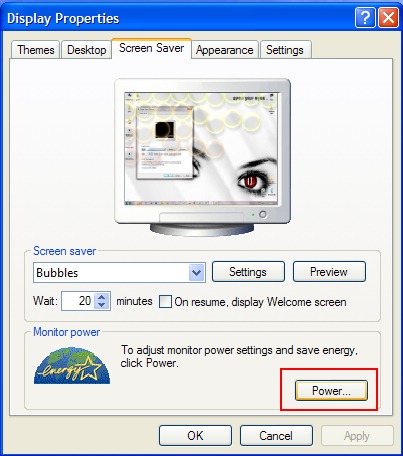
1. Click-dreapta pe monitor si selecteaza Eigenschappen din meniul afisat. In Eigenschappen weergeven da click pe tab-ul Schermbeveiliging si apoi pe butonul de Stroom.
2. In Power Options Properties selecteaza tab-ul Advanced. In sectiunea Power Buttons ai posibilitatea sa alegi cum sa reactioneze Windows cand apesi butonul de Power:
When I press the power button on my computer:
- Do nothing
- Ask me what to do
- Stand by
- Hibernate
- Shut down
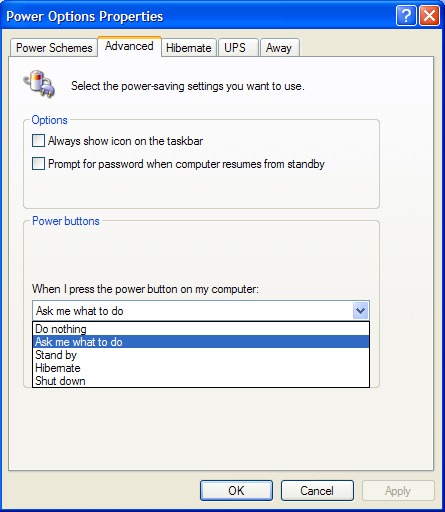
Klikken “Ok” Dan “Apply” si restart PC. Dupa restart, cand o sa apasati butonul Power al calculatorului o sa fiti intrebat ce anume doriti sa se intample. Sa se inchida de tot, sa intre in hibernare sau standby.


Mogelijk bent u ook geïnteresseerd in...

2 gedachten over “Open het afsluitenmenu in Windows XP wanneer u op de aan / uit -knop drukt”