

Odata cu aparitia primelor laptop-uri, producatorii de astfel de PC-uri portabile (Notitieboekje) au cautat sa elimine pe cat posibil componentele hardware externe, pentru a face cat mai simpla portabilitatea. Unul dintre aceste componente hardware este muis-ul. In locul lui, pe laptop, sub tastatura a aparut touchpad-ul. Touchpad-ul este compus dintr-o suprafata senzitiva care la trecerea degetelor peste ea joaca functia de miscare a CURSOR pe display, si doua butoane care joaca rolul de Rechtsklik En Left-links. Touchpad-ul ne este foarte util atunci cand plecam in calatorii si utilizam laptopde van maand, van trein, avion…etc. Acolo unde atasarea unui mouse pe un mouse pad ar fi o problema.
Utilitatea touchpad-ul nu poate fi contestata de nimeni, insa atunci cand suntem cu laptop- op kantoor is het veel eenvoudiger om er een te gebruiken muis in plaats van touchpad. Grotere precisie en snelheid. In  plus, in één grafisch bewerkingsprogramma ((Adobe Photoshop, CorelDraw, Verf) Het gebruik van het touchpad maakt ons werk erg moeilijk.
Wanneer we de muis gebruiken en dat moet bewerkte documenten of als we spelen, raken we per ongeluk het touchpad aan. Om problemen te voorkomen die ontstaan als gevolg van het per ongeluk aanraken van het touchpad, kunt u dit het beste volledig uitschakelen wanneer u de muis gebruikt. De meeste fabrikanten van muis ik gebruik zoals bestuurder En software voor muis & touchpad, Synaptics-aanwijsapparaat.
Met de hulp Synaptics-aanwijsapparaat we kunnen de functies van de muis besturen, we kunnen de snelheid van de cursor verhogen en wij kunnen schakelt het touchpad automatisch uit wanneer de muis op de laptop wordt aangesloten.
Dit kunt u doen door het vakje aan de rechterkant aan te vinken “Disable internal pointing device when external USB pointing device is attached“.
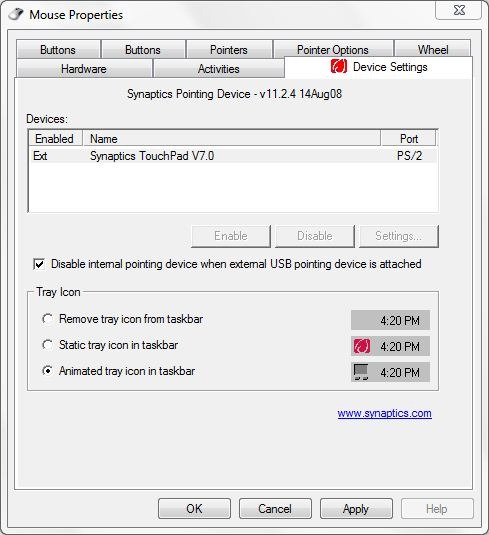
Pe laptop-urile modele mai noi de 2008 cu sisteme de operare Windows Vista of Windows 7, aceasta aplicatie se instaleaza automat (by Windows Updatecentrum).
Downloaden Synaptics Device Driver .
Daca nu aveti posibilitatea sa folositi Synaptics Device Driver, exista programe asemanatoare. Sunt si aplicatii care va ajuta sa dezactivati touchpad-ul pentru a preveni atingerile accidentale wanneer lucrati cu tastatura. Una din aceste aplicatii este Touchpad Blocker. Dit programma nu va blocheaza permanent touchpad-ul si poate fi folosit chiar daca aveti sau nu mouse atasat.
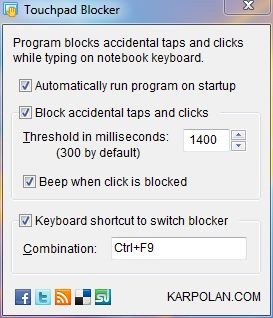
Majoritatea click-urilor accidentale pe touchpad apar atunci cand avem de editat documente. Acest program blocheaza touchpad-ul atunci cand tastam si ne permite sa stabilim si un interval de timp in care sa de deblocheze dupa ultima atingere a unei taste. Default este 300 milisecunde, insa este de preferat sa va puneti valori de timp mai mari.
Download Touchpad Blocker.
Aplicatia este gratuita si necesita instalare. Noi am testat pe Windows 7 32-bits si se comporta foarte bine.


Mogelijk bent u ook geïnteresseerd in...

2 gedachten over “Touchpad Blocker – Schakel touchpad / notebook / laptop -tips uit”