


With the appearance of the first ones laptop-s, the manufacturers of such portable PCs (Notebook) sought to eliminate external hardware components as much as possible, in order to make portability as simple as possible. One of these hardware components is mousethe In its place, on the laptop, the touchpad appeared under the keyboard. Touchpadis composed of a sensitive surface that, when the fingers pass over it, plays the function of moving the CURSOR on the display, too two buttons who plays the role of click-right and Click-left. The touchpad is very useful when we go on trips and use it laptopthe from month, from train, plane…And so on Where attaching a mouse to a mouse pad would be a problem.
The usefulness of the touchpad cannot be contested by anyone, but when we are with laptop- at the office much simpler is to use one mouse instead of touchpad. Greater precision and speed. In  plus, in one graphic editing program (Adobe Photoshop, CorelDraw, Paint) using the touchpad makes our work very difficult.
When we use the mouse and have to edited documents or when we play, we happen to touch the touchpad by mistake. To avoid problems arising due to accidental touching of the touchpad, it is best to disable it completely when using the mouse. Most manufacturers of mouse i use like driver and software for mouse & touchpad, Synaptics Pointing Device.
With the help Synaptics Pointing Device we can control the functions of the mouse, we can increase the speed of the cursor and we can automatically disable the touchpad when the mouse is connected to the laptop.
This can be done by checking the box on the right “Disable internal pointing device when external USB pointing device is attached“.
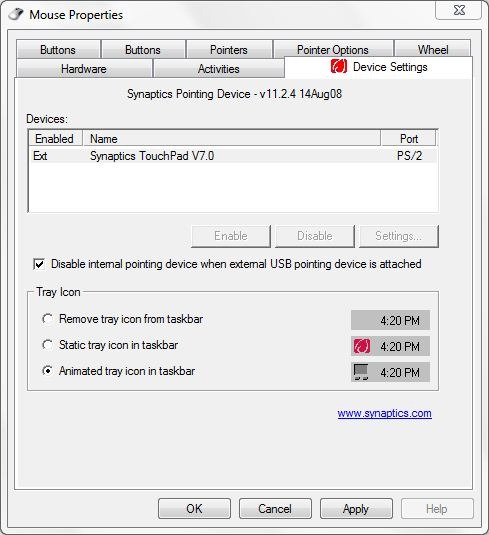
On laptops newer than 2008 models with operating systems Windows Vista or Windows 7, this application is installed automatically (by Windows Update Center).
Download Synaptics Device Driver .
If you don't have the opportunity to use Synaptics Device Driver, there are similar programs. There are also applications that will help you disable the touchpadto prevent accidental touches when work with the keyboard. One of these applications is Touchpad Blocker. This program it doesn't block your touchpad permanently- and can be used even if you have a mouse attached or not.
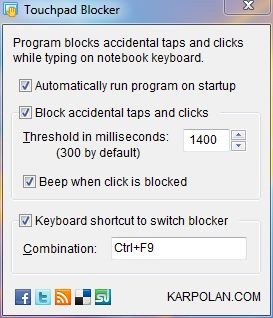
Most of the accidental clicks on the touchpad occur when we have to edit documents. This program blocks the touchpad when typing and allows us to set a time interval in which to unlock after the last touch of a key. The default is 300 milliseconds, but it is preferable to set higher time values.
Download Touchpad Blocker.
The application is also free requires installation. We tested on Windows 7 32-bit and behaves very well.


You may also be interested in...

2 thoughts on “Touchpad Blocker – Disable Touchpad / Notebook / Laptop Tips”