

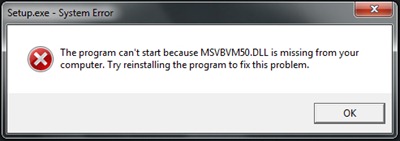
Brakujące komponenty systemu / bibliotekarze (akta .Dll) może przestać Instalacja niektóre aplikacje włączone Windows XP lub dalej Windows 7 (x86,x64). O błąd często się spotyka “Program nie może zostać uruchomiony, ponieważ w komputerze brakuje pliku MSVBVM50.DLL. Spróbuj ponownie zainstalować program i napraw ten problem.”.
Rozwiązanie błędu jest bardzo proste. Microsoft oddaj narzędzie do dyspozycji Msvbvm50.exe którego zadaniem jest umieszczenie pliku MSVBVM50.DLL na jego miejscu w systemie.
Pobierz plik Msvbvm50.exe – pobierz link @Microsoftu.
Zamknij instalator, który spowodował błąd “Program nie może zostać uruchomiony, ponieważ w komputerze brakuje pliku MSVBVM50.DLL“, uruchom pobrany powyżej plik (Msvbvm50.exe), a następnie wznów instalację aplikacji, w której wystąpił błąd. Wszystko powinno pójść gładko.
Podobne błędy:
- Program nie może zostać uruchomiony, ponieważ w komputerze brakuje pliku MSVCRT10.dll. – NAPRAW BŁĄD.
- Program nie może zostać uruchomiony, ponieważ w komputerze brakuje pliku MSVBVM60.DLL. NAPRAW BŁĄD.
Stealth Settings – NAPRAW BŁĄD “Brak pliku MSBVM50.DLL – Windows 7 32-bitowy & 64-bit.


Może zainteresują Cię także...
