


Google Chrome este unul dintre cele mai folosite browsere web, atat pe sistemele de operare Windows cat si pe OS X si Linux. Este un browser destul de rapid si care ofera o Timing completa a Lesezeichendes EINSTELLUNG, PASSWÖRTER Und extensiilor. Toate acestea sunt salvate in contul dvs. Google.
Google Chrome fürDas x, desi nu este prezent in App Store, este instalat si rulat de un numar destul de mare de utilizatori.
O chestie ciudata, este “Invasion” Google dupa ce lansam pentru prima data Chrome pe OS X. In “Launchpad” apar automat shortcut-uri catre aplicatiile Google: YouTube, Google Drive, Google-Suche Und Google Mail. Nu stiu exact care este scopul acestor Abkürzung-uri in lista de aplicatii instalate, pentru ca ele practic nu fac altceva decat sa deschida Google Chrome.

Cum stergem aplicatiile Google (Youtube, Google Drive, Google Search si Gmail) din Launchpad dupa instalarea Chrome pe OS X
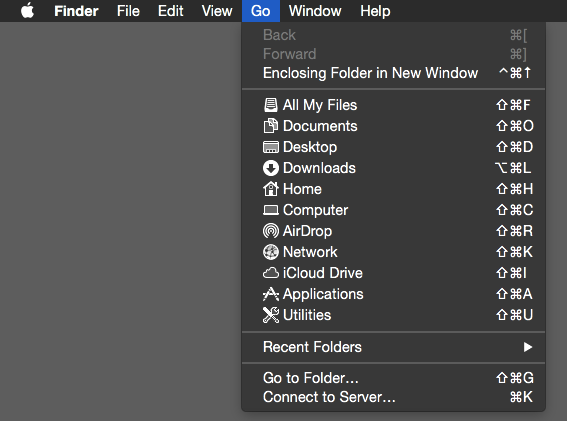
1. Aceste aplicatii se gasesc in folderul de aplicatii instalate, “Anwendungen”, insa ele nu sunt vizibile. Pentru a ajunge la ele, va trebui sa mergem in “Finder” Die “Gehen” > “Gehen Sie zum Ordner…“
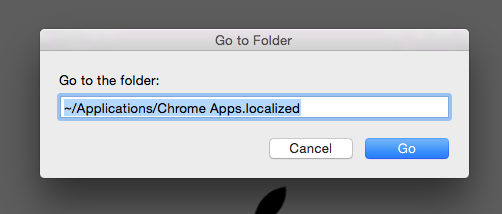
2. In casuta care deschide la “Gehen Sie zum Ordner…” tastam calea (path) in care sunt aceste aplicatii.
~/Applications/Chrome Apps.localized
3. Stergem aplicatiile / shortcut-urile din folder-ul care se va deschide.
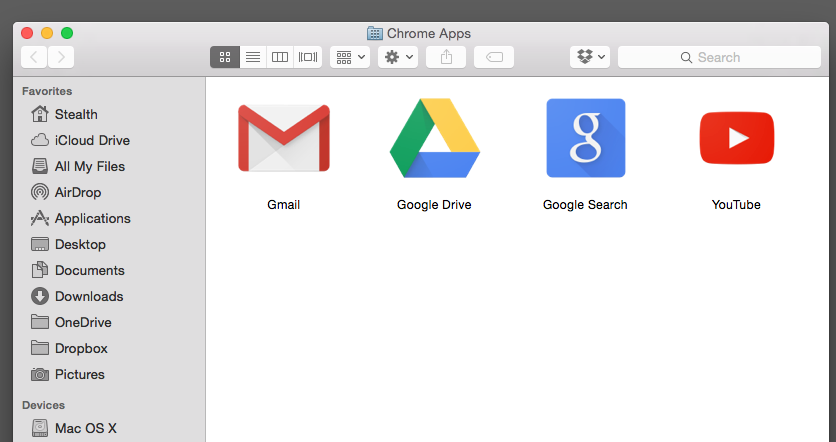
Dupa acest pas, aplicatiile Gmail, Google Drive, Google Search si YouTube or sa dispara din Launchpad Das x.


Vielleicht interessieren Sie sich auch für...
