


Yahoo! Téléchargement des skins Messenger & Installer
Y!M Peau VISTA
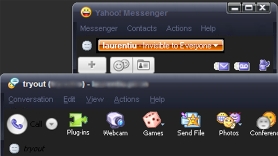
Télécharger Yahoo! Apparence Messenger Vista – Oui! Vista.zip
Y!M Peau de fenêtre noire
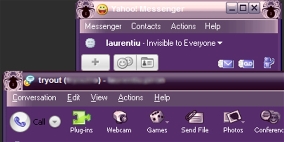
Télécharger Yahoo! Apparence de fenêtre noire Messenger – Fenêtre noire.zip
Y!M “Un peu girly“
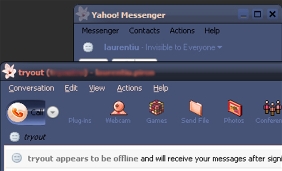
Télécharger Yahoo! Messager “Un peu girly” Peau – A Lil Bit Girly.zip
Y!M Peau de jean bleu
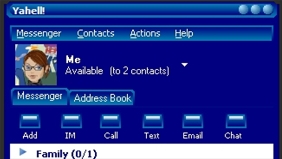
Télécharger “Jean bleu” , Peau Y!M – Jean bleu.zip
Installer Yahoo! Apparences de messager :
Ouvrez votre dossier skins (My computer\C:\Program Files\Yahoo\Messenger\Skins) ou (C:\Program Files\Yahoo!\Shared\Graphics) une fois dans votre dossier skins vous devez créer un “nouveau dossier” pour ce faire, cliquez sur “déposer” puis sur “nouveau” alors “nouveau dossier”une fois que vous avez créé le nouveau dossier, vous devez le renommer…pour le renommer..faites un clic droit sur le dossier puis cliquez sur “rebaptiser” titrez-le avec un nom qui décrit la peau. Quelque chose dont vous vous souviendrez (si téléchargé un skin Vista alors nomme-le Vista). Revenez maintenant à la fenêtre qui contient le fichier décompressé dessus et traîner & baisse chaque fichier dans le nouveau dossier que vous venez de créer (les fichiers sont dans une seule fenêtre…le nouveau dossier est dans un autre….vous pouvez redimensionner ces deux fenêtres pour qu'elles apparaissent toutes les deux sur votre écran).
Une fois que vous avez tous les fichiers dans le dossier connectez-vous à Yahoo Messenger (si vous n'étiez pas déjà connecté) cliquez maintenant sur “Se connecter” sur votre fenêtre de messagerie, puis cliquez sur “préférences” une nouvelle fenêtre s'ouvrira et dans cette fenêtre sur le côté gauche, cliquez sur “apparence” cliquez sur la flèche pointant vers le bas à côté de “thème actuel” et tu verras le nouvelle peau dans la liste qui se trouve dans la fenêtre déroulante. (ex. Vista) cliquez dessus puis cliquez sur “appliquer” qui se trouve en bas de cette fenêtre et cliquez sur “d'accord” .


Vous pourriez également être intéressé par...

20 réflexions sur “Yahoo! Skins Messenger (Y!M Vista, Fenêtre Noire & plus)”