


Yahoo! Scarica skin per Messenger & Installare
Y!M Pelle VISTA
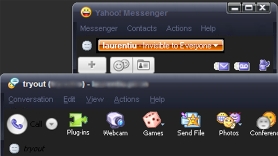
Scaricamento Yahoo! Pelle Messenger Vista – Sì! Vista.zip
Y!M Pelle della finestra nera
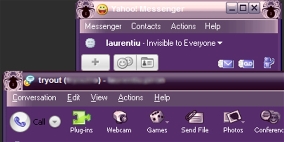
Scaricamento Yahoo! Pelle della finestra nera di Messenger – Finestra Nera.zip
Y!M “Un po' femminile“
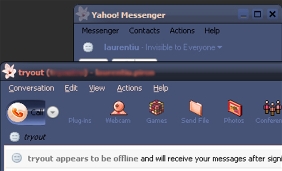
Scaricamento Yahoo! Messaggero “Un po' femminile” Pelle – Un po' da ragazzina.zip
Y!M Pelle di jeans blu
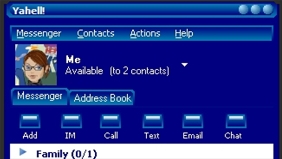
Scaricamento “Jeans blu” , Y!M Pelle – Jeans blu.zip
Installazione Yahoo! Skin di Messenger :
Apri la cartella delle skin (My computer\C:\Program Files\Yahoo\Messenger\Skins) O (C:\Program Files\Yahoo!\Shared\Graphics) una volta nella cartella delle skin devi creare un file “nuova cartella” per farlo clicca su “file” poi via “nuovo” Poi “nuova cartella”una volta creata la nuova cartella è necessario rinominarla…per rinominarlo...fare clic con il pulsante destro del mouse sulla cartella, quindi fare clic su “rinominare” intitolatelo con un nome che descriva la pelle. Qualcosa che ricorderai (se scaricato una skin per Vista Poi chiamalo Vista). Ora torna alla finestra che ha il file file decompresso su di esso e lagna & gocciolare ogni file nella nuova cartella appena creata (i file sono in una finestra…la nuova cartella è in un'altra….puoi ridimensionare entrambe le finestre in modo che appaiano entrambe sullo schermo).
Una volta che hai tutti i file nella cartella accedi a Yahoo Messenger (se non eri già registrato) ora clicca su “Login” nella finestra di Messenger, quindi fare clic su “preferenze” si aprirà una nuova finestra e in quella finestra sul lato sinistro fare clic su “aspetto” fare clic sulla freccia rivolta verso il basso accanto a “tema attuale” e vedrai il nuova pelle nell'elenco che si trova nella finestra a discesa. (es. Vista) fare clic su di esso, quindi fare clic su “fare domanda a” che si trova nella parte inferiore della finestra e fare clic su “OK” .


Potrebbe interessarti anche...

20 pensieri su “Yahoo! Skin di Messenger (Y!M Vista, Finestra Nera & Di più)”