

Ce este Windows 10 S?
Microsoft a creat aceasta versiune de Windows 10 in ideea de a oferi utilizatorilor un plus de securitate si de stabilitate pe calculatoare si laptop-uri. Tinta acestui proiect au fost studentii, insa desi Windows 10 s este o varianta derivata din Windows 10 Pro, acesta este foarte restrictiv. In Windows 10 S nu puteti instala terte aplicatii sau software, decat cele livrate prin intermediulWindows 스토어.
De exemplu, ca browser implicit pentru accesarea de website-uri, pe Windows 10 S este setatMicrosoft Edge. Nu veti putea instala Chrome, 모질라 파이어 폭스, 오페라 sau oricare alt browser pe aceasta versiune de Windows. Nici macar motorul de cautare implicit setat Bing, nu poate fi modificat in Microsoft Edge. Daca doriti sa cautati ceva pe Google, trebuie mai intai sa accesati google.com, apoi sa efectuati cautarile dorite. Direct din bara de search a browser-ului, o sa va fie livrate din motorul de cautare Bing.
Asadar, aplicatiile de toate felurile pot fi instalate numai daca sunt prezente in Microsoft Store si sunt verificate.
Windows Defender Antivirus este inclus in Windows 10 S, insa sunt putine sansele sa poata fi virusat un sistem inchis, pe care nu se poate face mare lucru. Decat simplul browsing si Office.
다음 표/스크린샷에는 Windows 10 S, Windows 10 Pro 및 Windows 10 Home 간의 기능 목록과 차이점이 나와 있습니다.
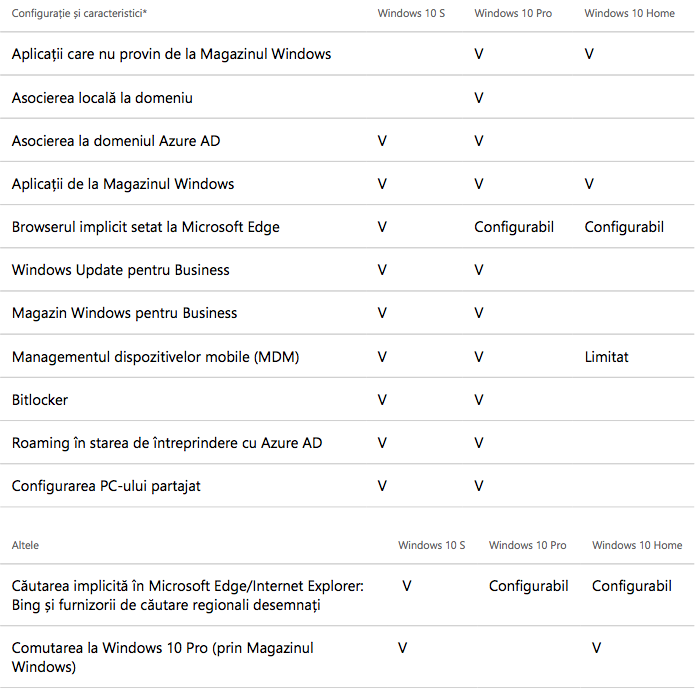
앞서 말했듯이 Windows 10 S와 Windows 10 Pro 사이에는 큰 차이가 없습니다. 적어도 이론적으로는. 기술적으로 우리는 단 하나의 차이점만을 다루고 있습니다. 하나와 좋은 것. 이 Windows 버전에는 타사 응용 프로그램을 설치할 수 없습니다. 또 다른 불편한 점은 프로그램 실행이 불가능하다는 것입니다. Win32, 스토어에 있는 경우에도 마찬가지입니다.
마이크로소프트의 문제는 이 시스템이 안전하고 안정적일 것이라는 점이다. Windows 10 S 사용자의 요구 사항은 Microsoft Store에서 제공하는 리소스를 훨씬 초과합니다.. Microsoft의 온라인 Windows 애플리케이션 스토어입니다. Mac용 App Store와 비슷한 것입니다.
이런 의미에서 미국 회사는 Windows 10 S가 설치된 장치를 구입한 사람들에게 Windows 10 Pro로 무료 업그레이드를 허용하기로 결정했습니다. 특히 학교가 시작된 이래로 학년도 개강이 가까워지고 학생들은 현재 제공할 수 있는 것보다 더 많은 지원서가 필요합니다. Microsoft Store.
Windows 10 S에서 Windows 10 Pro로 무료로 업그레이드할 수 있습니다. 처음에 미국 회사는 이 업그레이드를 2017년 말까지 무료로 사용할 수 있다고 발표했지만 최근 성명에서는 이 기간을 2018년 3월 31일까지 연장했습니다.
Windows 10 S에서 Windows 10 Pro로 업그레이드하는 방법
Upgrade-ul se poate face din Microsoft Store, urmand cu atentie pasii necesar acestei operatiuni. Nu este nevoie sa expert IT pentru ca procesul de upgrade de la Windows 10 S la Windows 10 Pro sa iasa ca la carte.


당신은 또한에 관심이있을 수 있습니다 ...

한 가지 생각 “Windows 10 S에서 Windows 10 Pro로 무료로 업그레이드하는 방법”
ka man ieladet bezmaksas 10 windovs datora , paldies