


DNS-cache ((Naamservers in cache opslaan), is een proces waardoor het gebeurt een zoekopdracht opgeslagen DNS van een applicatie (Internetbrowser, client-FTP, Yahoo! Boodschapper, enz …). Kortom, dit proces helpt de servers die de domeinnamen bevatten, bij het opslaan voor een bepaalde periode (bepaald door de serverconfiguratie) gegevens opvragen op de computer van de eindgebruiker. Op deze manier wordt een hogere reactiesnelheid van de webserver of de server die gegevens over een applicatie bewaart verkregen en wordt er een communicatiebrug gecreëerd tussen de pc en de server.
Een aantal applicaties maken gebruik van de DNS-cache terwijl de applicatie actief is controleer de updatede updates of zelfs geldigheid van de licentie.
Als u nieuwsgierig bent om te zien welke servers DNS-caches op uw pc hebben, opent u (met beheerdersrechten) a Commando prompt (Ctrl+Win > CMD > Enter) als u typte:
ipconfig /displaydns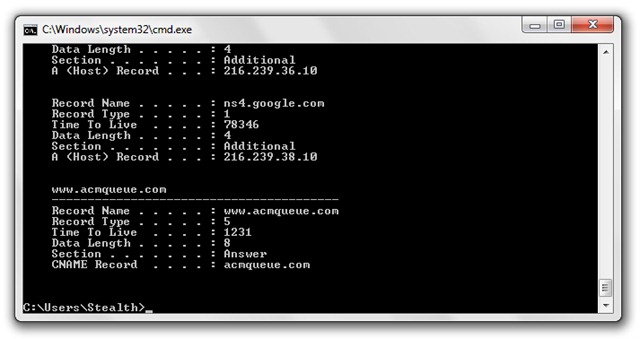
Om te schone DNS-cache, typ CMD:
ipconfig /flushdnsIn CMD zou u het bericht moeten ontvangen:
Windows IP-configuratie
De DNS Resolver Cache is leeggemaakt.
DNS-cache in- en uitschakelen (DNS-clientservice) :
net stop dnscache
net start dnscache
DNS-cachereferentie (Recursieve en caching-naamserver) (Wikipedia).
Stealth Settings – SCHOON, INSCHAKELEN & Schakel DNS-CACHE UIT.


Mogelijk bent u ook geïnteresseerd in...

11 gedachten over “Schoon DNS -cache om uw privacy te beschermen. (Schoon, inschakelen, DNS -cache uitschakelen – Windows XP, Vista & Windows 7)”