


Pamięć podręczna DNS (Buforowanie serwerów nazw), to proces, dzięki któremu tak się dzieje zapisano zapytanie DNS aplikacji (Przeglądarka internetowa, klient FTP, Yahoo! Komunikator itp …). Zasadniczo proces ten pomaga serwerom nazw domen przechowywać przez pewien czas (określone przez konfigurację serwera) odpytuje dane na komputerze użytkownika końcowego. W ten sposób uzyskuje się większą prędkość odpowiedzi serwera WWW lub serwera przechowującego dane o aplikacji i tworzony jest most komunikacyjny pomiędzy komputerem PC a serwerem.
Wiele aplikacji korzysta z pamięci podręcznej DNS podczas działania aplikacji sprawdź aktualizacjęthe aktualizacje a nawet ważność licencji.
Jeśli chcesz zobaczyć, które serwery mają pamięć podręczną DNS na Twoim komputerze, otwórz (z uprawnieniami administratora) a Monit polecenia (Ctrl+wygraj > CMD > Enter), jeśli wpisałeś:
ipconfig /displaydns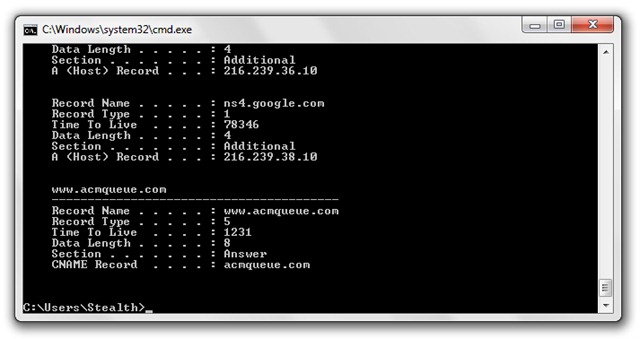
W celu wyczyść pamięć podręczną DNS, wpisz CMD:
ipconfig /flushdnsW CMD powinieneś otrzymać komunikat:
Konfiguracja IP systemu Windows
Pomyślnie opróżniono pamięć podręczną narzędzia do rozpoznawania nazw DNS.
Włącz i wyłącz pamięć podręczną DNS (Usługa klienta DNS) :
net stop dnscache
net start dnscache
Odniesienie do pamięci podręcznej DNS (Rekurencyjny i buforujący serwer nazw) (Wikipedia).
Stealth Settings – CZYSTE, WŁĄCZONE & WYŁĄCZ pamięć podręczną DNS.


Może zainteresują Cię także...

11 przemyśleń na temat “Wyczyść pamięć podręczną DNS, aby chronić swoją prywatność. (Wyczyść, włącz, wyłącz pamięć podręczną DNS – Windows XP, Vista & Windows7)”