

Også selvom jeg bruger det med jævne mellemrum MSCONFIG at "rense" Windows opstart, mange brugere af dette operativsystem (især brugere Vista og Windows 7) klager over, at denne tager for meget tid støvle, uanset om det drejer sig om starte systemet eller af en Genstart. En mulig løsning på dette ret irriterende problem er brugen af et integreret hjælpeprogram Microsoft I operativsystemer Windows Vista og Windows 7, nemlig Windows Boot Performance Diagnostics.
Med hjælpen Windows Boot Performance Diagnostics, kan brugere identificere problemer, der øger Windows-starttiden og samtidig identificere og fjerne dem ÅRSAGER de problemer.
For at Windows Boot Performance Diagnostics skal kunne opdage opstartsproblemer, skal det først aktiveret FRA Gruppepolitisk redaktør, som du kan åbne ved at skrive Gpedit.msc i SøgFrom Startmenu. Når du har åbnet Group Policy Editor, skal du navigere til Computer konfiguration > Administrativ skabelon > Systemer > Fejlfinding og diagnostik > Windows Boot Performance Diagnostics.
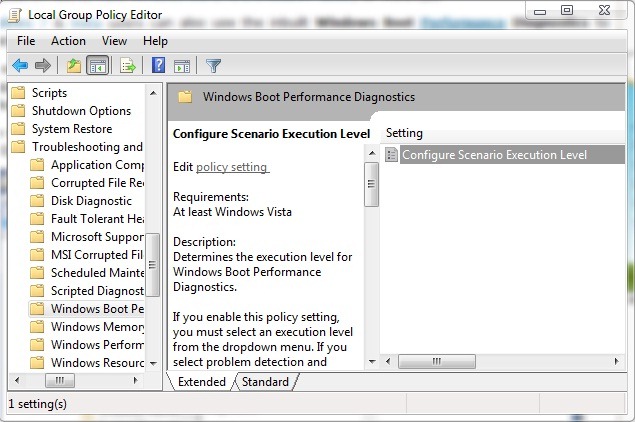
Dobbeltklik på Konfigurer scenarieudførelsesniveau, og vælg derefter i det nyligt åbnede vindue Aktiveret. Sub Muligheder > Scenariets udførelsesniveau vælg en af de to Windows Boot Performance Diagnostics-konfigurationsindstillinger: Kun detektering og fejlfinding eller Registrering, fejlfinding og løsning.
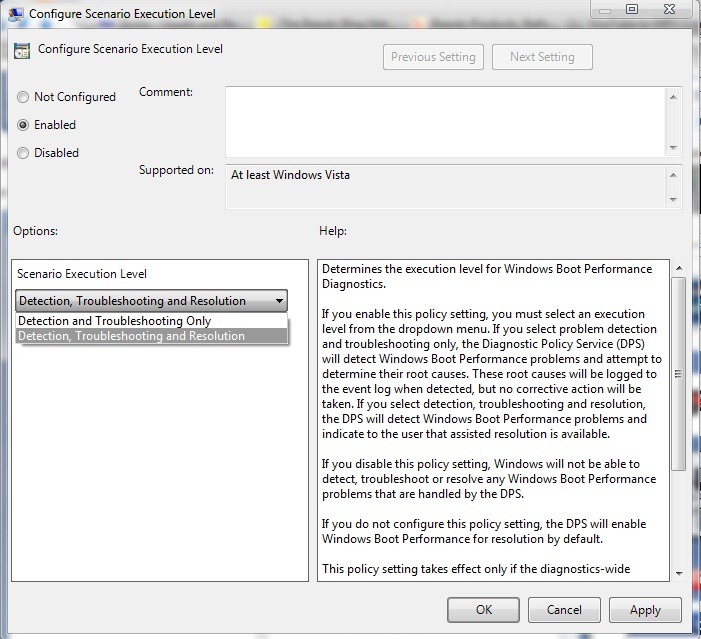
Hvis du vælger Kun registrering og fejlfinding, DPS-ul (Diagnostic Policy Service) vil identificere Problemer med Windows Boot Performance samt deres årsager - årsager, der vil blive registreret i hændelseslog – men ingen vil blive gennemført korrigerende handling af dem.
Hvis du vælger Detection, Troubleshooting and Resolution, vil DSP identificere Windows Boot Performance-problemer og deres årsager (som også vil blive registreret i hændelseslog), og derudover vil det vise brugerne, hvem de er tilgængelige løsninger for at løse disse problemer.
Bemærkninger: Group Policy Editor er ikke tilgængelig for Home Basic- eller Home Premium-versioner.


Du kan også være interesseret i...
