

Cunoscut si ca cel mai rapid Internet Browser, Firefox-ul a lansat de curand versiunea 3.5. Aceasta vine la pachet cu cateva imbunatatiri cum ar fi rezolvarea unor probleme de security, private browsing etc. dar si cu o caracteristica oarecum iritanta, chiar daca bine intentionata: scanarea automata a fisierelor pe care le downloadam de pe internet. Aceasta nu este necesara atunci cand downloadam de pe site-uri sigure, si in nici un caz nu este de ajutor atunci cand sunt downloadate mai multe fisiere o data, deoarece scanarea acestora papa destul din timpul de care uneori nu dispunem.
Scanarea Automata este activata default in Firefox cand acesta este instalat pentru prima data pe un computer, insa poate fi dezactivata foarte usor atunci cand mai mult incurca decat ajuta.
To disable the automatic scanning of downloaded files in Firefox 3.5, you have to follow a few simple steps:
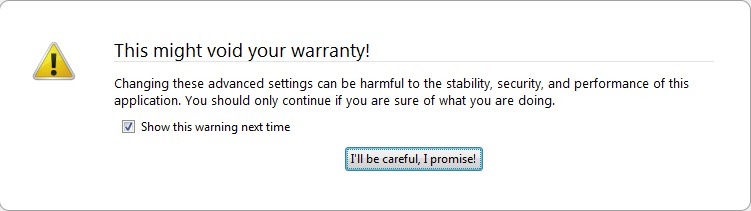
1. Open a tab nou (New Tab) in Firefox is typed in address bar about:config (then click on the button "I’ll be Careful, I promise” in response to the warning message that will bloom on the screen).
2. Taste "browser.download.manager.scanWhendone” in Filter (you can also search by word only scan). You will notice that the automatic scan has the value true.
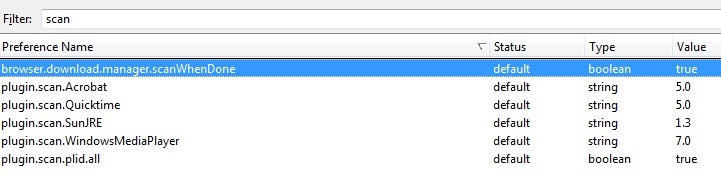
3. Double-click on the value to change it to false. Thus, automatic scanning will be disabled, and Firefox will not scan any of the downloaded files.
Atentie! Daca aveti suspiciuni in legatura cu anumite fisiere downloadate cu Firefox dupa dezactivarea scanarii automate, verificati-le cu antivirusul pe care il folositi in mod obisnuit.


You may also be interested in...
