


I don't know about others, but it annoys me to the max windows idle moments, especially when I realize how quickly time passes. That's why I looked for a "medicine" with a quick effect, and I found it in the same form registry.
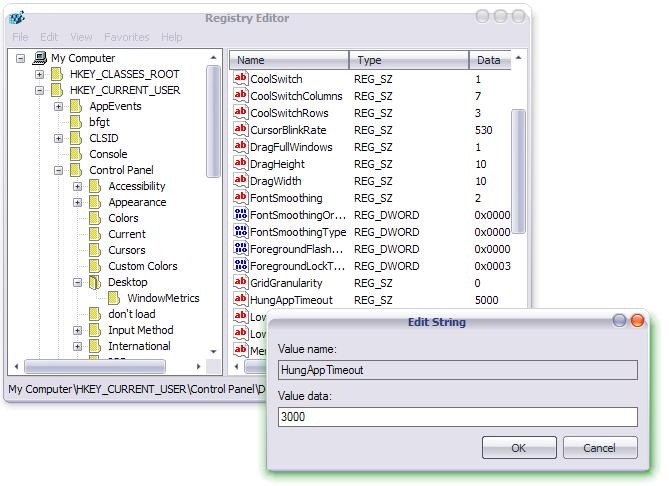
1. Hasten the termination of an application that refuses to respond to your commands (not responding application). How? open Registry Editor (Start->Run->regedit.exe->OK) and follow the way [HKEY_CURRENT_USERControl PanelDesktop]. Search among the entries in the panel on the right HungAppTimeout and change its value in 3000* (recommended minimum value).
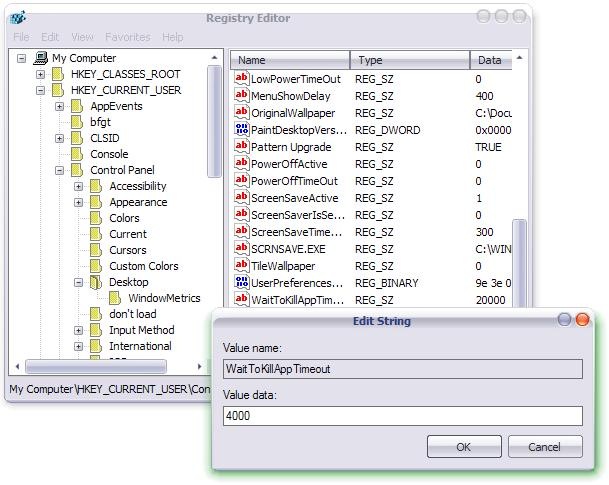
2. Increase the speed of Windows shutdown. In Registry Editor, the same way as in point 1. Look for the entrance WaitToKillAppTimeout and change its value in 4000* (recommended minimum value).
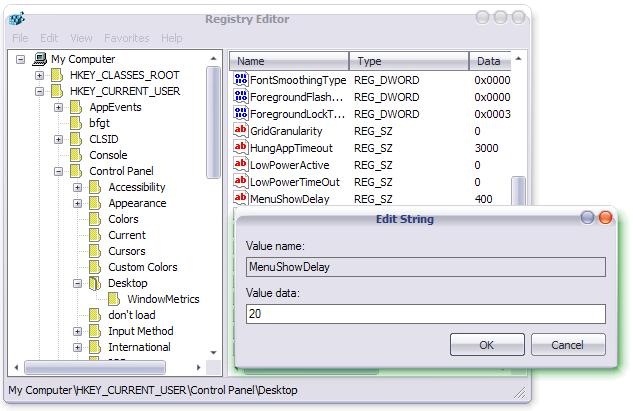
3. Increase the display speed of a menu. Follow the same path as in points 1 and 2 and change the input value MenuShowDelay in 20 (recommended minimum value).
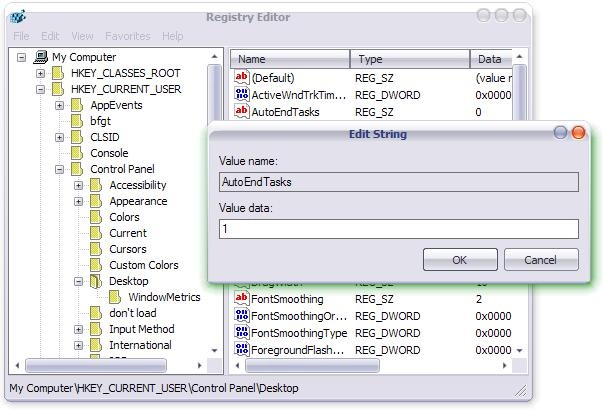
4. Activate the automatic closing of applications running before Shutdown. Look for the entrance AutoEndTasks and change its value in 1 (0= disable; 1=enable).
* every 1000 = 1 sec.


You may also be interested in...

2 thoughts on “Fast Windows response & fast Shutdown in XP”