


Si vous êtes accro aux emails, notamment professionnels, à partir de ce tutoriel vous apprendrez étape par étape comment créer une signature email HTML pour iPhone ou iPad.
contenu
Une signature électronique professionnelle HTML doit inclure : votre nom, votre poste au sein de l'organisation, le nom de l'entreprise, le logo de l'entreprise, vos coordonnées et celles de l'entreprise (téléphone, e-mail, adresse Web).
Dans la plupart des applications de messagerie telles qu'Outlook, Signature HTML sont ajoutés en insérant le code HTML dans le champ signature. Pour iPhone ou iPad c'est un peu différent, mais dans les deux cas vous avez besoin de la signature HTML.
Comment créer une signature de messagerie HTML pour iPhone ou iPad
Comme je l'ai dit plus haut, vous devez d'abord créer la signature HTML (si vous l'avez déjà, vous pouvez ignorer cette partie du tutoriel).
Créer la signature HTML
Dans mon exemple, j'ai fait un Signature email HTML pour iPhone quelque chose de plus simple, qui comprend : une image (ou le logo de l'entreprise), des icônes de réseaux sociaux avec lien, nom et prénom, fonction, numéro de téléphone, adresse e-mail et adresse Web.

Si vous souhaitez partir de ce modèle de signature, le code HTML est le suivant :
<!doctype html>
<html>
<head>
<meta charset="utf-8">
<title>Email Signature</title>
<link rel="stylesheet" href="http://fonts.googleapis.com/css?family=Montserrat">
<style type="text/css">
	img { outline: none; text-decoration: none; border: none; }
	p { margin: 0px !important; }
	a { color: #000 !important; text-decoration:none !important; }

	@media only screen and (max-width: 480px) {
		.heading-one {
			font-size:16px !important;
			line-height:18px !important;
		}

		.heading-two {
			font-size:12px !important;
			line-height:14px !important;
		}

		.paragraph {
			font-size:10px !important;
			line-height:11px !important;
		}
	}

	href>a { color:#000; text-decoration: none !important; text-decoration: none; }
</style>
</head>

<body>
<!-- EDIT BELOW IF YOU AREN'T OUTLOOK USER -->
<!--[if !mso]><!-->
<table width="100%" border="0" cellspacing="0" cellpadding="0">
	<tbody>
		<tr>
			<td valign="top" style="display:inline-block; min-width:100px; max-width:100px; padding-right: 20px; padding-bottom: 10px;"><table width="80" border="0" cellspacing="0" cellpadding="0">
				<tbody>
					<tr>
						<td style="display: block; height: 100px; text-align: center;"><img src="img/model.jpg" width="100" height="100" alt=""/></td>
					</tr>
					<tr>
						<td style="background: #305dbf; padding-top: 10px; padding-bottom: 10px; text-align: center;"><table border="0" align="center" cellpadding="0" cellspacing="0">
							<tbody>
								<tr>
									<td style="padding-right: 15px;"><a href="http://www.facebook.com/" target="_blank"><img src="img/icon-facebook-0.png" width="12" height="12" alt=""/></a></td>
									<td style="padding-right: 15px;"><a href="http://www.twitter.com/" target="_blank"><img src="img/icon-twitter-0.png" width="12" height="12" alt=""/></a></td>
									<td><a href="http://www.linkedin.com/" target="_blank"><img src="img/icon-linkedin-0.png" width="12" height="12" alt=""/></a></td>
								</tr>
							</tbody>
						</table></td>
					</tr>
				</tbody>
			</table></td>
			<td valign="top" style="display:inline-block; min-width:300px; max-width:400px;"><table width="100%" border="0" cellspacing="0" cellpadding="0">
				<tbody>
					<tr>
						<td style="padding-bottom: 10px;"><span class="heading-one" style="font-family:'Montserrat', Arial, sans-serif; font-size:16px; line-height:18px; font-weight:600; color:#000; text-transform:uppercase;">John Doe</span><br><span class="heading-two" style="font-family:'Montserrat', Arial, sans-serif; font-size:14px; line-height:16px; font-weight:500; color:#000; text-transform:capitalize;">Creative Director</span></td>
					</tr>
					<tr>
						<td style="padding-bottom: 7px;"><table width="100%" border="0" cellspacing="0" cellpadding="0">
							<tbody>
								<tr>
									<td width="16" style="padding-right: 5px;"><img src="img/icon-phone-10.png" width="16" height="16" alt=""/></td>
									<td><span class="paragraph" style="font-family:'Montserrat', Arial, sans-serif; font-size:12px; line-height:14px; font-weight:400; color:#000;">858-272-3400</span></td>
								</tr>
							</tbody>
						</table></td>
					</tr>
					<tr>
						<td style="padding-bottom: 7px;"><table width="100%" border="0" cellspacing="0" cellpadding="0">
							<tbody>
								<tr>
									<td width="16" style="padding-right: 5px;"><img src="img/icon-email-10.png" width="16" height="16" alt=""/></td>
									<td><a href="mailto:[email protected]" target="_blank" style="color:#000; text-decoration: none !important; text-decoration: none;"><span class="paragraph" style="font-family:'Montserrat', Arial, sans-serif; font-size:12px; line-height:14px; font-weight:400; color:#000;">[email protected]</span></a></td>
								</tr>
							</tbody>
						</table></td>
					</tr>
					<tr>
						<td><table width="100%" border="0" cellspacing="0" cellpadding="0">
							<tbody>
								<tr>
									<td width="16" style="padding-right: 5px;"><img src="img/icon-website-10.png" width="16" height="16" alt=""/></td>
									<td><a href="http://www.yourwebsite.com" target="_blank" style="color:#000; text-decoration: none !important; text-decoration: none;"><span class="paragraph" style="font-family:'Montserrat', Arial, sans-serif; font-size:12px; line-height:14px; font-weight:400; color:#000;">www.website.com</span></a></td>
								</tr>
							</tbody>
						</table></td>
					</tr>
				</tbody>
			</table></td>
		</tr>
	</tbody>
</table>
<!--<![endif]-->

<!-- EDIT BELOW IF YOU ARE OUTLOOK USER -->
<!--[if mso]>
<table border="0" cellspacing="0" cellpadding="0">
	<tbody>
		<tr>
			<td width="100" valign="top" style="padding-right: 20px; padding-bottom: 10px;"><table width="80" border="0" cellspacing="0" cellpadding="0">
				<tbody>
					<tr>
						<td style="display: block; height: 100px; text-align: center;"><img src="img/model.jpg" width="100" height="100" alt=""/></td>
					</tr>
					<tr>
						<td style="background: #305dbf; padding-top: 10px; padding-bottom: 10px; text-align: center;"><table border="0" align="center" cellpadding="0" cellspacing="0">
							<tbody>
								<tr>
									<td style="padding-right: 15px;"><a href="http://www.facebook.com/" target="_blank"><img src="img/icon-facebook-0.png" width="12" height="12" alt=""/></a></td>
									<td style="padding-right: 15px;"><a href="http://www.twitter.com/" target="_blank"><img src="img/icon-twitter-0.png" width="12" height="12" alt=""/></a></td>
									<td><a href="http://www.linkedin.com/" target="_blank"><img src="img/icon-linkedin-0.png" width="12" height="12" alt=""/></a></td>
								</tr>
							</tbody>
						</table></td>
					</tr>
				</tbody>
			</table></td>
			<td width="400" valign="top"><table width="100%" border="0" cellspacing="0" cellpadding="0">
				<tbody>
					<tr>
						<td style="padding-bottom: 10px;"><span class="heading-one" style="font-family:'Montserrat', Arial, sans-serif; font-size:16px; line-height:18px; font-weight:600; color:#000; text-transform:uppercase;"><font face="'Montserrat', Arial, sans-serif !important;">John Doe</font></span><br><span class="heading-two" style="font-family:'Montserrat', Arial, sans-serif; font-size:14px; line-height:16px; font-weight:500; color:#000; text-transform:capitalize;"><font face="'Montserrat', Arial, sans-serif !important;">Creative Director</font></span></td>
					</tr>
					<tr>
						<td style="padding-bottom: 7px;"><table width="100%" border="0" cellspacing="0" cellpadding="0">
							<tbody>
								<tr>
									<td width="16" style="padding-right: 5px;"><img src="img/icon-phone-10.png" width="16" height="16" alt=""/></td>
									<td><span class="paragraph" style="font-family:'Montserrat', Arial, sans-serif; font-size:12px; line-height:14px; font-weight:400; color:#000;"><font face="'Montserrat', Arial, sans-serif !important;">858-272-3400</font></span></td>
								</tr>
							</tbody>
						</table></td>
					</tr>
					<tr>
						<td style="padding-bottom: 7px;"><table width="100%" border="0" cellspacing="0" cellpadding="0">
							<tbody>
								<tr>
									<td width="16" style="padding-right: 5px;"><img src="img/icon-email-10.png" width="16" height="16" alt=""/></td>
									<td><a href="mailto:[email protected]" target="_blank" style="color:#000; text-decoration: none !important; text-decoration: none;"><span class="paragraph" style="font-family:'Montserrat', Arial, sans-serif; font-size:12px; line-height:14px; font-weight:400; color:#000;"><font face="'Montserrat', Arial, sans-serif !important;">[email protected]</font></span></a></td>
								</tr>
							</tbody>
						</table></td>
					</tr>
					<tr>
						<td><table width="100%" border="0" cellspacing="0" cellpadding="0">
							<tbody>
								<tr>
									<td width="16" style="padding-right: 5px;"><img src="img/icon-website-10.png" width="16" height="16" alt=""/></td>
									<td><a href="http://www.yourwebsite.com" target="_blank" style="color:#000; text-decoration: none !important; text-decoration: none;"><span class="paragraph" style="font-family:'Montserrat', Arial, sans-serif; font-size:12px; line-height:14px; font-weight:400; color:#000;"><font face="'Montserrat', Arial, sans-serif !important;">www.website.com</font></span></a></td>
								</tr>
							</tbody>
						</table></td>
					</tr>
				</tbody>
			</table></td>
		</tr>
	</tbody>
</table>
<![endif]-->
</body>
</html>
Le plus simple est de créer un dossier pour la signature. Vous copiez ce code dans un éditeur de texte ou HTML, puis le modifiez avec vos données. A la fin vous l'enregistrez avec l'extension .html.
À côté du fichier HTML, vous créez le dossier img dans lequel vous incluez les éléments graphiques. Image et icônes. Vous identifiez ces éléments dans votre code HTML. Exemple: <img src="img/icon-email-10.png".../>.
Après avoir personnalisé votre signature, ouvrez le fichier HTML dans votre navigateur. Le résultat devrait être similaire à l'image du début du didacticiel.
Comment ajouter une signature HTML pour iPhone ou iPad
Pour que la signature soit ouverte et lisible par les destinataires, elle doit être hébergée sur un serveur ou un service web cloud qui vous permet de télécharger des fichiers HTML et des graphiques.
J'ai apposé ma signature adresse Internet.

Une fois la signature HTML créée et disponible en ligne, l'étape suivante consiste à ajouter la signature HTML à vos comptes de messagerie sur votre iPhone ou iPad.
Le tutoriel concerne les comptes de messagerie ajoutés à l'application Mail présent sur tous les appareils iPhone, iPad, Mac.
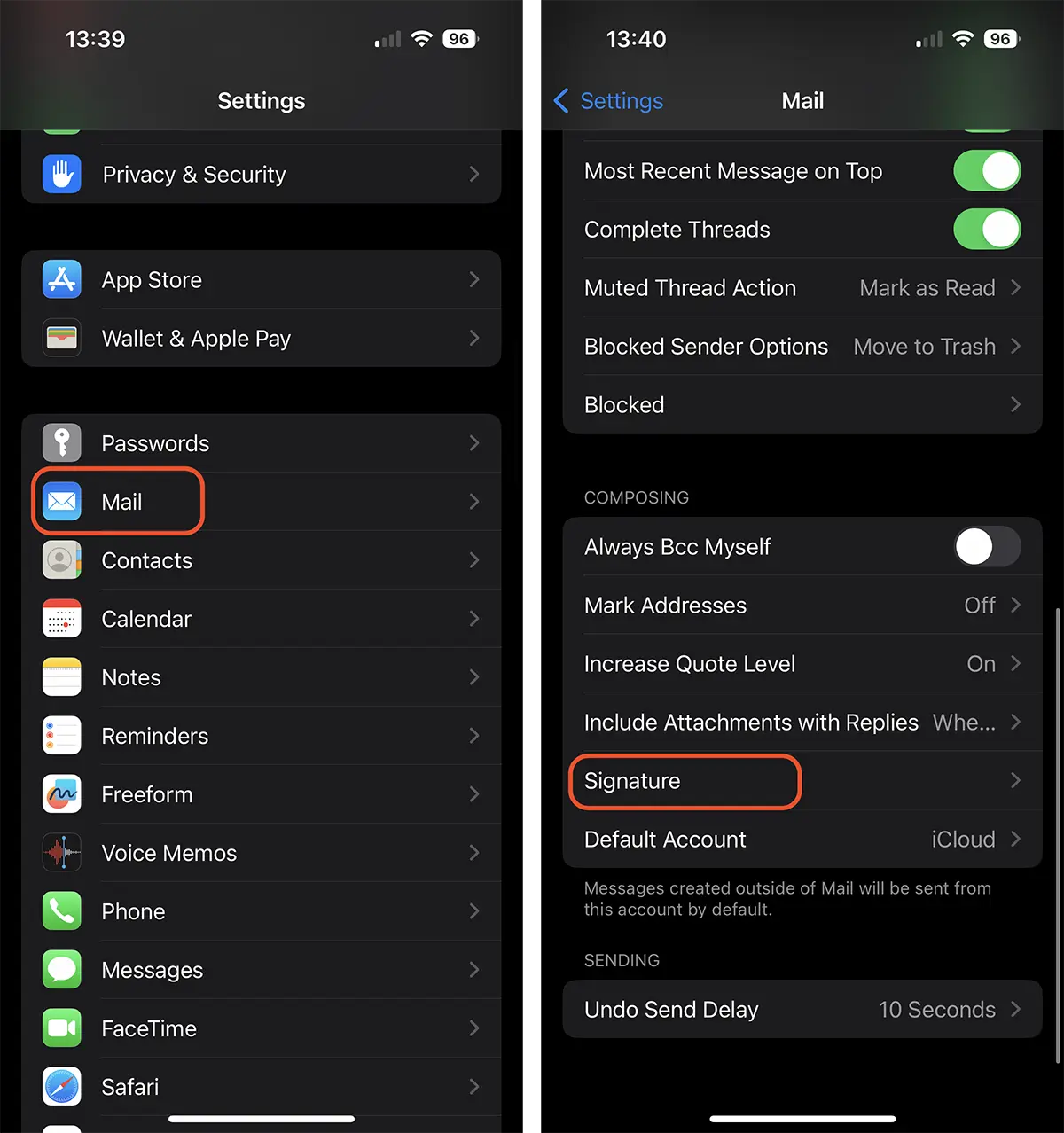
1. Ouver “Settings“, puis faites défiler jusqu'à “Mail“.
2. Dans les options “Mail“, tu ouvres “Signature“.
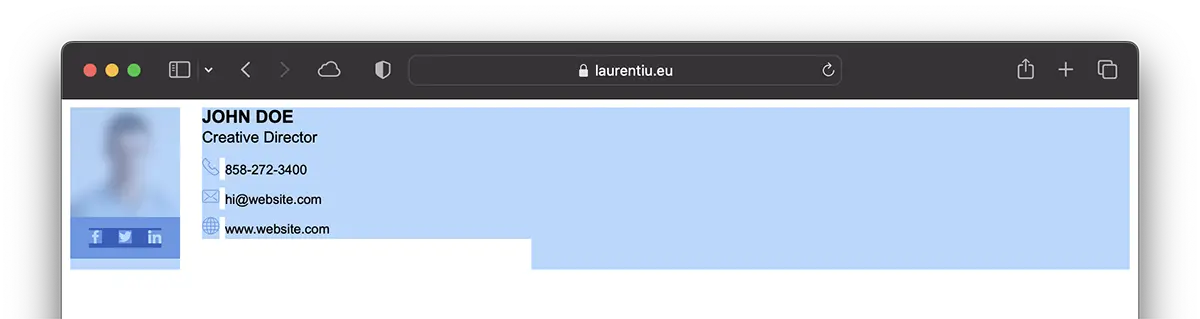
2. Ouvrez le lien Web sur lequel vous avez la signature et copiez tout le contenu. Vous pouvez le faire depuis Safari sur votre iPhone ou iPad. Avec la fonction Handoff (Presse-papiers universel) activé, vous pouvez copier la signature HTML depuis votre ordinateur Mac ou MacBook.
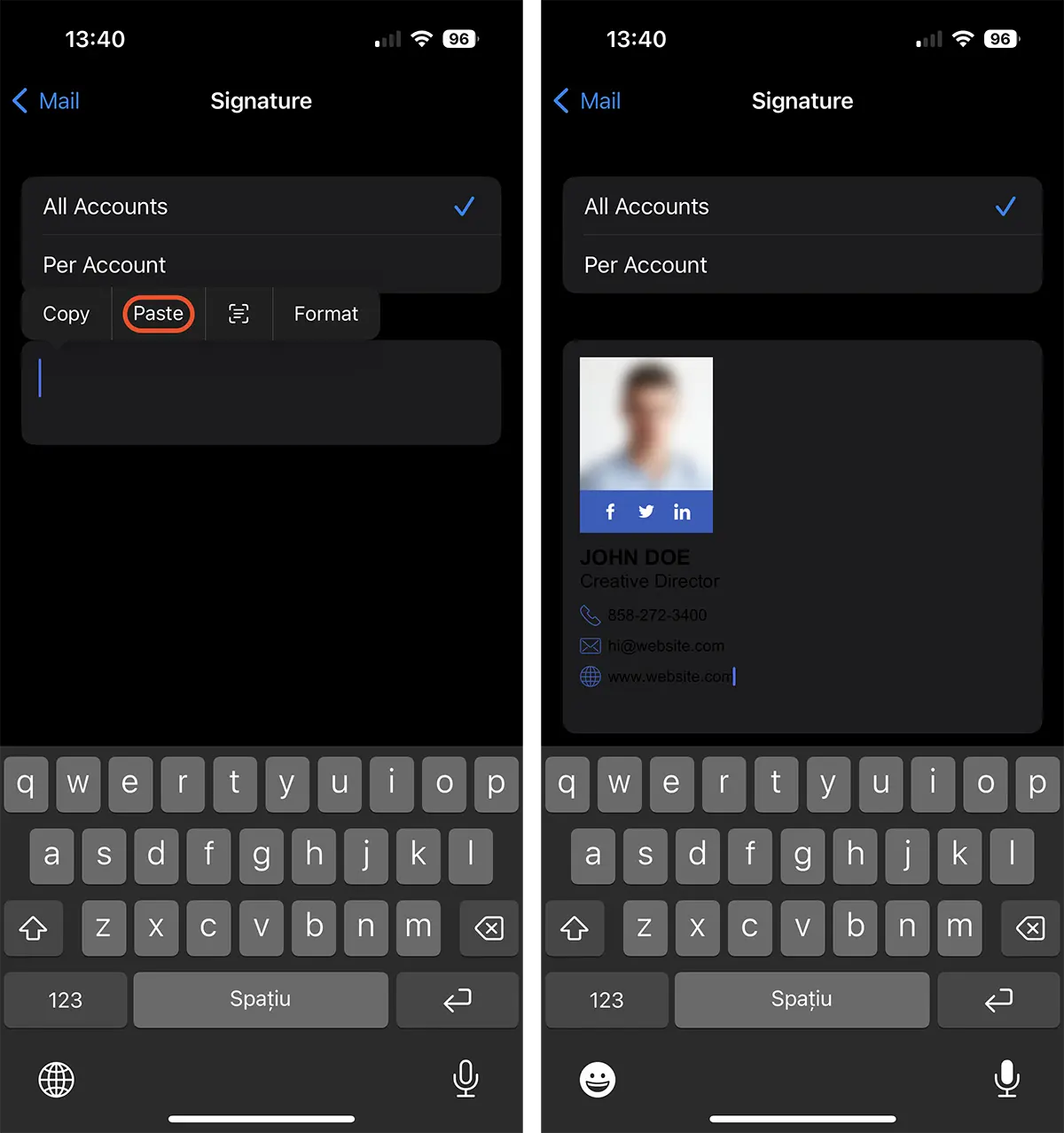
3. Retour à “Signature” et collez (paste) le contenu copié.
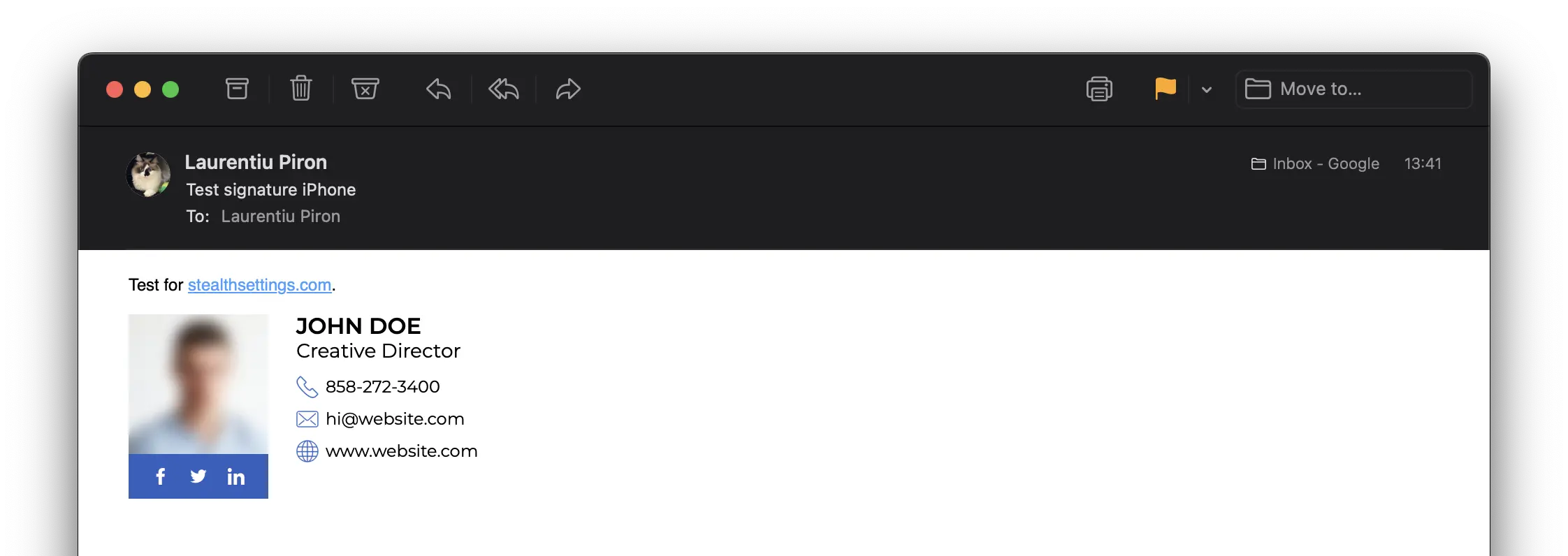
Après cette étape, vous pouvez dire que vous avez appris à créer et ajouter une signature électronique HTML pour iPhone ou iPad.
En rapport: Comment faire une signature HTML avec une image pour Outlook
Ne vous inquiétez pas si vous constatez qu'au point 3 le texte n'est pas lisible. La couleur d'arrière-plan sera copiée à partir de la source de signature HTML. Ainsi, si l'interface de messagerie du destinataire est définie sur un thème “sombre”, votre message arrivera avec un fond blanc.


Vous pourriez également être intéressé par...
