


If you are addicted to emails, especially for business, from this tutorial you will learn step by step how to create an HTML email signature for iPhone or iPad.
content
An HTML business email signature should include: your name, position within the organization, company name, company logo, your and company contact details (phone, email, web address).
In most email applications such as Outlook, HTML signatures are added by inserting the code HTML in the signature field. For iPhone or iPad it's a little different, but in both cases you need the HTML signature.
How do you create HTML Email signature for iPhone or iPad
As I said above, first you need to make the HTML signature (if you already have it, you can skip this part of the tutorial).
Create the HTML signature
In my example I did a HTML email signature for iPhone something simpler, which includes: picture (or company logo), social network icons with link, name and surname, function, phone number, email address and web address.

If you want to start from this signature template, the HTML code is as follows:
<!doctype html>
<html>
<head>
<meta charset="utf-8">
<title>Email Signature</title>
<link rel="stylesheet" href="http://fonts.googleapis.com/css?family=Montserrat">
<style type="text/css">
	img { outline: none; text-decoration: none; border: none; }
	p { margin: 0px !important; }
	a { color: #000 !important; text-decoration:none !important; }

	@media only screen and (max-width: 480px) {
		.heading-one {
			font-size:16px !important;
			line-height:18px !important;
		}

		.heading-two {
			font-size:12px !important;
			line-height:14px !important;
		}

		.paragraph {
			font-size:10px !important;
			line-height:11px !important;
		}
	}

	href>a { color:#000; text-decoration: none !important; text-decoration: none; }
</style>
</head>

<body>
<!-- EDIT BELOW IF YOU AREN'T OUTLOOK USER -->
<!--[if !mso]><!-->
<table width="100%" border="0" cellspacing="0" cellpadding="0">
	<tbody>
		<tr>
			<td valign="top" style="display:inline-block; min-width:100px; max-width:100px; padding-right: 20px; padding-bottom: 10px;"><table width="80" border="0" cellspacing="0" cellpadding="0">
				<tbody>
					<tr>
						<td style="display: block; height: 100px; text-align: center;"><img src="img/model.jpg" width="100" height="100" alt=""/></td>
					</tr>
					<tr>
						<td style="background: #305dbf; padding-top: 10px; padding-bottom: 10px; text-align: center;"><table border="0" align="center" cellpadding="0" cellspacing="0">
							<tbody>
								<tr>
									<td style="padding-right: 15px;"><a href="http://www.facebook.com/" target="_blank"><img src="img/icon-facebook-0.png" width="12" height="12" alt=""/></a></td>
									<td style="padding-right: 15px;"><a href="http://www.twitter.com/" target="_blank"><img src="img/icon-twitter-0.png" width="12" height="12" alt=""/></a></td>
									<td><a href="http://www.linkedin.com/" target="_blank"><img src="img/icon-linkedin-0.png" width="12" height="12" alt=""/></a></td>
								</tr>
							</tbody>
						</table></td>
					</tr>
				</tbody>
			</table></td>
			<td valign="top" style="display:inline-block; min-width:300px; max-width:400px;"><table width="100%" border="0" cellspacing="0" cellpadding="0">
				<tbody>
					<tr>
						<td style="padding-bottom: 10px;"><span class="heading-one" style="font-family:'Montserrat', Arial, sans-serif; font-size:16px; line-height:18px; font-weight:600; color:#000; text-transform:uppercase;">John Doe</span><br><span class="heading-two" style="font-family:'Montserrat', Arial, sans-serif; font-size:14px; line-height:16px; font-weight:500; color:#000; text-transform:capitalize;">Creative Director</span></td>
					</tr>
					<tr>
						<td style="padding-bottom: 7px;"><table width="100%" border="0" cellspacing="0" cellpadding="0">
							<tbody>
								<tr>
									<td width="16" style="padding-right: 5px;"><img src="img/icon-phone-10.png" width="16" height="16" alt=""/></td>
									<td><span class="paragraph" style="font-family:'Montserrat', Arial, sans-serif; font-size:12px; line-height:14px; font-weight:400; color:#000;">858-272-3400</span></td>
								</tr>
							</tbody>
						</table></td>
					</tr>
					<tr>
						<td style="padding-bottom: 7px;"><table width="100%" border="0" cellspacing="0" cellpadding="0">
							<tbody>
								<tr>
									<td width="16" style="padding-right: 5px;"><img src="img/icon-email-10.png" width="16" height="16" alt=""/></td>
									<td><a href="mailto:[email protected]" target="_blank" style="color:#000; text-decoration: none !important; text-decoration: none;"><span class="paragraph" style="font-family:'Montserrat', Arial, sans-serif; font-size:12px; line-height:14px; font-weight:400; color:#000;">[email protected]</span></a></td>
								</tr>
							</tbody>
						</table></td>
					</tr>
					<tr>
						<td><table width="100%" border="0" cellspacing="0" cellpadding="0">
							<tbody>
								<tr>
									<td width="16" style="padding-right: 5px;"><img src="img/icon-website-10.png" width="16" height="16" alt=""/></td>
									<td><a href="http://www.yourwebsite.com" target="_blank" style="color:#000; text-decoration: none !important; text-decoration: none;"><span class="paragraph" style="font-family:'Montserrat', Arial, sans-serif; font-size:12px; line-height:14px; font-weight:400; color:#000;">www.website.com</span></a></td>
								</tr>
							</tbody>
						</table></td>
					</tr>
				</tbody>
			</table></td>
		</tr>
	</tbody>
</table>
<!--<![endif]-->

<!-- EDIT BELOW IF YOU ARE OUTLOOK USER -->
<!--[if mso]>
<table border="0" cellspacing="0" cellpadding="0">
	<tbody>
		<tr>
			<td width="100" valign="top" style="padding-right: 20px; padding-bottom: 10px;"><table width="80" border="0" cellspacing="0" cellpadding="0">
				<tbody>
					<tr>
						<td style="display: block; height: 100px; text-align: center;"><img src="img/model.jpg" width="100" height="100" alt=""/></td>
					</tr>
					<tr>
						<td style="background: #305dbf; padding-top: 10px; padding-bottom: 10px; text-align: center;"><table border="0" align="center" cellpadding="0" cellspacing="0">
							<tbody>
								<tr>
									<td style="padding-right: 15px;"><a href="http://www.facebook.com/" target="_blank"><img src="img/icon-facebook-0.png" width="12" height="12" alt=""/></a></td>
									<td style="padding-right: 15px;"><a href="http://www.twitter.com/" target="_blank"><img src="img/icon-twitter-0.png" width="12" height="12" alt=""/></a></td>
									<td><a href="http://www.linkedin.com/" target="_blank"><img src="img/icon-linkedin-0.png" width="12" height="12" alt=""/></a></td>
								</tr>
							</tbody>
						</table></td>
					</tr>
				</tbody>
			</table></td>
			<td width="400" valign="top"><table width="100%" border="0" cellspacing="0" cellpadding="0">
				<tbody>
					<tr>
						<td style="padding-bottom: 10px;"><span class="heading-one" style="font-family:'Montserrat', Arial, sans-serif; font-size:16px; line-height:18px; font-weight:600; color:#000; text-transform:uppercase;"><font face="'Montserrat', Arial, sans-serif !important;">John Doe</font></span><br><span class="heading-two" style="font-family:'Montserrat', Arial, sans-serif; font-size:14px; line-height:16px; font-weight:500; color:#000; text-transform:capitalize;"><font face="'Montserrat', Arial, sans-serif !important;">Creative Director</font></span></td>
					</tr>
					<tr>
						<td style="padding-bottom: 7px;"><table width="100%" border="0" cellspacing="0" cellpadding="0">
							<tbody>
								<tr>
									<td width="16" style="padding-right: 5px;"><img src="img/icon-phone-10.png" width="16" height="16" alt=""/></td>
									<td><span class="paragraph" style="font-family:'Montserrat', Arial, sans-serif; font-size:12px; line-height:14px; font-weight:400; color:#000;"><font face="'Montserrat', Arial, sans-serif !important;">858-272-3400</font></span></td>
								</tr>
							</tbody>
						</table></td>
					</tr>
					<tr>
						<td style="padding-bottom: 7px;"><table width="100%" border="0" cellspacing="0" cellpadding="0">
							<tbody>
								<tr>
									<td width="16" style="padding-right: 5px;"><img src="img/icon-email-10.png" width="16" height="16" alt=""/></td>
									<td><a href="mailto:[email protected]" target="_blank" style="color:#000; text-decoration: none !important; text-decoration: none;"><span class="paragraph" style="font-family:'Montserrat', Arial, sans-serif; font-size:12px; line-height:14px; font-weight:400; color:#000;"><font face="'Montserrat', Arial, sans-serif !important;">[email protected]</font></span></a></td>
								</tr>
							</tbody>
						</table></td>
					</tr>
					<tr>
						<td><table width="100%" border="0" cellspacing="0" cellpadding="0">
							<tbody>
								<tr>
									<td width="16" style="padding-right: 5px;"><img src="img/icon-website-10.png" width="16" height="16" alt=""/></td>
									<td><a href="http://www.yourwebsite.com" target="_blank" style="color:#000; text-decoration: none !important; text-decoration: none;"><span class="paragraph" style="font-family:'Montserrat', Arial, sans-serif; font-size:12px; line-height:14px; font-weight:400; color:#000;"><font face="'Montserrat', Arial, sans-serif !important;">www.website.com</font></span></a></td>
								</tr>
							</tbody>
						</table></td>
					</tr>
				</tbody>
			</table></td>
		</tr>
	</tbody>
</table>
<![endif]-->
</body>
</html>
The easiest is to create a folder for the signature. You copy this code into a text or HTML editor, then modify it with your data. At the end you save it with the extension .html.
Next to the HTML file you create the folder img in which you include the graphic elements. Picture and icons. You identify these elements in your HTML code. Example: <img src="img/icon-email-10.png".../>.
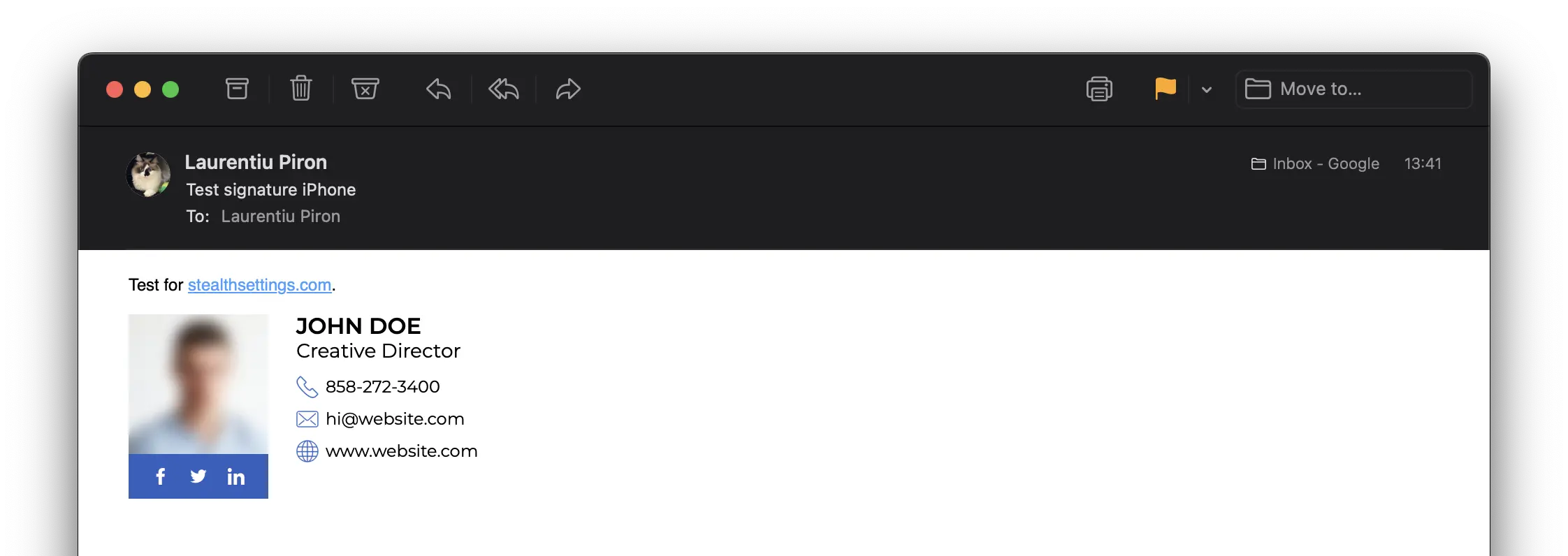
After you've customized your signature, open the HTML file in your browser. The result should be similar to the image at the beginning of the tutorial.
How to add HTML signature for iPhone or iPad
For the signature to be open and readable by recipients, it must be hosted on a web server or service cloud which allows you to upload HTML files and graphics.
I put my signature on Web address.

After the HTML signature has been created and is available online, the next step is to add the HTML signature to your email accounts on your iPhone or iPad.
The tutorial is for email accounts added to the app Mail present on all iPhone, iPad, Mac devices.
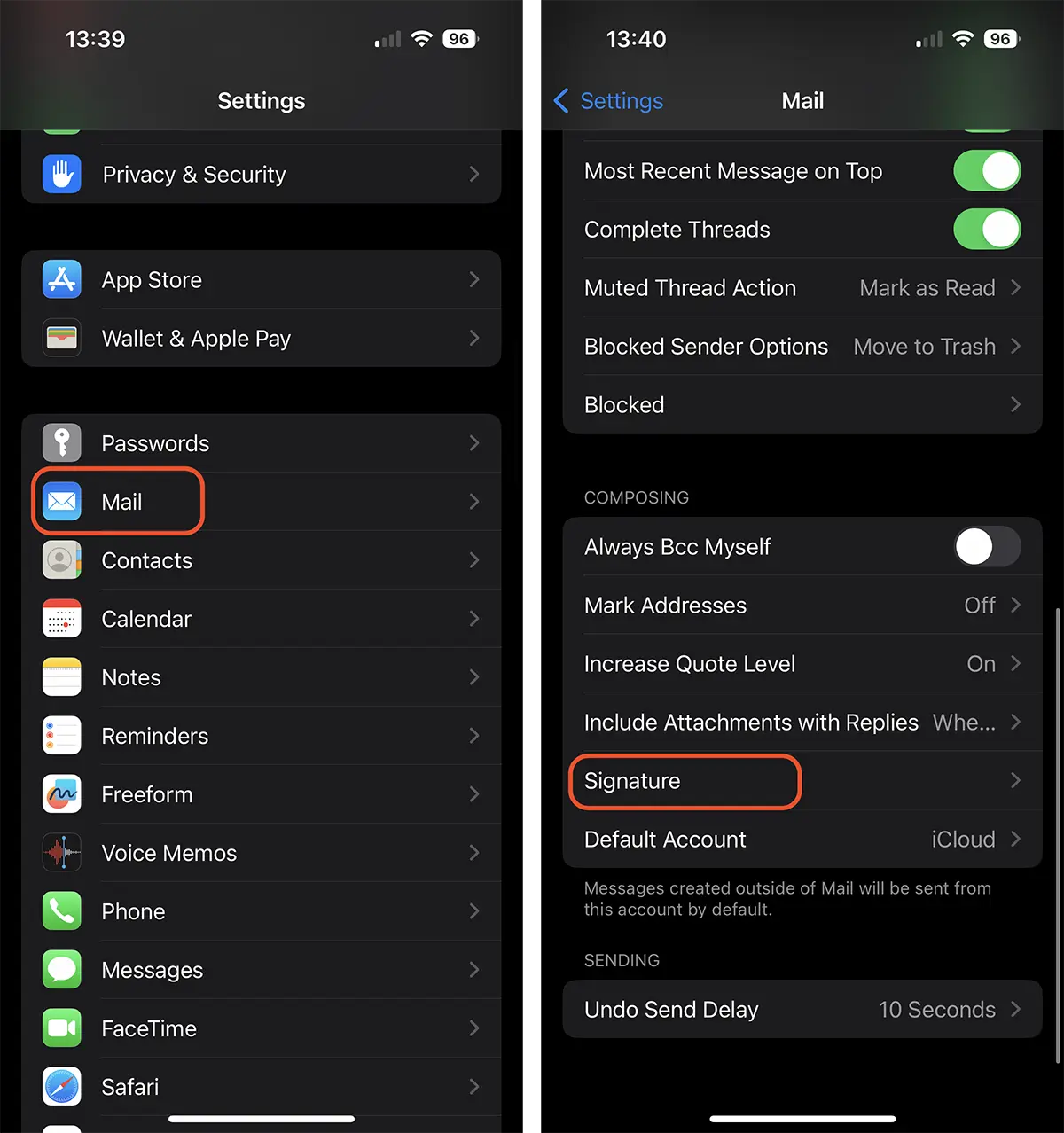
1. Open “Settings“, then scroll to “Mail“.
2. In the options “Mail“, open “Signature“.
2. Open the web link to which you have the signature and copy all the content. You can do this from Safari on your iPhone or iPad. With the function Handoff (Universal Clipboard) enabled, you can copy the HTML signature from your Mac or MacBook computer.

3. Return to “Signature” and paste (paste) the copied content.
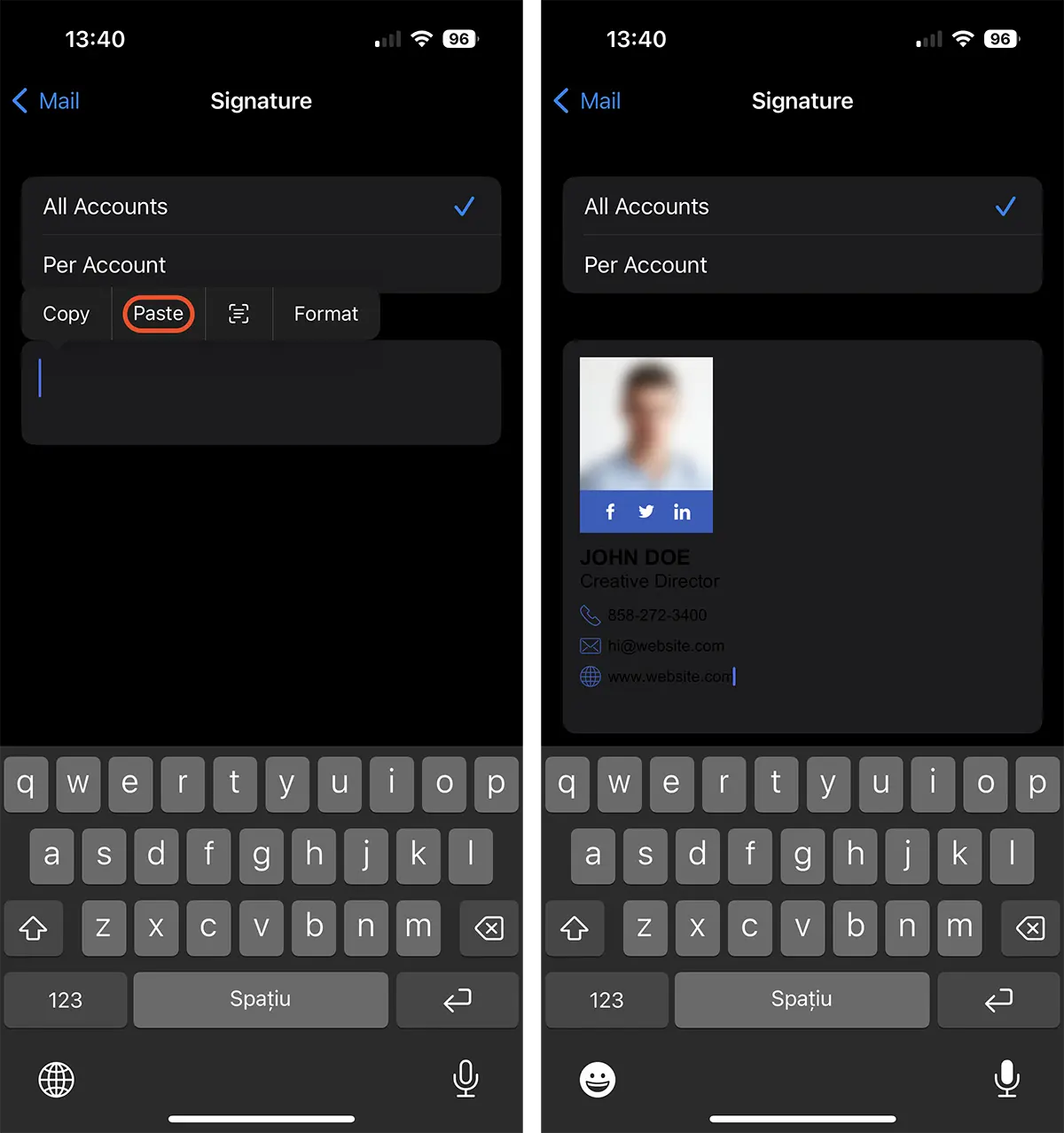
After this step, you can say that you have learned how to create and add HTML email signature for iPhone or iPad.
Related: How do you do an HTML signature with picture for Outlook
Don't worry if you notice that in point 3 the text is not legible. The background color will be copied from the HTML signature source. So, if the recipient has the email interface set to a theme “dark”, your message will arrive with a white background.


You may also be interested in...
