

正式サービス開始以来、 Windows 10として来ました アップグレード “無料” アル Windows7、 Windows 8 そして Windows 8.1、製品のアクティベーションに関して多くの混乱が生じています。 Windows 正規品。 Microsoftはどちらについても正確な説明を提供していません どのようにしてインストールできますか “クリーン” 新しい Windows 10 (Windows 10をクリーンインストールする)そしてそれについてではありません Windows 10のライセンス認証プロセスを購入していた人には、 Windows 7 ライセンス、 Windows 8 またはの Windows 8.1。
ここ数日 マイクロソフト 最大規模のものを発売した アップデート これまでのところ、Windows 10 向けです。オペレーティング システムのいくつかの重要な機能を変更する更新プログラムです。最新のアップデートの変更点/新規性の中には、アクティベーションプロセスもカウントされます。アップデート後は、次のような可能性があります。 Windows 10のシリアル変更sau sa introducem un serial de Windows 7, 8, 8.1. Aceasta noua optiune ne ajuta foarte mult atunci cand instalam un Windows 10 curat.
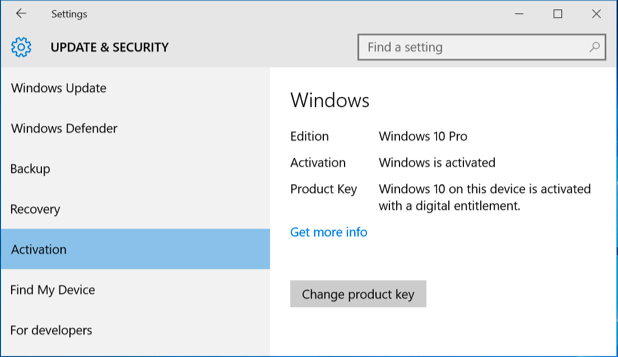
Schimabrea serialului pentru Windows 10 se poate face din 設定 > アップグレード & 安全 > Activation > Change product key。
Pentru activarea Windows 10 puteti folosi orice serial pe care l-ati primit la cumpararea sistemului Windows 7, Windows 8 sau Windows 8.1.


あなたも興味があるかもしれません...
