


一部のオペレーティング システム ユーザーの場合 ウィンドウXP、 システムパフォーマンス それがすべてだ。 Windows XP にはいくつかの機能があります 視覚効果 目を盗むことができますが、活性化すると、人から「盗む」こともできます。 反応速度 システムの。必ずしもモニターに視覚効果を満載する必要がなく、それが必要な場合 システムパフォーマンスを最適化する いくつかの簡単な手順で実行できます。
アクセス コントロールパネル (ボタンで表示されるメニューから 始める) アイコンをクリックします システム (パフォーマンスとメンテナンス)。
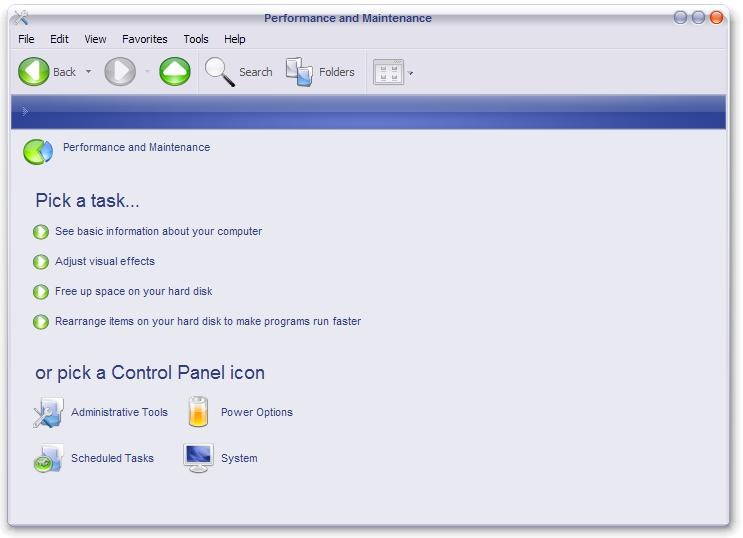
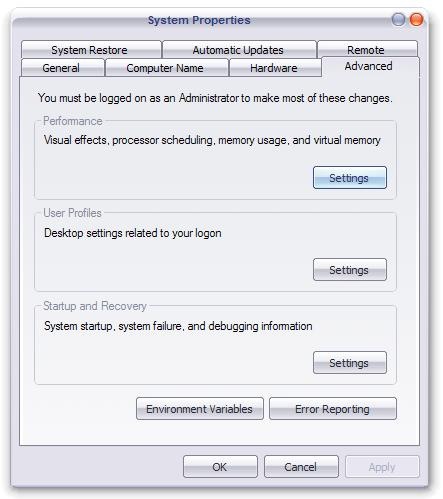
開いたウィンドウでタブを選択します 高度なをクリックし、ボタンをクリックします。 設定 パネルから パフォーマンス。
で パフォーマンスオプション、タブをクリックします 視覚効果、選択 カスタム そしてオプションをチェックするだけです:
- メニューの下に影を表示する
- マウスポインタの下に影を表示
- 半透明の選択範囲の四角形を表示
- デスクトップ上のアイコンラベルにドロップシャドウを使用する
- ウィンドウとボタンに視覚スタイルを使用する
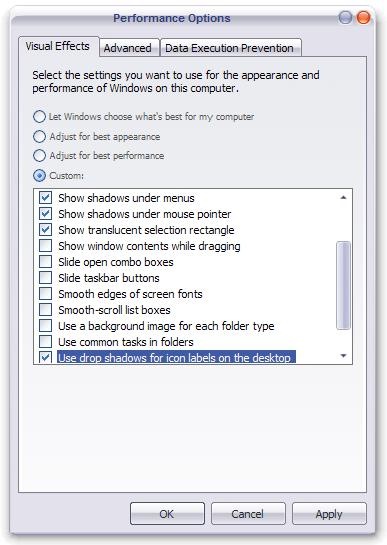
適用する そして わかりました。
最適なパフォーマンスを得るには、視覚効果はありませんが、タブで 視覚効果 選択します 最高のパフォーマンスを実現するために調整する。


あなたも興味があるかもしれません...

Macで自動輝度と色の変化をどのように無効にしますか
明るさと色調の自動変更(True Tone)は、視覚の健康と健康の両方に非常に役立つ機能です。
バッテリーセーバーモード & 高効率モードPentru Chrome
あなたが Google Chrome ユーザーで、ラップトップからオンラインに多くの時間を費やしている場合、このチュートリアルはバッテリー寿命を延ばすのに役立ちます。
Windows11の書き込みとすべてのIUアイテムをどのように増やすか – スケーリングを表示します
物事をよりよく見るためのチュートリアル。 Windows 11 で書き込みとすべての UI 要素を拡大する方法。表示スケーリング。象徴的なテキスト...
Windows 11とWindows 10のパフォーマンスをどのように向上させますか?コンピューターまたはラップトップがより速くなります
私たちは皆、快適に動作する、Windows のパフォーマンスが高い、実行中に固まらないコンピュータを望んでいます...
ディスプレイ上の画像をオンにする方法。 Windows 7 で画面を回転する
画面解像度 - Windows 7 でのディスプレイの回転。ビデオ カード ソフトウェアによって許可される設定とは別に、Windows 7 ...
ディスク上のサイズとサイズの違いはどこですか
"Size" si "Size on disk" se refera la spatiul ocupat de un fisier pe disk (HDD) si la marimea reala a fisierului. Daca aveti un folder ...
知っておくべき 5 つの XP レジストリ調整
システムのパフォーマンスを向上させるためにレジストリを編集する「味」をつかんだ人 (またはその他のさまざまな理由:P) のために、この投稿では...
カラースキームが Windows Vista Basic に変更されました
「カラースキームが Windows Vista Basic に変更されました」は、開いたソフトウェアに互換性がないことを通知するメッセージです...
Windows Vista の視覚効果を調整して PC の動作速度を向上させます
Windows Vista は間違いなく、多くの人がデスクトップやパソコンの RAM をアップグレードするきっかけとなったオペレーティング システムです。
一つの考え “XPをスピードアップします – 表示設定を最適化します”