

일부 프로그램을 사용하면 조정 아니면 좀 만들어봐 가감 시스템(세대. 시각적 테마 설치 속하지 않는 것 Windows Vista), 확실히 그럴 가능성이 매우 높다. 시스템 파일 변화를 겪게 됩니다. 시스템 파일 변경 사항(시스템 파일), 대부분의 시간을 운영 체제 오류 또는 일부 응용 프로그램의 오류. OS 비스타 충돌. 그런 다음 Windows Vista 시스템 파일을 복구해야 합니다.
Windows Vista에서는 시스템 파일을 복원할 수 있는 두 가지 또는 세 가지 옵션을 제공합니다. 옵션은 다음과 같습니다. “시스템 복원”, 그러나 복원 지점을 기록하지 않은 경우(포인트를 복원하십시오) 이 유틸리티는 사용할 수 없습니다. 또한 시스템 복원을 사용하면 모든 것을 가져올 수 있습니다. 응용 프로그램 및 시스템 설정 등록이 이루어진 이전 날짜부터 “시스템 복원”. 보다 정확하게는 1월 초에 복원 지점을 생성한 후 3월 10일에 복원 지점을 사용하려는 경우 1월에 설치된 모든 설정 및 응용 프로그램이 손실됩니다. – 3월 10일. 각각의 복원 지점을 생성하기 전에 복원 지점을 생성하는 것이 좋습니다. 소프트웨어 설치 또는 레지스터 수정.
System File Checker (SFC) Windows Vista 운영 체제를 복구하는 훨씬 더 간단하고 효율적인 옵션입니다. 시스템 파일 검사기는 검사만 수행합니다. 시스템 파일, 그리고 그들이 나타날 경우 손상되었거나 누락된 파일, 복원됩니다.
Windows Vista 시스템 파일 [SFC – 시스템 파일 검사기 / 수정 오류]]
1. 명령 프롬프트 열기(CMD) 관리자 권한이 있습니다. (관리자 권한으로 실행)
2. 명령 명령에서 키 ‘SFC‘ 이 MS 도구의 모든 기능을 확인하세요.
Scans the integrity of all protected system files and replaces incorrect versions with correct Microsoft versions.
/SCANNOW : 보호된 모든 시스템 파일의 무결성을 검사하고 가능한 경우 문제가 있는 파일을 복구합니다.
/VERIFYONLY : 보호된 모든 시스템 파일의 무결성을 검사합니다. 복구 작업이 수행되지 않습니다.
/SCANFILE : 참조된 파일의 무결성을 검사하고, 문제가 식별되면 파일을 복구합니다. 전체 경로 지정 <파일>
/VERIFYFILE : 전체 경로로 파일의 무결성을 확인합니다. <파일>. 복구 작업이 수행되지 않습니다.
/OFFBOOTDIR : 오프라인 복구의 경우 오프라인 부팅 디렉터리의 위치를 지정합니다.
/OFFWINDIR : 오프라인 복구의 경우 오프라인 Windows 디렉터리의 위치를 지정합니다.
우리의 경우 가장 적절한 것은 “sfc /SCANNOW“.
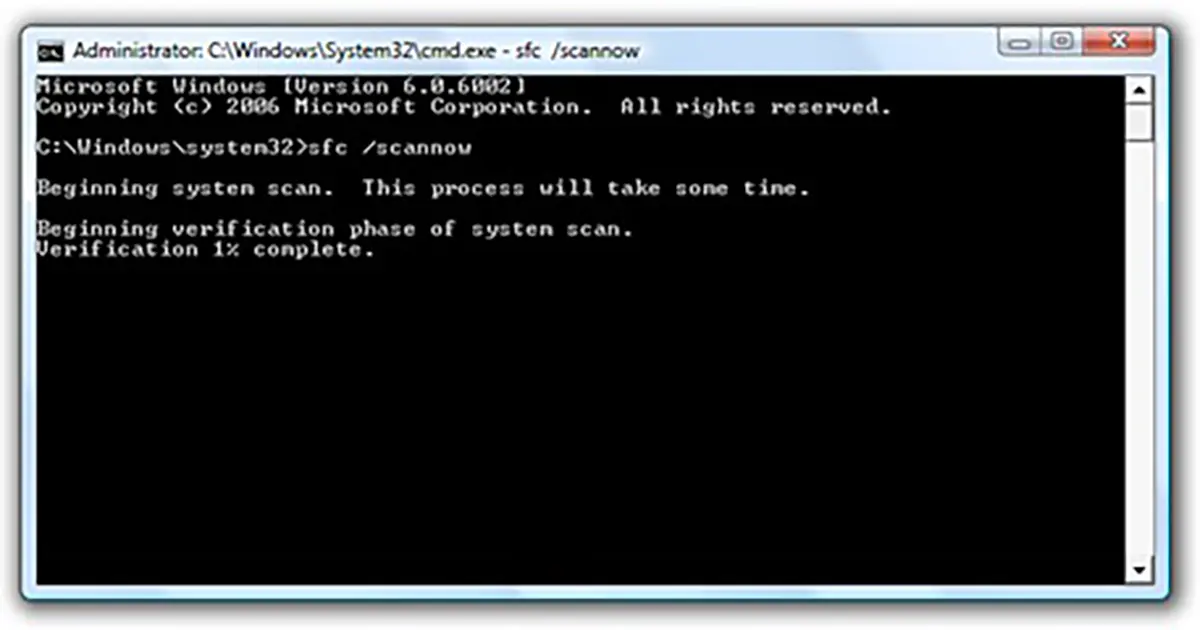
3. 스캔 작업이 완료되면 보고서 시스템의 손상된 파일이 기록됩니다. 보고서는 시스템 폴더(예: C:\Windows\Logs\CBS\CBS.log), 열려면 메모장이나 워드패드를 사용하는 것이 가장 좋습니다.


당신은 또한에 관심이있을 수 있습니다 ...
