


A useful solution for beginners who use Safari pe MAC OS X and are dependent on Bookmarks bar.
By default, once in full screen, the Safari browser hide the bookmark bar, and to make it visible we need to hold the cursor in the upper part of the screen for a while. This can be annoying for users who want to quickly open a Web page din bookmarks.
To make the bookmarks bar permanently visible when working with Safari in full screen, it is enough to press the key combination (keyboard shortcuts):
CMD + SHIFT + B
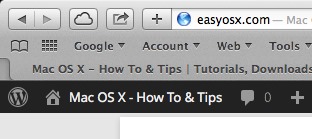
Note: Test or Mac OS X Mavericks 7.0.1
STEALTH SETTINGS – Always Show Bookmarks Bar in Safari Full Screen (Mac OS X)


You may also be interested in...

Enable preview for PDF, Excel, or Word files in Windows 11 – (Preview Pane)
Enable preview for PDF, Excel, Word, or PowerPoint files in File Explorer (Preview Pane). Step-by-step tutorial.
What's new in Windows 11 Build 27823. Top Cards.
Microsoft introduces Top Cards in Build 27823. Top Cards provides quick view of the most important hardware information.
How to remove _gl and _ga parameters from a website's URLs.
Find out why _gl and _ga parameters appear and what they are, and how to remove _gl and _ga parameters from the URLs of a website's subdomains with Google Analytics.
Sudden drop in organic traffic on the site in March 2025? Google Search Core Update
If you noticed a sudden drop in organic traffic on the site in March 2025, you most likely need to make some SEO changes.
How to configure Fail2Ban for WordPress (wp-login, xmlrpc)
See how you can install and configure Fail2Ban for WordPress. Secure WordPress authentication and xmlrpc.php.
What's new in GPT-4.5? The most powerful ChatGPT model.
Discover the new capabilities of GPT-4.5 and how the new artificial intelligence model interacts with ChatGPT users.
Pegasus spyware detected on only half of iPhones
Taking advantage of zero-day vulnerabilities, the Pegasus spyware can only be detected on half of the infected iPhone devices.
Free Starlink connectivity on iPhone until July.
T-Mobile users in the United States can enjoy Starlink free connectivity until July.
How to add ChatGPT to WhatsApp on any phone.
OpenAI has integrated ChatGPT into WhatsApp for users around the world, regardless of the smartphone model used.
Microsoft gives up on the free VPN and raises prices
Microsoft gives up the FREE VPN in Defender. Users need to find alternatives for online security and privacy.
Deepseek on the first place in the App Store, before Chatgpt
The success of Deepseek demonstrates China's power to compete in the field and question the US technological supremacy.
Authentication Deepseek with Apple account in browser
A Deepseek authentication problem with Apple's account in your browser. Problem at Deepseek accounts created on the iPhone.