


For de fleste hjemmebrugere er ændringen IP-adressen (Internetprotokol) er ikke nødvendigt. Som regel er dette indstilles automatisk af internetudbyderen. RCS & Rds, UPC, iNES indstiller automatisk IP-adressen for hver enkelt abonnent.
I afdelinger, institutioner og andre miljøer, hvor der er større netværk, er det noget normalt at ændre IP-adressen på computeren eller laptoppen. Ændring af IP-adressen på et Windows 10-operativsystem kan udføres af enhver, hvis et par enkle trin følges.
Sådan ændres IP-adressen på en computer eller bærbar computer med Windows 10
1. vi går til Proceslinje (proceslinjen) og højreklik på internetforbindelsesikonet. I vores tilfælde på skiltet, der angiver WiFi-forbindelsen.
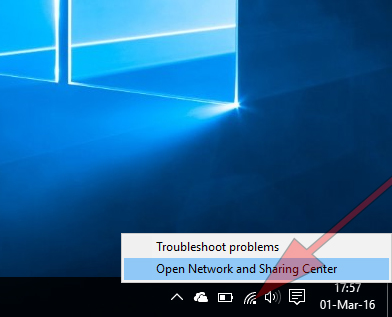
Klik på pe “Åbent netværk og delingscenter“.
2. Klik på den aktive forbindelse i panelet, der åbnes.
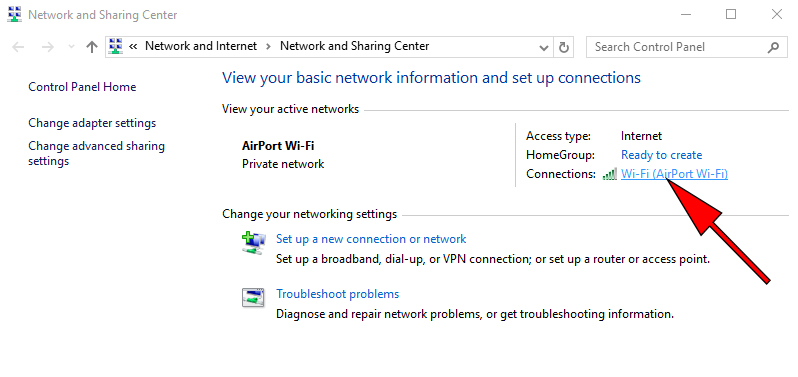
3. la Forbindelsesstatus vi klikker på knappen “Egenskaber“.
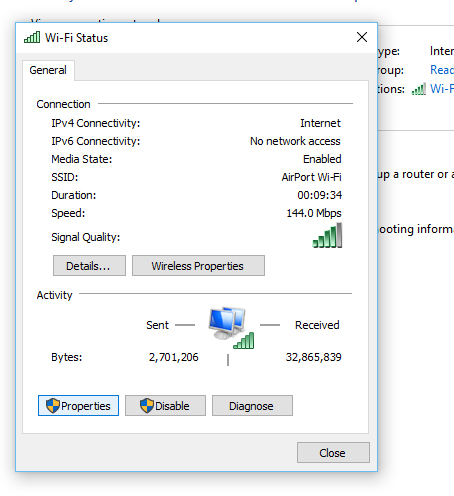
4. i Internetforbindelsesstatus dobbeltklik påInternetprotokol version 4 (TCP/IP v4).
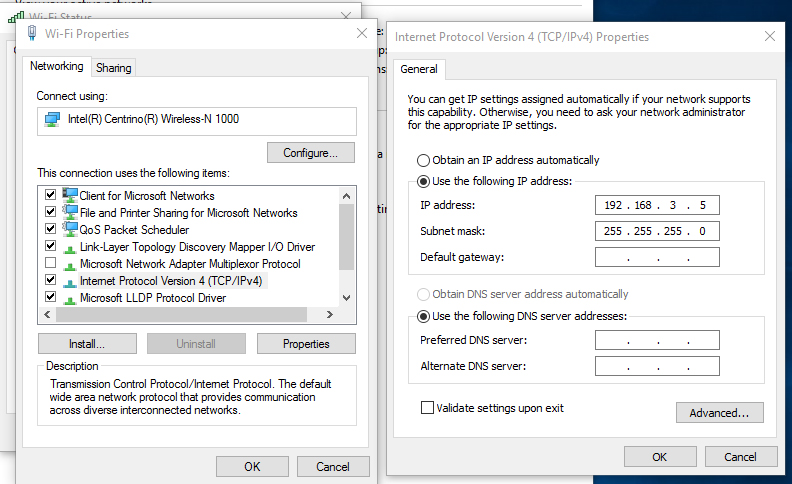
IInternet Protocol Version 4 (TCP/IP v4) Egenskaber Jeg vil bryde sammen “Få en IP-adresse automatisk” og på markerne “IP-adresse” og “Undernetmaske” vi indstiller den nye IP-adresse.


Du kan også være interesseret i...

2 tanker vedr “Hvordan vi ændrer IP -adressen på din pc eller bærbare computer til Windows 10”
Hej Stealth,
Jeg er fra Holland. Jeg vil ændre min IP til græsk, så jeg kan få adgang til Pokerstars, som ikke er licenseret her i øjeblikket. Jeg prøvede VPN & proxy uden held. Firewallen, de bruger, forstår det. Hvis du har en anden løsning, hører jeg det gerne.
Hej,
Proxy er bestemt ikke en løsning. Brugen af VPN tror jeg kan være nyttig, hvis tjenesten er krypteret og fuldstændig animerer kilden (betalt tjeneste det meste af tiden).
Der er et andet aspekt. Jeg ved ikke, om de tjenester, som VPN tilbyder, ikke er underlagt internationale regler, der ikke tillader anonym adgang til tjenester/applikationer som den, du nævnte.