


Hvis indtil nu en måned eller deromkring mulighed for DOWNLOAD og afsendelse af beskederne på Live Mail og Hot Mail ved POP3 / SMTP det var kun tilgængeligt for kunderne “præmie“, mente Microsoft, at det ville være godt at tilbyde gratis denne mulighed for alle brugere. Blandt de største udbydere af gratis e-mail-tjenester, Gmail det var den eneste, der tilbød (og stadig tilbyder) gratis POP3-adgang.
Hvad er POP3? Det er en protokol som tillader overtagelsen indlæg FRA Indbakkekassen af E-mail med enhver e-mail-applikation (gen: Outlook, Windows Live Mail, Zimbraosv.) installeret på skrivebordet (Pc), pe mobiltelefon eller på Smartphone.
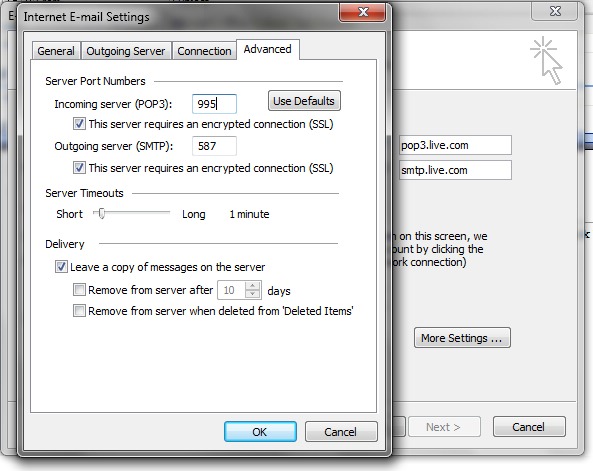
POP3-indstillinger for Live Mail og Hotmail. Indstillinger for Outlook og mobiltelefoner:
POP-server: pop3.live.com (Port 995)
POP SSL påkrævet? Ja
Brugernavn: Dit Windows Live ID, for eksempel [email protected]
Adgangskode: Den adgangskode, du normalt bruger til at logge på Hotmail eller Windows Live
SMTP-server: smtp.live.com (Port 25 eller 587)
Påkrævet godkendelse? Ja (dette matcher dit POP-brugernavn og adgangskode)
TLS/SSL påkrævet? Ja
Konto konfiguration af Live Mail pe Office Outlook vil vise:
Internet-e-mail-indstillinger (POP3):
Sandsynligvis vil denne mulighed snart være tilgængelig på Yahoo! Post.


Du kan også være interesseret i...

2 tanker vedr “POP3 til live og hot mail [Office Outlook Settings]”