


Якщо до цього часу місяць або близько того варіант ЗАВАНТАЖИТИ і відправлення повідомлень на Жива пошта і Гаряча пошта за Pop3 / SMTP це було доступно лише клієнтам “премія“, Microsoft подумала, що було б добре запропонувати безкоштовний цю опцію для всіх користувачів. Серед основних постачальників безкоштовних послуг електронної пошти, Gmail це був єдиний, який пропонував (і досі пропонує) безкоштовний доступ POP3.
Що таке POP3? Це протокол що дозволяє поглинання пости З Вхіднікоробка з Електронна пошта з будь-якою програмою електронної пошти (генерація: Перспектива, Windows Live Mail, Зімбратощо), встановлених на робочому столі (ПК), pe мобільний телефон або на смартфон.
Налаштування POP3 для Live Mail і Hotmail. Налаштування для Outlook і мобільних телефонів:
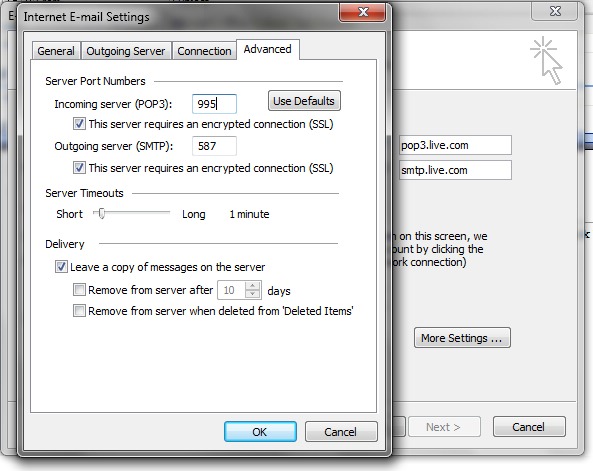
POP сервер: pop3.live.com (Порт 995)
Потрібен POP SSL? так
Ім'я користувача: Ваш Windows Live ID, наприклад [email protected]
Пароль: пароль, який ви зазвичай використовуєте для входу в Hotmail або Windows Live
SMTP сервер: smtp.live.com (порт 25 або 587)
Потрібна автентифікація? Так (це відповідає вашому імені користувача та паролю POP)
Потрібен TLS/SSL? Так
Конфігурація облікового запису Жива пошта ПЕ Office Outlook покаже:
Налаштування електронної пошти в Інтернеті (POP3) :
Ймовірно, незабаром ця опція буде доступна на Yahoo! Пошта.


Вас також може зацікавити...

2 думки про “POP3 для Live and Hot Mail [Налаштування Office Outlook]”