


Daca pana acum o luna si ceva optiunea de preluare I trimitere a mesajelor de pe Poczta na żywo I Hot Mail przez Pop3 / SMTP era disponibila numai clientilor “premia“, Microsoft s-a gandit ca ar fi bine sa ofere bezpłatny aceasta optiune tuturor utilizatorilor. Intre marii furnizori de servicii e-mail gratuite, Gmail era singurul care oferea (si ofera in continuare) acces POP3 gratuit.
Ce este POP3? To jest protocol care permite preluarea posty Z Skrzynka odbiorcza-ul casutei de e-mail cu orice aplicatie e-mail (gen: Outlook, Windows Live Mail, Zimbra, etc) instalata pe desktop (PC), pe telefon komórkowy lub dalej smartfon.
Setarile POP3 pentru Live Mail si Hotmail. Setari pentru Outlook si telefoane mobile:
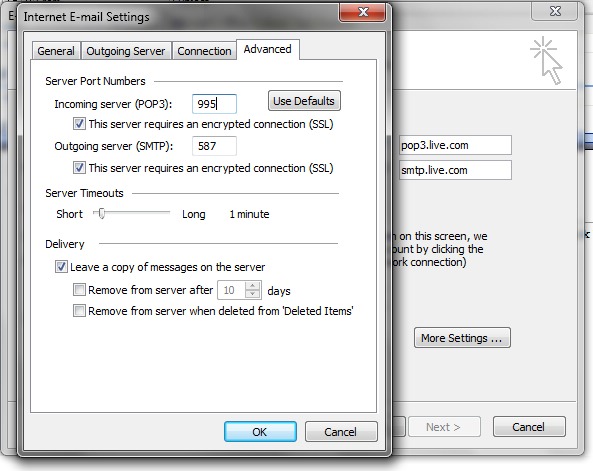
POP server: pop3.live.com (Port 995)
POP SSL required? Yes
Nazwa użytkownika: Your Windows Live ID, for example [email protected]
Hasło: The password you usually use to sign in to Hotmail or Windows Live
SMTP server: smtp.live.com (Port 25 or 587)
Authentication required? Yes (this matches your POP username and password)
TLS/SSL required? Tak
Configuratia contului de Poczta na żywo pe Outlook w biurze va arata :
Ustawienia e-mail internetowych (POP3) :
Probabil ca in curand aceasta optiune va fi disponibila si pe Yahoo! Mail.


Może zainteresują Cię także...

2 przemyślenia na temat “POP3 dla poczty Live i Hot Mail [Ustawienia programu Office Outlook]”