

Shift+Delete. Enter. O combination useful but also dangerous at the same time. Useful because you escapes in record time of files which you no longer need and that occupies the space for nothing on the hard. Dangerous because they exist the possibility to accidentally delete important files, which you cannot recover from Recycle Bin. Precisely for repairing such mistakes, have been developed soft-urand (applications) that come to the aid of the disabled user, recovering files “irreparable"Sterse.
Of a few tens of such software, we recommend Undelete MORE, a program that you can find including in Portable version (without installer) and will help to Recover recently erased files of which you were suddenly missing (we did not guarantee the recovery of the files deleted months ago).
Undelete PLUS are o Simple interface and easy to use, share recoverable files on categories or folders, displaying the status of each file (very good, good, bad, etc.).
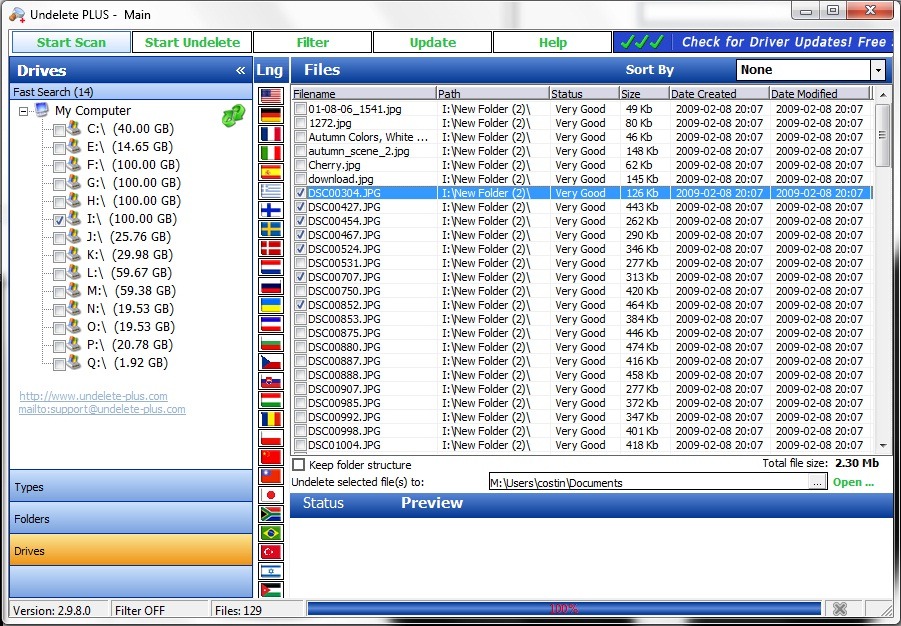
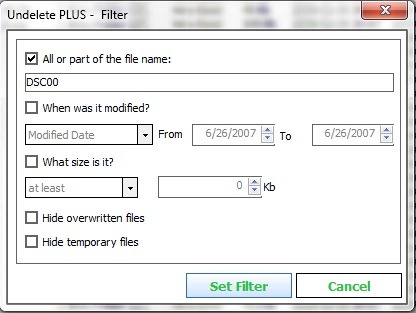
For a faster identification of the files you want to recover, apply the filter.
Undelete Plus is compatible with operating systems Windows 98/2000, Windows XP/ME/NT, Windows Server 2003, Windows Vista and can recover deleted files from format hard drives NTFS/NTFS5, FAT12/FAT16/FAT32 .


You may also be interested in...

2 thoughts on “How to Recover Accidentally Deleted Files”