

If you do not have a router or switch, but you wish you could connect multiple computers from home to the internet, the best method of share of the connection is the transformation of one of the computers (obviously, the one where the internet cable enters) – be it laptop with WiFi included, be it PC cu adaptor wireless - in one access point. In this way, all computers with WiFi in the house will be able to connect to the Internet through that computer using ad-hoc network created. Although the users Windows 7 have the opportunity to CREATE reteaua Wireless ad-hoc and from Control Panel/Network and Sharing Center, if you want to be able to control how it is used, we recommend you to use it MyPublicWiFi.
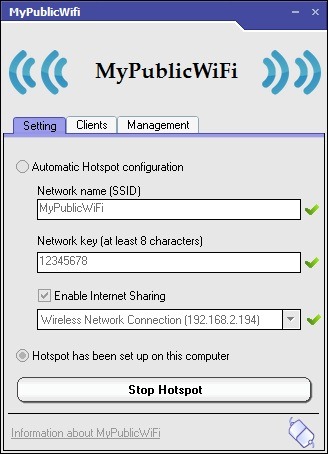
MyPublicWiFi It's O Freeware application which allows users not only to create a wireless ad hoc network through which to connect to the Internet on different computers with WiFi from the house, but also allows them to track which web pages are accessed from the respective computers and sa restrict their access to sharing servers (bittorrent sheep peer2peer).
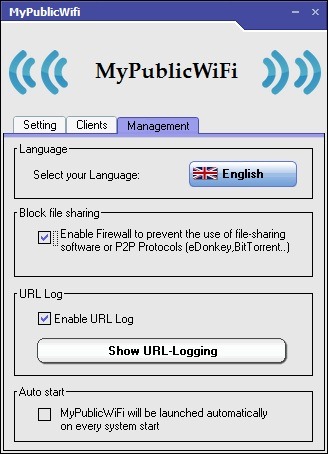
In plus MyPublicWiFi it will automatically create the hotspot, without it being necessary for users to make settings for the network, and in the tab Clients all are displayed the computers that connect to the ad hoc network. Also, the application can be set to start automatically every time the system on which it is installed is also started.
{filelink=28}
Note: The application is only compatible with Windows 7 and Windows Server 2008 (32 and 64 bits), but computers running earlier Windows systems, such as XP or Vista, can also be connected to the adhoc network created by it.
STEALTH SETTINGS – Turn your Windows 7 Computer into a WiFi Access Point with Firewall and URL Tracking


You may also be interested in...

6 thoughts on “Turn your PC with Windows 7 into WiFi Access Point with Firewall and URL Tracking”