
Dalam tutorial ini Anda akan mempelajari caranya aktifzi TLSv1.3 atau NGINX. Apa maksudnya? TLSv 1.3, apa yang membantu dan mengapa kamu perlu di server web sebagai TLS dapat diaktifkan. Untuk server dengan sistem manajemen Vestacp (CentOS atau Ubuntu) sedikit lebih sulit untuk mengaktifkan TLS 1.3 daripada di server cPanel, tapi itu bukan tidak mungkin.
isi
Mengapa TLS 1.3 lebih baik daripada TLS 1.2?
TLS (Transport Layer Security) Itu a protokol kriptografi yang menjamin keamanan koneksi antara komputer dan jaringan dimana komputer tersebut menjadi bagiannya. TLS itu digunakan dalam aplikasi seperti: e-mail, kurir, panggilan suara dan video (VoIP), tetapi khususnya pada HTTPS. Memastikan komunikasi yang aman antara komputer atau ponsel cerdas pengguna dan server web dari halaman yang diakses.
TLS 1.3 menawarkan a kecepatan lebih tinggi login klien – server dan a Plus keamanan dengan menghilangkan beberapa algoritma. Perbedaan antara TLSV1.2 dan TLSV1.3.
Tentang HTTPS, SSL (Secure Sockets Layer) Saya juga mengatakan di artikel lain:
- Bagaimana Kami Menginstal SSL (HTTPS Connection) Bersertifikat untuk situs web hostat di server nginx tanpa cpanel atau vestacp
- Recompilare OpenSSL 1.1 & Ningin 1.25 untuk TLS 1.3 (Centos 7)
- Cara memindahkan blog atau situs web WordPress dari http ke https (nginx)
- Hapus Domain Lama Sertifikat Certbot (Let's Encrypt Certificate)
Cara mengaktifkan TLS 1.3 di NGINX. Server dengan manajemen VestaCP / CentOS
Sebelum melihat cara mengaktifkan TLSv1.3 di NGINX, ada beberapa persyaratan minimum yang perlu dipertimbangkan TLS 1.3.
- NGINX 1.13.x atau lebih baru
- Sertifikat TLS yang valid
- Nama domain aktif dengan DNS yang dikonfigurasi dengan benar – dapat diakses di Internet
- Sertifikat TLS/SSL yang valid. Bisa juga Let’s Encrypt.
Di VestaCP yang sudah lama terinstal, kami hanya memiliki protokol yang tersedia TLS 1.2. Saya telah melihat di banyak tutorial bahwa itu sudah cukup nginx.conf tambahkan baris berikut untuk mengaktifkan TLS 1.3:
server {

  listen 443 ssl http2;
  listen [::]:443 ssl http2;

  server_name example.com;
  root /var/www/example.com/public;

  ssl_certificate /path/to/your/certificate.crt;
  ssl_certificate_key /path/to/your/private.key;

  ssl_protocols TLSv1.2 TLSv1.3;
PALSU. Jika di server Manajemen CentOS cu Vestacp, NGINX tidak dikompilasi dengan versi minimum OpenSSL 1.1.1.1, ssl_protocols TLSv1.2 TLSv1.3; di dalam nginx.conf .. itu tidak membantu sama sekali.
[root@north ~]# nginx -V
nginx version: nginx/1.22.0
built by gcc 4.8.5 20150623 (Red Hat 4.8.5-44) (GCC)
built with OpenSSL 1.0.2k-fips  26 Jan 2017
TLS SNI support enabled
Jadi pada contoh di atas Nginx 1.22.0 kompatibel dengan TLS versi 1.3, tetapi perpustakaan kami tidak membantu OpenSSL 1.0.2k-fips.
Untuk mengaktifkan TLSv1.3 di Nginx, Anda harus menginstal pustaka anak dan paket pengembangan terlebih dahulu. Development Tools. Jalankan di CentOS 7 baris perintah:
yum install gcc gcc-c++ pcre-devel zlib-devel make unzip gd-devel perl-ExtUtils-Embed libxslt-devel openssl-devel perl-Test-Simple
yum groupinstall 'Development Tools'
1. Instal versi terbaru OpenSSL
Saat ini versi terbarunya adalah OpenSSL 1.1.1p, tapi setahu saya sudah ada OpenSSL 3. Sumbernya bisa dilihat di OpenSSL.org.
cd /usr/src
wget https://www.openssl.org/source/openssl-1.1.1p.tar.gz
tar xvf openssl-1.1.1p.tar.gz
mv openssl-1.1.1p openssl
cd openssl
./config --prefix=/usr/local/openssl --openssldir=/usr/local/openssl --libdir=/lib64 shared zlib-dynamic
make -j4
make test
make install
Sangat penting untuk dijalankan make test sebelum menginstal perpustakaan. Jika pengujian mengalami kesalahan, jangan dijalankan make install sampai kesalahan tersebut diperbaiki.
Pada langkah selanjutnya kita membuat cadangan file biner saat ini openssl dan kami menambahkan symlink ke yang baru.
mv /usr/bin/openssl /usr/bin/openssl-backup
ln -s /usr/local/openssl/bin/openssl /usr/bin/openssl
Di dalam /usr/local/openssl/bin menjalankan ldd untuk memeriksa dependensi openssl. Kami mungkin juga dapat memeriksa versi openssl. Memerintah openssl version.
[root@north bin]# ldd openssl
	linux-vdso.so.1 =>  (0x00007ffd20bd7000)
	libssl.so.1.1 => /lib64/libssl.so.1.1 (0x00007fab09b62000)
	libcrypto.so.1.1 => /lib64/libcrypto.so.1.1 (0x00007fab09675000)
	libdl.so.2 => /lib64/libdl.so.2 (0x00007fab09471000)
	libpthread.so.0 => /lib64/libpthread.so.0 (0x00007fab09255000)
	libc.so.6 => /lib64/libc.so.6 (0x00007fab08e87000)
	/lib64/ld-linux-x86-64.so.2 (0x00007fab09df5000)
[root@north bin]# openssl version
OpenSSL 1.1.1p  21 Jun 2022
Saat ini kami telah menginstal versi terbaru OpenSSL yang bertahan TLSv1.3. Kami dapat memeriksa versinya TLS / SSL didukung oleh toko buku OpenSSL berdasarkan pesanan:
[root@north bin]# openssl ciphers -v | awk '{print $2}' | sort | uniq
SSLv3
TLSv1
TLSv1.2
TLSv1.3
[root@north bin]#
Ini tidak berarti bahwa situs web dihosting dengan bantuan pengelola VestaCP mereka akan segera mendapatkannya TLS 1.3.
Meskipun kami telah menginstal OpenSSL 1.1.1p, Nginx dikompilasi dengan versi lama OpenSSL 1.0.2k-fips.
[root@north bin]# nginx -V
nginx version: nginx/1.22.0
built by gcc 4.8.5 20150623 (Red Hat 4.8.5-44) (GCC)
built with OpenSSL 1.0.2k-fips  26 Jan 2017
TLS SNI support enabled
configure arguments: --prefix=/etc/nginx --sbin-path=/usr/sbin/nginx --modules-path=/usr/lib64/nginx/modules --conf-path=/etc/nginx/nginx.conf --error-log-path=/var/log/nginx/error.log --http-log-path=/var/log/nginx/access.log --pid-path=/var/run/nginx.pid --lock-path=/var/run/nginx.lock --http-client-body-temp-path=/var/cache/nginx/client_temp --http-proxy-temp-path=/var/cache/nginx/proxy_temp --http-fastcgi-temp-path=/var/cache/nginx/fastcgi_temp --http-uwsgi-temp-path=/var/cache/nginx/uwsgi_temp --http-scgi-temp-path=/var/cache/nginx/scgi_temp --user=nginx --group=nginx --with-compat --with-file-aio --with-threads --with-http_addition_module --with-http_auth_request_module --with-http_dav_module --with-http_flv_module --with-http_gunzip_module --with-http_gzip_static_module --with-http_mp4_module --with-http_random_index_module --with-http_realip_module --with-http_secure_link_module --with-http_slice_module --with-http_ssl_module --with-http_stub_status_module --with-http_sub_module --with-http_v2_module --with-mail --with-mail_ssl_module --with-stream --with-stream_realip_module --with-stream_ssl_module --with-stream_ssl_preread_module --with-cc-opt='-O2 -g -pipe -Wall -Wp,-D_FORTIFY_SOURCE=2 -fexceptions -fstack-protector-strong --param=ssp-buffer-size=4 -grecord-gcc-switches -m64 -mtune=generic -fPIC' --with-ld-opt='-Wl,-z,relro -Wl,-z,now -pie'
[root@north bin]# openssl version
OpenSSL 1.1.1p  21 Jun 2022
[root@north bin]#
2. Kompilasi ulang Nginx untuk sistem VestaCP
Pada langkah ini kita perlu mengkompilasi ulang OpenSSL versi Nginx sudah terinstal pada sistem CentOS / VestaCP. Seperti yang saya katakan di atas, dalam kasus saya ini tentang nginx/1.22.0. Karena kita berbicara tentang server web yang memiliki VestaCP sistem administrasi, sebelum kita mulai mengkompilasi ulang ada baiknya membuat cadangan file konfigurasi nginx.
Cadangkan Nginx saat ini di sistem VestaCP
Arsipkan dan simpan direktori di suatu tempat di server “/etc/nginx” Dan “/usr/local/vesta/nginx“.
BERLARI nginx -V dan menyimpan modul yang ada ke file.
configure arguments: --prefix=/etc/nginx --sbin-path=/usr/sbin/nginx --modules-path=/usr/lib64/nginx/modules --conf-path=/etc/nginx/nginx.conf --error-log-path=/var/log/nginx/error.log --http-log-path=/var/log/nginx/access.log --pid-path=/var/run/nginx.pid --lock-path=/var/run/nginx.lock --http-client-body-temp-path=/var/cache/nginx/client_temp --http-proxy-temp-path=/var/cache/nginx/proxy_temp --http-fastcgi-temp-path=/var/cache/nginx/fastcgi_temp --http-uwsgi-temp-path=/var/cache/nginx/uwsgi_temp --http-scgi-temp-path=/var/cache/nginx/scgi_temp --user=nginx --group=nginx --with-compat --with-file-aio --with-threads --with-http_addition_module --with-http_auth_request_module --with-http_dav_module --with-http_flv_module --with-http_gunzip_module --with-http_gzip_static_module --with-http_mp4_module --with-http_random_index_module --with-http_realip_module --with-http_secure_link_module --with-http_slice_module --with-http_ssl_module --with-http_stub_status_module --with-http_sub_module --with-http_v2_module --with-mail --with-mail_ssl_module --with-stream --with-stream_realip_module --with-stream_ssl_module --with-stream_ssl_preread_module --with-cc-opt='-O2 -g -pipe -Wall -Wp,-D_FORTIFY_SOURCE=2 -fexceptions -fstack-protector-strong --param=ssp-buffer-size=4 -grecord-gcc-switches -m64 -mtune=generic -fPIC' --with-ld-opt='-Wl,-z,relro -Wl,-z,now -pie'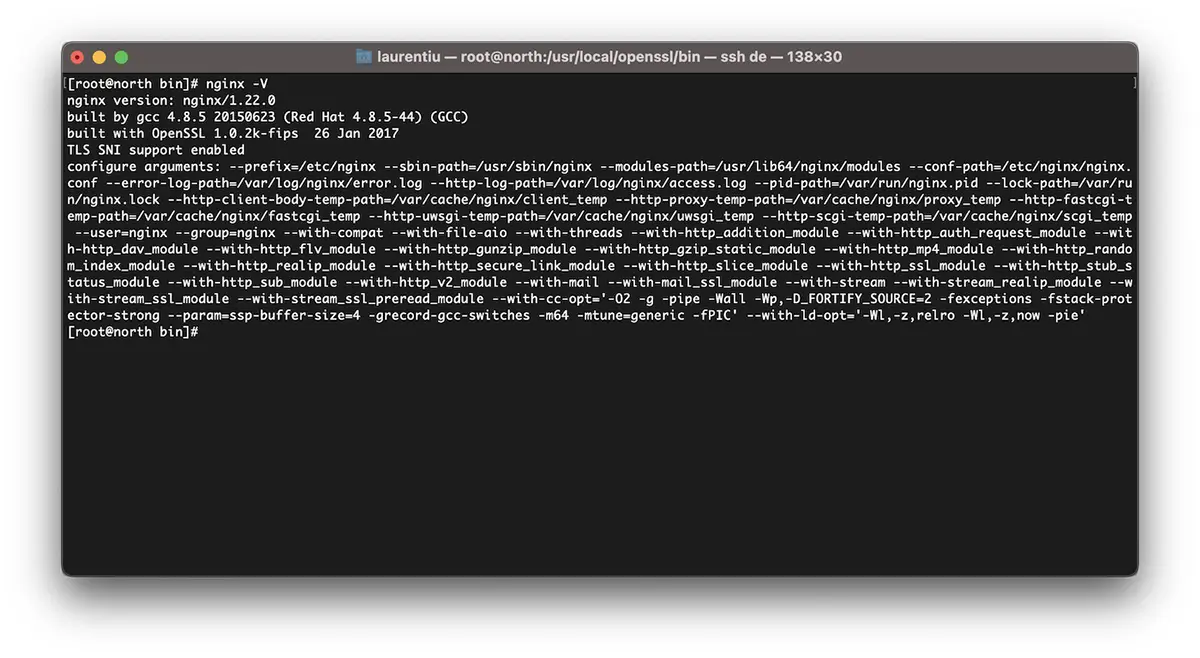
Cara mengkompilasi ulang Nginx untuk peningkatan OpenSSL / CentOS 7
saya ulangi. kalau sudah Vestacp, unduh versi Nginx yang sudah Anda instal. Anda dapat menemukan semua arsip dengan versi Nginx aktif nginx.org.
cd /usr/src
wget https://nginx.org/download/nginx-1.22.0.tar.gz
tar xvf nginx-1.22.0.tar.gz
cd nginx-1.22.0
Kami mengkompilasi ulang modul nginx:
./configure --prefix=/etc/nginx \
--sbin-path=/usr/sbin/nginx \
--modules-path=/usr/lib64/nginx/modules \
--conf-path=/etc/nginx/nginx.conf \
--error-log-path=/var/log/nginx/error.log  \
--http-log-path=/var/log/nginx/access.log  \
--pid-path=/var/run/nginx.pid  \
--lock-path=/var/run/nginx.lock  \
--http-client-body-temp-path=/var/cache/nginx/client_temp  \
--http-proxy-temp-path=/var/cache/nginx/proxy_temp  \
--http-fastcgi-temp-path=/var/cache/nginx/fastcgi_temp  \
--http-uwsgi-temp-path=/var/cache/nginx/uwsgi_temp  \
--http-scgi-temp-path=/var/cache/nginx/scgi_temp  \
--user=nginx  \
--group=nginx  \
--with-compat  \
--with-file-aio  \
--with-threads  \
--with-http_addition_module  \
--with-http_auth_request_module  \
--with-http_dav_module  \
--with-http_flv_module  \
--with-http_gunzip_module  \
--with-http_gzip_static_module  \
--with-http_mp4_module  \
--with-http_random_index_module  \
--with-http_realip_module  \
--with-http_secure_link_module  \
--with-http_slice_module  \
--with-http_ssl_module  \
--with-http_stub_status_module  \
--with-http_sub_module  \
--with-http_v2_module  \
--with-mail  \
--with-mail_ssl_module  \
--with-stream  \
--with-stream_realip_module  \
--with-stream_ssl_module  \
--with-stream_ssl_preread_module  \
--with-openssl=/usr/src/openssl  \
--with-cc-opt='-O2 -g -pipe -Wall -Wp,-D_FORTIFY_SOURCE=2 -fexceptions -fstack-protector-strong  \
--param=ssp-buffer-size=4 -grecord-gcc-switches -m64 -mtune=generic -fPIC'  \
--with-ld-opt='-Wl,-z,relro -Wl,-z,now -pie'
make -j4
make installKami sekarang telah menginstal dan mengkompilasi Nginx dengan versi terbaru OpenSSL mampu mendukung TLSv1.3.
[root@north bin]# nginx -V
nginx version: nginx/1.22.0
built by gcc 4.8.5 20150623 (Red Hat 4.8.5-44) (GCC)
built with OpenSSL 1.1.1p  21 Jun 2022
TLS SNI support enabled
*jika nginx sudah terinstal di server, Anda harus menghapus instalasinya. Kompilasi tidak berfungsi pada peningkatan nginx.
Cara mengaktifkan TLSv1.3 untuk domain di VestaCP
Di file /etc/nginx/nginx.conf kami menambahkan baris berikut:
ssl_protocols TLSv1.2 TLSv1.3;
ssl_prefer_server_ciphers on;
ssl_ciphers 'ECDHE-ECDSA-AES256-GCM-SHA384:ECDHE-RSA-AES256-GCM-SHA384:ECDHE-ECDSA-CHACHA20-POLY1305:ECDHE-RSA-CHACHA20-POLY1305:ECDHE-ECDSA-AES128-GCM-SHA256:ECDHE-RSA-AES128-GCM-SHA256:ECDHE-ECDSA-AES256-SHA384:ECDHE-RSA-AES256-SHA384:ECDHE-ECDSA-AES128-SHA256:ECDHE-RSA-AES128-SHA256';
Di tingkat domain, saya mengubah sesuatu di templat VestaCP dan untuk mengaktifkan HTTP/2. Jadi ketika menambahkan domain baru (example.com) dengan Let's Encrypt diaktifkan, saya memiliki file konfigurasi berikut untuk SSL:
cat /home/vestacpuser/conf/web/example.com.nginx.ssl.conf

server {
    listen      IP.IP.IP.IP:443 ssl http2;
    server_name example.com www.example.com;
    root        /home/vestacpuser/web/example.com/public_html;
    index       index.php index.html index.htm;
    access_log  /var/log/nginx/domains/example.com.log combined;
    access_log  /var/log/nginx/domains/example.com.bytes bytes;
    error_log   /var/log/nginx/domains/example.com.error.log error;

    ssl_certificate      /home/vestacpuser/conf/web/ssl.example.com.pem;
    ssl_certificate_key  /home/vestacpuser/conf/web/ssl.example.com.key;

....

ssl_protocols TLSv1.2 TLSv1.3;
ssl_prefer_server_ciphers on;
ssl_ciphers 'ECDHE-ECDSA-AES256-GCM-SHA384:ECDHE-RSA-AES256-GCM-SHA384:ECDHE-ECDSA-CHACHA20-POLY1305:ECDHE-RSA-CHACHA20-POLY1305:ECDHE-ECDSA-AES128-GCM-SHA256:ECDHE-RSA-AES128-GCM-SHA256:ECDHE-ECDSA-AES256-SHA384:ECDHE-RSA-AES256-SHA384:ECDHE-ECDSA-AES128-SHA256:ECDHE-RSA-AES128-SHA256';
Sebelum me-restart nginx, ada baiknya untuk menguji konfigurasinya terlebih dahulu.
[root@north web]# nginx -t
nginx: the configuration file /etc/nginx/nginx.conf syntax is ok
nginx: configuration file /etc/nginx/nginx.conf test is successful
[root@north web]# systemctl restart nginx
Saya harap tutorial ini bermanfaat bagi Anda dan jika Anda mengalami kebuntuan, tinggalkan detail masalahnya di komentar.


