

Neste tutorial você aprenderá como activezi TLSv1.3 ou NGINX. O que isso significa TLSv 1.3, o que isso ajuda e por que você precisa no servidor web como TLS pode ser ativado. Para servidores com sistema de gerenciamento Vestacp (CentOS ou Ubuntu) é um pouco mais difícil para ativar o TLS 1.3 do que em um servidor cPanel, mas não é impossível.
contente
Por que o TLS 1.3 é melhor que o TLS 1.2?
TLS (Transport Layer Security) É um protocolo criptográfico o que garante segurança de conexão dintre calculator și o rețea din care face parte. TLS este folosit în aplicații precum: e-mail, mensageiro, apeluri voce și video (VoIP), dar mai ales la HTTPS. Asigurând o comunicare securizată între calculatorul sau smartphone-ul utilizatorului și serverul web al paginii accesate.
TLS 1.3 oferă o viteză mai mare de conectare client – server și un mais segurança prin eliminarea unor algoritmi. Diferenças entre TLSv1.2 e TLSv1.3.
Sobre HTTPS, SSL (Secure Sockets Layer) am mai spus și în alte articole:
- Como instalamos o SSL (HTTPS Connection)
- Recompilare OpenSSL 1.1 & Ningin 1,25 para TLS 1.3 (CentOS 7)
- Como mover um blog ou site WordPress de HTTP para HTTPS (NGINX)
- Excluir domínios antigos certificados certificados (vamos criptografar)
Como habilitar o TLS 1.3 no NGINX. Servidor com gerenciamento VestaCP / CentOS
Inainte să vezi cum activezi TLSv1.3 pe NGINX, trebuie să ai în vedere câteva cerințe minime pentru TLS 1.3.
- NGINX 1.13.x sau o versiune mai nouă
- Un certificat TLS valid
- Nume de domeniu activ cu DNS configurat corect – să fie accesibil pe internet
- Um certificado TLS/SSL válido. Também pode ser Let’s Encrypt.
Pe VestaCP instalat în urmă cu mult timp, avem la dispozitie doar protocolul TLS 1.2. I have seen in many tutorials that it is enough as in nginx.conf adicione a seguinte linha para ativar o TLS 1.3:
server {

  listen 443 ssl http2;
  listen [::]:443 ssl http2;

  server_name example.com;
  root /var/www/example.com/public;

  ssl_certificate /path/to/your/certificate.crt;
  ssl_certificate_key /path/to/your/private.key;

  ssl_protocols TLSv1.2 TLSv1.3;
Falso. Se em um servidor Gerenciamento CentOS cu Vestacp, NGINX não foi compilado com a versão mínima OpenSSL 1.1.1.1, ssl_protocols TLSv1.2 TLSv1.3; em nginx.conf .. não ajuda em nada.
[root@north ~]# nginx -V
nginx version: nginx/1.22.0
built by gcc 4.8.5 20150623 (Red Hat 4.8.5-44) (GCC)
built with OpenSSL 1.0.2k-fips  26 Jan 2017
TLS SNI support enabled
Așdar, în exemplul de mai sus Nginx 1.22.0 este compatibil cu versiunea TLS 1.3, însă nu ne ajută libraria OpenSSL 1.0.2k-fips.
Ca să activezi TLSv1.3 pe Nginx, trebuie să instalezi mai întâi librăriile pentru copilare și pachetele de dezvoltare. Development Tools. Execute no CentOS 7 as linhas de comando:
yum install gcc gcc-c++ pcre-devel zlib-devel make unzip gd-devel perl-ExtUtils-Embed libxslt-devel openssl-devel perl-Test-Simple
yum groupinstall 'Development Tools'
1. Instale a versão mais recente OpenSSL
La aceasta oră cea mai recentă versiune este OpenSSL 1.1.1p, dar din câte am observat exista deja și OpenSSL 3. Sursele le găsiti pe OpenSSL.org.
cd /usr/src
wget https://www.openssl.org/source/openssl-1.1.1p.tar.gz
tar xvf openssl-1.1.1p.tar.gz
mv openssl-1.1.1p openssl
cd openssl
./config --prefix=/usr/local/openssl --openssldir=/usr/local/openssl --libdir=/lib64 shared zlib-dynamic
make -j4
make test
make install
Foarte important să rulați make test înainte de instalarea librăriei. În cazul în care la test au apărut erori, nu rulați make install până ce erorile nu sunt corectate.
La următorul pas facem un backup actualului fișier binar openssl și adăugam symlink către cel nou.
mv /usr/bin/openssl /usr/bin/openssl-backup
ln -s /usr/local/openssl/bin/openssl /usr/bin/openssl
Em /usr/local/openssl/bin executăm ldd pentru a verifica dependențele openssl. Putem verifica eventual și versiunea de openssl. Comanda openssl version.
[root@north bin]# ldd openssl
	linux-vdso.so.1 =>  (0x00007ffd20bd7000)
	libssl.so.1.1 => /lib64/libssl.so.1.1 (0x00007fab09b62000)
	libcrypto.so.1.1 => /lib64/libcrypto.so.1.1 (0x00007fab09675000)
	libdl.so.2 => /lib64/libdl.so.2 (0x00007fab09471000)
	libpthread.so.0 => /lib64/libpthread.so.0 (0x00007fab09255000)
	libc.so.6 => /lib64/libc.so.6 (0x00007fab08e87000)
	/lib64/ld-linux-x86-64.so.2 (0x00007fab09df5000)
[root@north bin]# openssl version
OpenSSL 1.1.1p  21 Jun 2022
În acest moment avem instalată cea mai recentă versiune OpenSSL care suportă TLSv1.3. Putem verifica versiunile TLS / SSL suportate de librariile OpenSSL prin comanda:
[root@north bin]# openssl ciphers -v | awk '{print $2}' | sort | uniq
SSLv3
TLSv1
TLSv1.2
TLSv1.3
[root@north bin]#
Asta nu înseamnă că website-urile găzduite cu ajutorul managerului VestaCP vor avea imediat TLS 1.3.
Deși avem instalat OpenSSL 1.1.1p, Nginx este compilat cu vechea versiune OpenSSL 1.0.2k-fips.
[root@north bin]# nginx -V
nginx version: nginx/1.22.0
built by gcc 4.8.5 20150623 (Red Hat 4.8.5-44) (GCC)
built with OpenSSL 1.0.2k-fips  26 Jan 2017
TLS SNI support enabled
configure arguments: --prefix=/etc/nginx --sbin-path=/usr/sbin/nginx --modules-path=/usr/lib64/nginx/modules --conf-path=/etc/nginx/nginx.conf --error-log-path=/var/log/nginx/error.log --http-log-path=/var/log/nginx/access.log --pid-path=/var/run/nginx.pid --lock-path=/var/run/nginx.lock --http-client-body-temp-path=/var/cache/nginx/client_temp --http-proxy-temp-path=/var/cache/nginx/proxy_temp --http-fastcgi-temp-path=/var/cache/nginx/fastcgi_temp --http-uwsgi-temp-path=/var/cache/nginx/uwsgi_temp --http-scgi-temp-path=/var/cache/nginx/scgi_temp --user=nginx --group=nginx --with-compat --with-file-aio --with-threads --with-http_addition_module --with-http_auth_request_module --with-http_dav_module --with-http_flv_module --with-http_gunzip_module --with-http_gzip_static_module --with-http_mp4_module --with-http_random_index_module --with-http_realip_module --with-http_secure_link_module --with-http_slice_module --with-http_ssl_module --with-http_stub_status_module --with-http_sub_module --with-http_v2_module --with-mail --with-mail_ssl_module --with-stream --with-stream_realip_module --with-stream_ssl_module --with-stream_ssl_preread_module --with-cc-opt='-O2 -g -pipe -Wall -Wp,-D_FORTIFY_SOURCE=2 -fexceptions -fstack-protector-strong --param=ssp-buffer-size=4 -grecord-gcc-switches -m64 -mtune=generic -fPIC' --with-ld-opt='-Wl,-z,relro -Wl,-z,now -pie'
[root@north bin]# openssl version
OpenSSL 1.1.1p  21 Jun 2022
[root@north bin]#
2. Recompilare Nginx pentru sistemul VestaCP
În acest pas trebuie să recompilam pentru OpenSSL versiunea de Nginx instalată deja pe sistemul CentOS / VestaCP. Cum am spus și mai sus, în cazul meu este vorba despre nginx/1.22.0. Fiind vorba despre un webserver care are VestaCP sistem de administrare, înainte să începem recompilarea este bine să facem un backup fișierelor de config nginx.
Backup Nginx actual pe sistemul VestaCP
Arhivați și păstrați undeva pe server directoarele “/etc/nginx” e “/usr/local/vesta/nginx“.
Executați nginx -V și salvati într-un fișier modulele existente.
configure arguments: --prefix=/etc/nginx --sbin-path=/usr/sbin/nginx --modules-path=/usr/lib64/nginx/modules --conf-path=/etc/nginx/nginx.conf --error-log-path=/var/log/nginx/error.log --http-log-path=/var/log/nginx/access.log --pid-path=/var/run/nginx.pid --lock-path=/var/run/nginx.lock --http-client-body-temp-path=/var/cache/nginx/client_temp --http-proxy-temp-path=/var/cache/nginx/proxy_temp --http-fastcgi-temp-path=/var/cache/nginx/fastcgi_temp --http-uwsgi-temp-path=/var/cache/nginx/uwsgi_temp --http-scgi-temp-path=/var/cache/nginx/scgi_temp --user=nginx --group=nginx --with-compat --with-file-aio --with-threads --with-http_addition_module --with-http_auth_request_module --with-http_dav_module --with-http_flv_module --with-http_gunzip_module --with-http_gzip_static_module --with-http_mp4_module --with-http_random_index_module --with-http_realip_module --with-http_secure_link_module --with-http_slice_module --with-http_ssl_module --with-http_stub_status_module --with-http_sub_module --with-http_v2_module --with-mail --with-mail_ssl_module --with-stream --with-stream_realip_module --with-stream_ssl_module --with-stream_ssl_preread_module --with-cc-opt='-O2 -g -pipe -Wall -Wp,-D_FORTIFY_SOURCE=2 -fexceptions -fstack-protector-strong --param=ssp-buffer-size=4 -grecord-gcc-switches -m64 -mtune=generic -fPIC' --with-ld-opt='-Wl,-z,relro -Wl,-z,now -pie'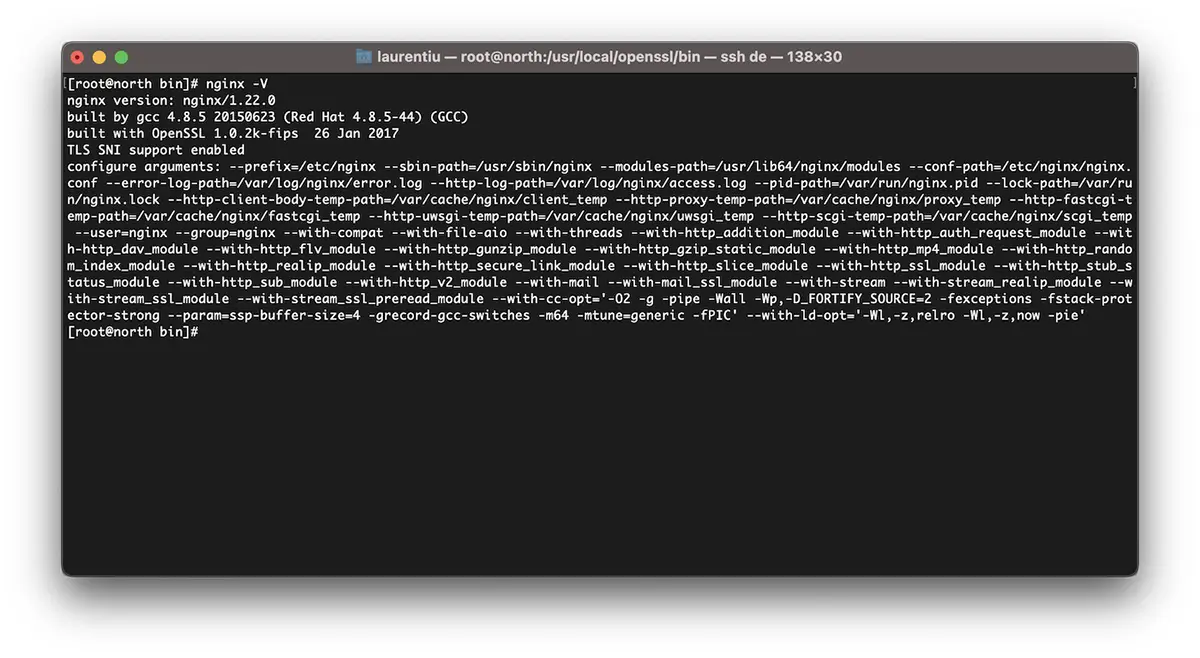
Como recompilar o Nginx para atualização do OpenSSL/CentOS 7
Repet. Dacă aveți Vestacp, descarcați versiunea de Nginx pe care o aveți deja instalată. Toate arhivele cu versiunile Nginx le găsiti pe nginx.org.
cd /usr/src
wget https://nginx.org/download/nginx-1.22.0.tar.gz
tar xvf nginx-1.22.0.tar.gz
cd nginx-1.22.0
Recompilăm modulele nginx:
./configure --prefix=/etc/nginx \
--sbin-path=/usr/sbin/nginx \
--modules-path=/usr/lib64/nginx/modules \
--conf-path=/etc/nginx/nginx.conf \
--error-log-path=/var/log/nginx/error.log  \
--http-log-path=/var/log/nginx/access.log  \
--pid-path=/var/run/nginx.pid  \
--lock-path=/var/run/nginx.lock  \
--http-client-body-temp-path=/var/cache/nginx/client_temp  \
--http-proxy-temp-path=/var/cache/nginx/proxy_temp  \
--http-fastcgi-temp-path=/var/cache/nginx/fastcgi_temp  \
--http-uwsgi-temp-path=/var/cache/nginx/uwsgi_temp  \
--http-scgi-temp-path=/var/cache/nginx/scgi_temp  \
--user=nginx  \
--group=nginx  \
--with-compat  \
--with-file-aio  \
--with-threads  \
--with-http_addition_module  \
--with-http_auth_request_module  \
--with-http_dav_module  \
--with-http_flv_module  \
--with-http_gunzip_module  \
--with-http_gzip_static_module  \
--with-http_mp4_module  \
--with-http_random_index_module  \
--with-http_realip_module  \
--with-http_secure_link_module  \
--with-http_slice_module  \
--with-http_ssl_module  \
--with-http_stub_status_module  \
--with-http_sub_module  \
--with-http_v2_module  \
--with-mail  \
--with-mail_ssl_module  \
--with-stream  \
--with-stream_realip_module  \
--with-stream_ssl_module  \
--with-stream_ssl_preread_module  \
--with-openssl=/usr/src/openssl  \
--with-cc-opt='-O2 -g -pipe -Wall -Wp,-D_FORTIFY_SOURCE=2 -fexceptions -fstack-protector-strong  \
--param=ssp-buffer-size=4 -grecord-gcc-switches -m64 -mtune=generic -fPIC'  \
--with-ld-opt='-Wl,-z,relro -Wl,-z,now -pie'
make -j4
make installAcum avem Nginx instalat și compilat cu cea mai recentă versiune de OpenSSL capabila sa suporte TLSv1.3.
[root@north bin]# nginx -V
nginx version: nginx/1.22.0
built by gcc 4.8.5 20150623 (Red Hat 4.8.5-44) (GCC)
built with OpenSSL 1.1.1p  21 Jun 2022
TLS SNI support enabled
*dacă nginx era deja instalat pe server, va fi nevoie să-l dezinstalți. Compilarea nu funționează la upgrade nginx.
Como habilitar TLSv1.3 para domínios no VestaCP
No arquivo /etc/nginx/nginx.conf adăugăm urmatoarele linii:
ssl_protocols TLSv1.2 TLSv1.3;
ssl_prefer_server_ciphers on;
ssl_ciphers 'ECDHE-ECDSA-AES256-GCM-SHA384:ECDHE-RSA-AES256-GCM-SHA384:ECDHE-ECDSA-CHACHA20-POLY1305:ECDHE-RSA-CHACHA20-POLY1305:ECDHE-ECDSA-AES128-GCM-SHA256:ECDHE-RSA-AES128-GCM-SHA256:ECDHE-ECDSA-AES256-SHA384:ECDHE-RSA-AES256-SHA384:ECDHE-ECDSA-AES128-SHA256:ECDHE-RSA-AES128-SHA256';
La nivel de domenii eu am schimbat ceva în template-urile VestaCP și pentru a activa HTTP/2. Astfel că la adăugarea unui domeniu nou (example.com) cu Let’s Encrypt activat, am următorul fișier de configurare pentru SSL:
cat /home/vestacpuser/conf/web/example.com.nginx.ssl.conf

server {
    listen      IP.IP.IP.IP:443 ssl http2;
    server_name example.com www.example.com;
    root        /home/vestacpuser/web/example.com/public_html;
    index       index.php index.html index.htm;
    access_log  /var/log/nginx/domains/example.com.log combined;
    access_log  /var/log/nginx/domains/example.com.bytes bytes;
    error_log   /var/log/nginx/domains/example.com.error.log error;

    ssl_certificate      /home/vestacpuser/conf/web/ssl.example.com.pem;
    ssl_certificate_key  /home/vestacpuser/conf/web/ssl.example.com.key;

....

ssl_protocols TLSv1.2 TLSv1.3;
ssl_prefer_server_ciphers on;
ssl_ciphers 'ECDHE-ECDSA-AES256-GCM-SHA384:ECDHE-RSA-AES256-GCM-SHA384:ECDHE-ECDSA-CHACHA20-POLY1305:ECDHE-RSA-CHACHA20-POLY1305:ECDHE-ECDSA-AES128-GCM-SHA256:ECDHE-RSA-AES128-GCM-SHA256:ECDHE-ECDSA-AES256-SHA384:ECDHE-RSA-AES256-SHA384:ECDHE-ECDSA-AES128-SHA256:ECDHE-RSA-AES128-SHA256';
Înainte sa restartați nginx, este bine ca înainte să-i testati configurarea.
[root@north web]# nginx -t
nginx: the configuration file /etc/nginx/nginx.conf syntax is ok
nginx: configuration file /etc/nginx/nginx.conf test is successful
[root@north web]# systemctl restart nginx
Espero que este tutorial seja útil para você e se tiver alguma dúvida, deixe os detalhes do problema nos comentários.


Você também pode estar interessado em...
