

이 튜토리얼에서 당신은 방법을 배울 것입니다 ActiveZi TLSV1.3 또는 Nginx. 그것이 의미하는 바 TLSv 1.3, 도움이되는 것 그리고 왜 당신은 필요합니다 웹 서버 ca TLS를 활성화 할 수 있습니다. 관리 시스템이있는 서버의 경우 Vestacp (Centos 또는 Ubuntu)는 조금 더 어렵습니다 활성화 TLS 1.3 CPANEL이있는 서버에서만 불가능하지는 않습니다.
콘텐츠
TLS 1.3이 TLS 1.2보다 더 나은 이유는 무엇입니까?
TLS (Transport Layer Security) 그것은 a입니다 암호화 프로토콜 보장합니다 연결 보안 컴퓨터와 네트워크 사이에 있습니다. TLS 다음과 같은 응용 프로그램에서 사용됩니다. 이메일, 전령, 음성 및 화상 통화 (VoIP),하지만 특히 HTTPS. 사용자의 컴퓨터 또는 스마트 폰과 액세스 된 페이지의 웹 서버 간의 안전한 통신을 보장합니다.
TLS 1.3 제공 o 더 높은 속도 클라이언트 연결 – 서버와 하나 또한 보안 알고리즘을 제거함으로써. TLSV1.2와 TLSV1.3의 차이.
에 대한 HTTPS, SSL (Secure Sockets Layer) 나는 또한 다른 항목들에서도 말했다.
- CPANEL 또는 VESTACP가없는 NGINX 서버에서 Hostat 웹 사이트에 대한 SSL (HTTPS Connection) 인증을 설치하는 방법
- Recompilare OpensSL 1.1 & TLS 1.3의 Ningin 1.25 (Centos 7)
- 블로그 또는 WordPress 웹 사이트를 http에서 https (nginx)로 옮기는 방법
- 이전 도메인 삭제 Certbot 인증서 (인증서 암호화)
Ninx에서 TLS 1.3을 어떻게 활성화합니까? VestACP / CentOS 관리가있는 서버
Nginx에서 TLSV1.3을 활성화하는 방법을보기 전에 최소 요구 사항을 고려해야합니다. TLS 1.3.
- Ningin 1.13.x 또는 최신 버전
- 유효한 TLS 인증서
- DNS가 올바르게 구성된 도메인 이름 – 인터넷에서 액세스 할 수 있습니다
- 유효한 TLS / SSL 인증서. 그럴 수 있습니다 Let’s Encrypt.
VestACP는 오래 전에 설치되어 프로토콜 만 있습니다. TLS 1.2. 많은 튜토리얼에서 충분하다는 것을 알았습니다. nginx.conf 활성화 할 TLS 1.3에 대한 다음 줄을 추가하겠습니다.
server {

  listen 443 ssl http2;
  listen [::]:443 ssl http2;

  server_name example.com;
  root /var/www/example.com/public;

  ssl_certificate /path/to/your/certificate.crt;
  ssl_certificate_key /path/to/your/private.key;

  ssl_protocols TLSv1.2 TLSv1.3;
거짓. 만약에 서버에서 Centos CU 관리 Vestacp, Ningx는 컴파일되지 않았습니다 최소 버전으로 OpenSSL 1.1.1.1, ssl_protocols TLSv1.2 TLSv1.3; ~에 nginx.conf .. 그것은 아무것도 도움이되지 않습니다.
[root@north ~]# nginx -V
nginx version: nginx/1.22.0
built by gcc 4.8.5 20150623 (Red Hat 4.8.5-44) (GCC)
built with OpenSSL 1.0.2k-fips  26 Jan 2017
TLS SNI support enabled
ASAR, 위의 예에서 Nginx 1.22.0은 TLS 1.3 버전과 호환되지만 서점에는 도움이되지 않습니다. OpenSSL 1.0.2k-fips.
Nginx에서 TLSV1.3을 활성화하려면 먼저 어린 시절 및 개발 패키지를위한 서점을 설치해야합니다. Development Tools. CentOS 7 명령 줄에서 실행 :
yum install gcc gcc-c++ pcre-devel zlib-devel make unzip gd-devel perl-ExtUtils-Embed libxslt-devel openssl-devel perl-Test-Simple
yum groupinstall 'Development Tools'
1. 최신 버전을 설치하십시오 OpenSSL
현재 가장 최근 버전은입니다 OpenSSL 1.1.1p, 그러나 내가 알았던 것에서 이미 Opennsl 3이 있습니다. 당신은 출처를 찾습니다. openssl.org.
cd /usr/src
wget https://www.openssl.org/source/openssl-1.1.1p.tar.gz
tar xvf openssl-1.1.1p.tar.gz
mv openssl-1.1.1p openssl
cd openssl
./config --prefix=/usr/local/openssl --openssldir=/usr/local/openssl --libdir=/lib64 shared zlib-dynamic
make -j4
make test
make install
실행하는 것이 매우 중요합니다 make test 서점을 설치하기 전에. 테스트에서 오류가 발생한 경우 실행하지 마십시오. make install 오류가 수정 될 때까지.
다음 단계에서 우리는 현재 이진 파일로 백업을 만듭니다. openssl 그리고 나는 추가합니다 symlink 새로운 사람에게.
mv /usr/bin/openssl /usr/bin/openssl-backup
ln -s /usr/local/openssl/bin/openssl /usr/bin/openssl
~ 안에 /usr/local/openssl/bin 실행하다 ldd OpenSSL 중독을 확인합니다. OpenSL 버전을 확인할 수도 있습니다. 명령 openssl version.
[root@north bin]# ldd openssl
	linux-vdso.so.1 =>  (0x00007ffd20bd7000)
	libssl.so.1.1 => /lib64/libssl.so.1.1 (0x00007fab09b62000)
	libcrypto.so.1.1 => /lib64/libcrypto.so.1.1 (0x00007fab09675000)
	libdl.so.2 => /lib64/libdl.so.2 (0x00007fab09471000)
	libpthread.so.0 => /lib64/libpthread.so.0 (0x00007fab09255000)
	libc.so.6 => /lib64/libc.so.6 (0x00007fab08e87000)
	/lib64/ld-linux-x86-64.so.2 (0x00007fab09df5000)
[root@north bin]# openssl version
OpenSSL 1.1.1p  21 Jun 2022
현재 최신 버전이 설치되어 있습니다 OpenSSL 지원합니다 TLSv1.3. 버전을 확인할 수 있습니다 TLS / SSL 사서의 지원 OpenSSL 순서로 :
[root@north bin]# openssl ciphers -v | awk '{print $2}' | sort | uniq
SSLv3
TLSv1
TLSv1.2
TLSv1.3
[root@north bin]#
그렇다고해서 웹 사이트가 관리자의 도움으로 호스팅 된 것은 아닙니다. VestaCP 그들은 즉시 가질 것입니다 TLS 1.3.
우리는 설치했지만 OpenSSL 1.1.1p, nginx는 이전 버전으로 컴파일됩니다 OpenSSL 1.0.2k-fips.
[root@north bin]# nginx -V
nginx version: nginx/1.22.0
built by gcc 4.8.5 20150623 (Red Hat 4.8.5-44) (GCC)
built with OpenSSL 1.0.2k-fips  26 Jan 2017
TLS SNI support enabled
configure arguments: --prefix=/etc/nginx --sbin-path=/usr/sbin/nginx --modules-path=/usr/lib64/nginx/modules --conf-path=/etc/nginx/nginx.conf --error-log-path=/var/log/nginx/error.log --http-log-path=/var/log/nginx/access.log --pid-path=/var/run/nginx.pid --lock-path=/var/run/nginx.lock --http-client-body-temp-path=/var/cache/nginx/client_temp --http-proxy-temp-path=/var/cache/nginx/proxy_temp --http-fastcgi-temp-path=/var/cache/nginx/fastcgi_temp --http-uwsgi-temp-path=/var/cache/nginx/uwsgi_temp --http-scgi-temp-path=/var/cache/nginx/scgi_temp --user=nginx --group=nginx --with-compat --with-file-aio --with-threads --with-http_addition_module --with-http_auth_request_module --with-http_dav_module --with-http_flv_module --with-http_gunzip_module --with-http_gzip_static_module --with-http_mp4_module --with-http_random_index_module --with-http_realip_module --with-http_secure_link_module --with-http_slice_module --with-http_ssl_module --with-http_stub_status_module --with-http_sub_module --with-http_v2_module --with-mail --with-mail_ssl_module --with-stream --with-stream_realip_module --with-stream_ssl_module --with-stream_ssl_preread_module --with-cc-opt='-O2 -g -pipe -Wall -Wp,-D_FORTIFY_SOURCE=2 -fexceptions -fstack-protector-strong --param=ssp-buffer-size=4 -grecord-gcc-switches -m64 -mtune=generic -fPIC' --with-ld-opt='-Wl,-z,relro -Wl,-z,now -pie'
[root@north bin]# openssl version
OpenSSL 1.1.1p  21 Jun 2022
[root@north bin]#
2. VestaCP
이 단계에서는 우리가 추천해야합니다 OpenSSL NGINX 버전이 이미 설치되었습니다 시스템에서 CentOS / VestaCP. 위에서 말했듯이 내 경우에는 nginx/1.22.0. 웹 서버에 관한 것입니다 VestaCP 관리 시스템, 재 컴파일을 시작하기 전에 Nginx 파일을 백업하는 것이 좋습니다.
시스템에서 Nginx 전류 백업 VestaCP
보관하고 서버 어딘가에 감독을 유지하십시오 “/etc/nginx” 그리고 “/usr/local/vesta/nginx“.
달리다 nginx -V 기존 모듈 파일로 저장하십시오.
configure arguments: --prefix=/etc/nginx --sbin-path=/usr/sbin/nginx --modules-path=/usr/lib64/nginx/modules --conf-path=/etc/nginx/nginx.conf --error-log-path=/var/log/nginx/error.log --http-log-path=/var/log/nginx/access.log --pid-path=/var/run/nginx.pid --lock-path=/var/run/nginx.lock --http-client-body-temp-path=/var/cache/nginx/client_temp --http-proxy-temp-path=/var/cache/nginx/proxy_temp --http-fastcgi-temp-path=/var/cache/nginx/fastcgi_temp --http-uwsgi-temp-path=/var/cache/nginx/uwsgi_temp --http-scgi-temp-path=/var/cache/nginx/scgi_temp --user=nginx --group=nginx --with-compat --with-file-aio --with-threads --with-http_addition_module --with-http_auth_request_module --with-http_dav_module --with-http_flv_module --with-http_gunzip_module --with-http_gzip_static_module --with-http_mp4_module --with-http_random_index_module --with-http_realip_module --with-http_secure_link_module --with-http_slice_module --with-http_ssl_module --with-http_stub_status_module --with-http_sub_module --with-http_v2_module --with-mail --with-mail_ssl_module --with-stream --with-stream_realip_module --with-stream_ssl_module --with-stream_ssl_preread_module --with-cc-opt='-O2 -g -pipe -Wall -Wp,-D_FORTIFY_SOURCE=2 -fexceptions -fstack-protector-strong --param=ssp-buffer-size=4 -grecord-gcc-switches -m64 -mtune=generic -fPIC' --with-ld-opt='-Wl,-z,relro -Wl,-z,now -pie'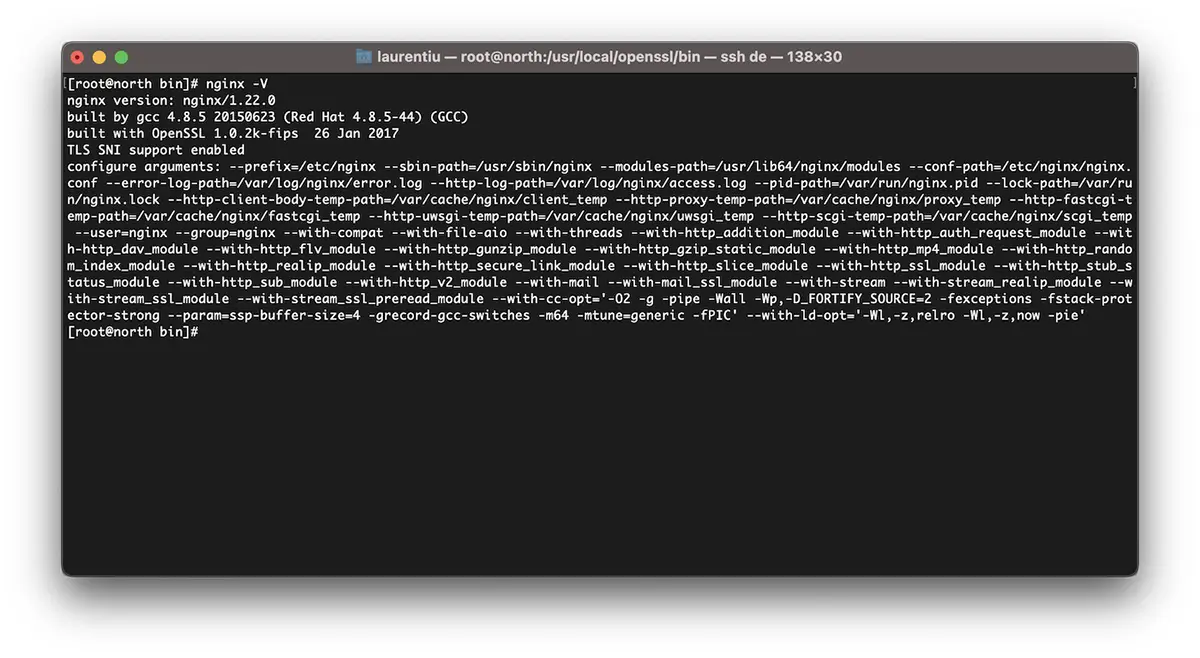
Upgrage Opensl / Centos 7에 대한 수신자 Ninx의 방법 7
나는 반복한다. 당신이 있다면 Vestacp, 이미 설치 한 Nginx 버전을 다운로드하십시오. 당신이 찾을 수있는 nginx 버전의 모든 아카이브 nginx.org.
cd /usr/src
wget https://nginx.org/download/nginx-1.22.0.tar.gz
tar xvf nginx-1.22.0.tar.gz
cd nginx-1.22.0
Nginx 모듈을 다시 복제합니다.
./configure --prefix=/etc/nginx \
--sbin-path=/usr/sbin/nginx \
--modules-path=/usr/lib64/nginx/modules \
--conf-path=/etc/nginx/nginx.conf \
--error-log-path=/var/log/nginx/error.log  \
--http-log-path=/var/log/nginx/access.log  \
--pid-path=/var/run/nginx.pid  \
--lock-path=/var/run/nginx.lock  \
--http-client-body-temp-path=/var/cache/nginx/client_temp  \
--http-proxy-temp-path=/var/cache/nginx/proxy_temp  \
--http-fastcgi-temp-path=/var/cache/nginx/fastcgi_temp  \
--http-uwsgi-temp-path=/var/cache/nginx/uwsgi_temp  \
--http-scgi-temp-path=/var/cache/nginx/scgi_temp  \
--user=nginx  \
--group=nginx  \
--with-compat  \
--with-file-aio  \
--with-threads  \
--with-http_addition_module  \
--with-http_auth_request_module  \
--with-http_dav_module  \
--with-http_flv_module  \
--with-http_gunzip_module  \
--with-http_gzip_static_module  \
--with-http_mp4_module  \
--with-http_random_index_module  \
--with-http_realip_module  \
--with-http_secure_link_module  \
--with-http_slice_module  \
--with-http_ssl_module  \
--with-http_stub_status_module  \
--with-http_sub_module  \
--with-http_v2_module  \
--with-mail  \
--with-mail_ssl_module  \
--with-stream  \
--with-stream_realip_module  \
--with-stream_ssl_module  \
--with-stream_ssl_preread_module  \
--with-openssl=/usr/src/openssl  \
--with-cc-opt='-O2 -g -pipe -Wall -Wp,-D_FORTIFY_SOURCE=2 -fexceptions -fstack-protector-strong  \
--param=ssp-buffer-size=4 -grecord-gcc-switches -m64 -mtune=generic -fPIC'  \
--with-ld-opt='-Wl,-z,relro -Wl,-z,now -pie'
make -j4
make install이제 Ningx를 설치하고 최신 버전으로 컴파일했습니다. OpenSSL TLSV1.3을 지원할 수 있습니다.
[root@north bin]# nginx -V
nginx version: nginx/1.22.0
built by gcc 4.8.5 20150623 (Red Hat 4.8.5-44) (GCC)
built with OpenSSL 1.1.1p  21 Jun 2022
TLS SNI support enabled
*NGINX가 이미 서버에 설치된 경우 제거해야합니다. 업그레이드 Ninx에서는 컴파일이 작동하지 않습니다.
VestACP의 필드에 대한 TLSV1.3을 어떻게 활성화합니까?
파일에서 /etc/nginx/nginx.conf 다음 줄을 추가합니다.
ssl_protocols TLSv1.2 TLSv1.3;
ssl_prefer_server_ciphers on;
ssl_ciphers 'ECDHE-ECDSA-AES256-GCM-SHA384:ECDHE-RSA-AES256-GCM-SHA384:ECDHE-ECDSA-CHACHA20-POLY1305:ECDHE-RSA-CHACHA20-POLY1305:ECDHE-ECDSA-AES128-GCM-SHA256:ECDHE-RSA-AES128-GCM-SHA256:ECDHE-ECDSA-AES256-SHA384:ECDHE-RSA-AES256-SHA384:ECDHE-ECDSA-AES128-SHA256:ECDHE-RSA-AES128-SHA256';
도메인 수준에서 나는 템플릿에서 무언가를 변경했습니다. Vestacp 및 HTTP/2를 활성화합니다. 따라서 Let 's Encrypt Activated와 함께 새 도메인 (example.com)을 추가 할 때 다음과 같은 SSL 구성 파일이 있습니다.
cat /home/vestacpuser/conf/web/example.com.nginx.ssl.conf

server {
    listen      IP.IP.IP.IP:443 ssl http2;
    server_name example.com www.example.com;
    root        /home/vestacpuser/web/example.com/public_html;
    index       index.php index.html index.htm;
    access_log  /var/log/nginx/domains/example.com.log combined;
    access_log  /var/log/nginx/domains/example.com.bytes bytes;
    error_log   /var/log/nginx/domains/example.com.error.log error;

    ssl_certificate      /home/vestacpuser/conf/web/ssl.example.com.pem;
    ssl_certificate_key  /home/vestacpuser/conf/web/ssl.example.com.key;

....

ssl_protocols TLSv1.2 TLSv1.3;
ssl_prefer_server_ciphers on;
ssl_ciphers 'ECDHE-ECDSA-AES256-GCM-SHA384:ECDHE-RSA-AES256-GCM-SHA384:ECDHE-ECDSA-CHACHA20-POLY1305:ECDHE-RSA-CHACHA20-POLY1305:ECDHE-ECDSA-AES128-GCM-SHA256:ECDHE-RSA-AES128-GCM-SHA256:ECDHE-ECDSA-AES256-SHA384:ECDHE-RSA-AES256-SHA384:ECDHE-ECDSA-AES128-SHA256:ECDHE-RSA-AES128-SHA256';
nginx를 다시 시작하기 전에 구성을 테스트하기 전에 좋습니다.
[root@north web]# nginx -t
nginx: the configuration file /etc/nginx/nginx.conf syntax is ok
nginx: configuration file /etc/nginx/nginx.conf test is successful
[root@north web]# systemctl restart nginx
이 튜토리얼이 귀하에게 유용하기를 바랍니다. 성공하지 못하면 문제의 세부 사항을 의견에 남겨 두십시오.


당신은 또한에 관심이있을 수 있습니다 ...
