

キーボードショートカット 2 つ以上のキーの組み合わせ (キーの組み合わせ + マウス クリックの場合もあります) で、これらを同時にアクティブにすると、通常はマウスを使用したりメニューにアクセスしたりする必要があったコマンドが実行されます。 キーボードショートカット (キーボード ショートカット) は、特に 時間を節約する、しかし、問題に対処しなければならないときに非常に役立ちます。 マウスの欠陥。キーの組み合わせは両方で使用できます。 Windows 同じように Windows にインストールされているほぼすべてのプログラム (Adobe、ペイント、Word、電卓、 Windowsエクスプローラー、など…)。
ほぼ2年前の頃、 Windows7 それはまだベータ段階であり、私たちはそれを発表していました いくつかのキーボード ショートカットのリスト、ほとんどはキーとの組み合わせです 勝つ。
最近私が見つけたのは マイクロソフト.com o lista interesanta de shortcut-uri (keyboard shortcuts) valabile pe sistemele de operare マイクロソフト Windows 7。
– Ease of Access keyboard shortcuts in Windows 7
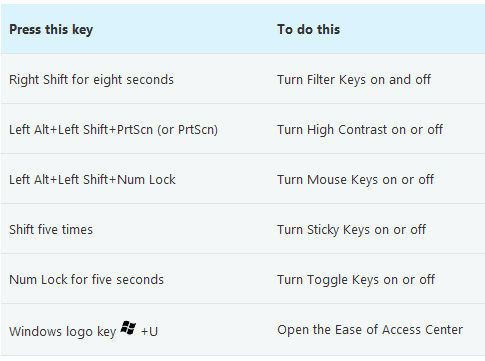
– General keyboard shortcuts in Windows 7

Lista completa de keyboard shortcuts in Windows 7, mai include:
– Dialog box keyboard shortcuts in Windows 7
– Windows logo key keyboard shortcuts
– Windows Explorer keyboard shortcuts
– Taskbar keyboard shortcuts
– Magnifier keyboard shortcuts
– Remote Desktop Connection keyboard shortcuts
– Paint keyboard shortcuts
– WordPad keyboard shortcuts
– Calculator keyboard shortcuts
– Windows Journalキーボードショートカット
– Windows Help viewer keyboard shortcuts
Windows7のヒント – Windows 7 のキーボード ショートカット。


あなたも興味があるかもしれません...
