

Keyboard shortcuts There are combinations of two or more keys (sometimes also combinations of keys + mouse click), which operated simultaneously execute an order for which you usually had to use the mouse or access a menu. The keyboard on the keyboard (Keyboard shortcuts) were designed especially for a save time, but they become very useful when we have to deal with a mouse defect. Key combinations can be used both in Windows as well in almost all programs installed on Windows (Adobe, Paint, Word, Calculator, Windows Explorer, etc…).
Almost two years ago, when Windows 7 was still in the beta phase, we presented a List with some Keyboard Shortcuts, most being combinations with the key Win.
These days I found on Microsoft.com o Shortcut interesting list-uri (KeyBoard Shortcuts) valid on operating systems Microsoft Windows 7.
– Ease of Access keyboard shortcuts in Windows 7
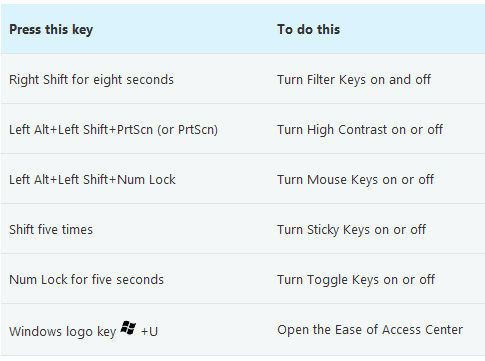
– General keyboard shortcuts in Windows 7

Lista completa de keyboard shortcuts in Windows 7, also includes:
– Dialog box keyboard shortcuts in Windows 7
– Windows logo key keyboard shortcuts
– Windows Explorer keyboard shortcuts
– Taskbar keyboard shortcuts
– Magnifier keyboard shortcuts
– Remote Desktop Connection keyboard shortcuts
– Paint keyboard shortcuts
– WordPad keyboard shortcuts
– Calculator keyboard shortcuts
– Windows Journal keyboard shortcuts
– Windows Help viewer keyboard shortcuts
Windows 7 Tips – Keyboard Shortcuts in Windows 7.


You may also be interested in...
