

Some tricks to help you increase your productivity when working with documents in Word or making calculations in Excel. Some of the most useful keyboard shortcuts in Microsoft Office.
content
If you prefer to hold your hands more on keyboard and help you less than mouse, or if the office mouse has failed and have a lot of work in Microsoft Office, you must know that using the keyboard you have access to almost all options and commands in Microsoft Office 2010.
Compared to the suite Office lansate anterior de Microsoft, Office 2010 It has the main editing orders grouped in tabor “ribbon” (in Romanian would sound “RIBBONS”.
Keyboard shortcuts for options in Microsoft Office
A few keyboards for access for access to the most used options in Word.
Insert, Page Layout, References, Mailings, Review, View and Acrobat.
Ribbon in Word
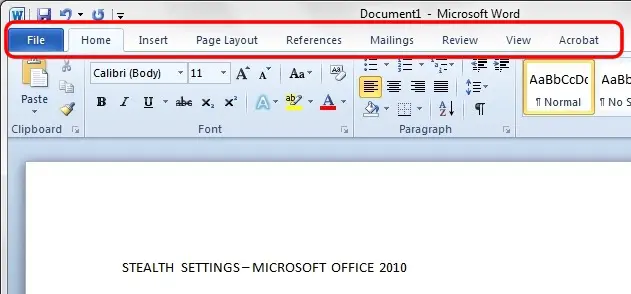
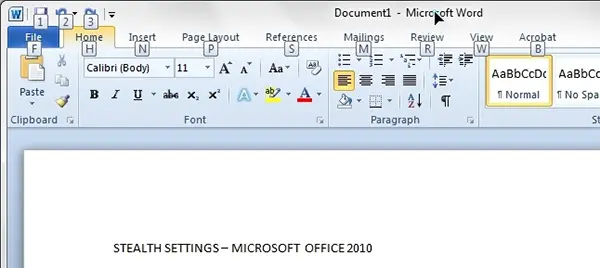
Each ribbon al Microsoft Office can be open using keyboard. Pressing the key ALT in Microsoft Word 2010 We will notice that next to each ribbon will appear a litera or a number.
Insert option – Keyboard shortcut
If we need to browse in the tab “Insert” It is enough as after ALT, or simultaneously with ALT, to press the key with the letter corresponding to the ribbon “Insert“. I mean the key “N“.
Once you arrive in the ribbon “Insert“, we will notice that next to each option below “Insert“, we have other characters (letters) of shortcut.
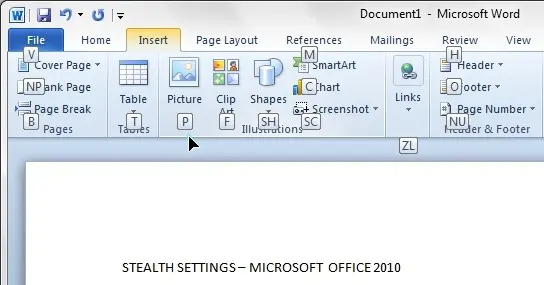
For example, if we want to We insert a picture IN A document Office Word 2010, using only the keyboard, it is enough to press ALT > N > P.
Insert Shapes
We observe in the image above that next to some options are two letters. Under “Shapes” For example we have the letters “SH“. That means that under the option “Shapes” We have other choice or element. If we press the keys ALT > N > S > H the elements of the “Shapes“.
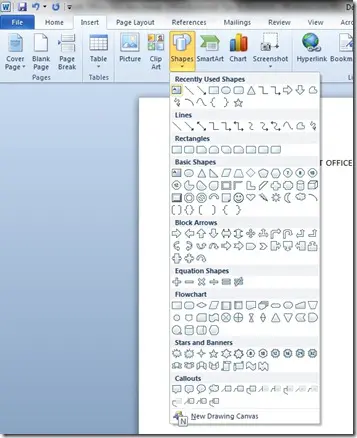
They can be selected using keys “arrows” (arrow keys) & Enter. For “New Drawing Canvas” We still press on the key “N“.
We can say that the key ALT (ALT key) in Microsoft Office 2010 este “Road opening” to the majority Microsoft Office 2010 Options. If we press the key ALT and then key 1 We can even We save the document in which we work.
We took in the above example ALT Key in Microsoft Office Word 2010, but of course these shortcuts with ALT are also valid in Office OneNote 2010, Office Excel 2010, Office PowerPoint 2010, Office OutLook 2010, Office Publisher 2010, Office Access 2010 … etc.
Keyboard shortcuts in Microsoft Office 2010 – Text editing
Besides the key combinations with ALT of the above examples when it comes to publishing / text manipulation, we still have a suite of keyboard shortcuts.
These are just a few shortcuts on the keyboard for Microsoft Office. If you know others, you can leave the comments and we will update the above list.


You may also be interested in...
