


Key combinations For Access to Rapid (keyboard shortcuts), help you open some faster Applications you are save time.
In the article Keyboard Shortcuts in Windows 7 & New Features, we show a few combinations of keys (default) to make your work easier in Windows 7.
Apart from keyboard shortcutthe default, you can define new combinations of keys, to open applications.
Let's see a concrete case. We want to create a combination of keys, which once operated, they will open Microsoft Word Office 2003.
Create KeyBoard Shortcut for Microsoft Word Office 2003 [Windows 7].
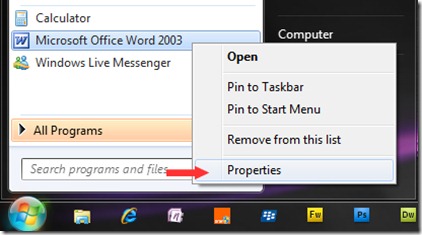
1. We go to Start Menu At the Microsoft Word Office 2003 application, we click on it, and in the open menu, click on Properties.
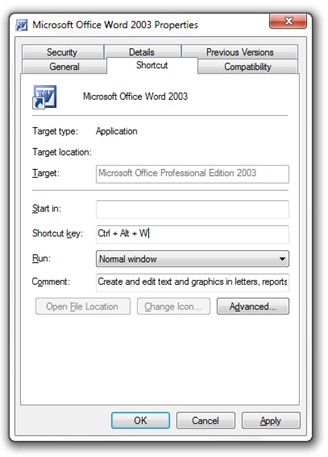
2. In the box Microsoft Word Office 2003 Tasting, go in tab-ul Shortcut, do a click in the box next “Shortcut Key:” (where he writes “None”), then choose and press a key. The key chosen by you will be the key that in combination with Ctrl+Alt will open the MS Word Office.
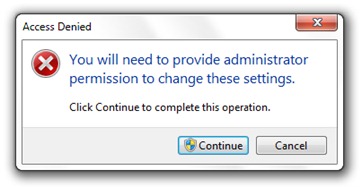
Click on the Apply button. If you are not logged in as an administrator, you will be greeted by a message “Access Denied“. Click the button “Continue”, then on OK.
In our example we chose the key “W” (Ctrl+Alt+W in Desktop – launches MS Word Office) as the key of shortcut For the application, but you can choose any key you want. The condition is that the shortcut key is not reserved by another application. You can create Key Shortcuts to open games, players, Internet browsers, connectivity applications, instant messaging customers, etc. Other Applications.
How to create custom keyboard shortcut to open any application in Windows 7.
Stealth Settings


You may also be interested in...
