

The best scenario, which we all want, is when we purchase a hard-disk nou, this one work perfectly for years, or at least until we give it up willingly. Unfortunately, the reality is different again hard disks have a relatively short lifespan, depending on how much it is or is not used by the user. Reason why, as a mandatory security measure (to not we risk losing important data stored on it), each hard disk in the equipment should checked periodically to detect when it starts to miss.

All hard drives use SMART technology (Self-Monitoring, Analysis and Reporting Technology) to identify the state of health and stability them and to determine if they have started to develop problems which sooner or later could lead to a irreversible failure. Users can find out this information either by using Third-Party applications or, for those who prefer not to use such methods, there is the possibility to check the status of a hard disk with the help Command prompt.
CrystalDiskInfo is such a third-party application, open-source (free) and simple to use, which helps users determine what working condition the hard disk(s) is located computer provided.
How does CrystalDiskInfo work?
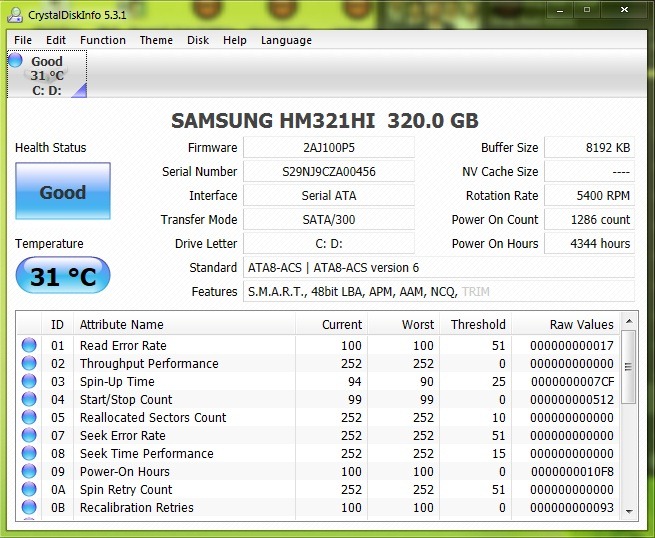
The application displays SMART status reported by hard disk of Windows, in this way the user can evaluate by himself if it is necessary replacing him or not. If the displayed status is GOOD, then the hard drive is in good working condition and does not require changing.
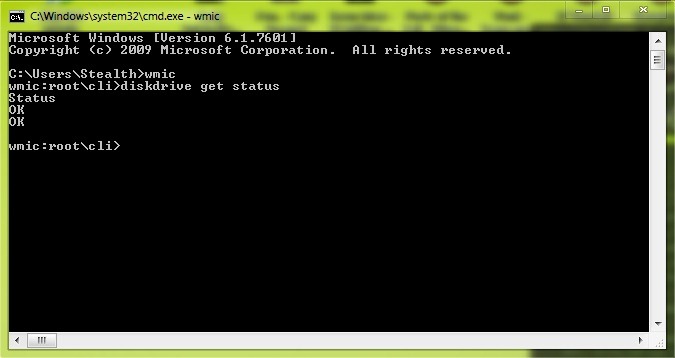
For users who prefer not to use third-party applications, we recommend using it Command prompt to identify the status of the hard disk:
- Open one Command Prompt, then type the following commands and wait for the status to be displayed
wmic
diskdrive get status
- if the status is OK, then the hard disk is in good working condition; other statuses might indicate SMART information identification errors or operating problems
Keep in mind that anything error displayed by SMART indicates that your hard drive is probably dying. This could happen in a few hours, a few months or even a few years, but you should keep this fact in mind and create backups of all important data stored on it so as not to bear the consequences later. When your hard drive shows signs of fatigue, it is best to replace it with a new one.
STEALTH SETTINGS – How to know when it’s time to buy a new hard drive


You may also be interested in...

2 thoughts on “How we find out when it's time to buy a new hard disk”