


Almost every time we open one Internet Browser we dreamed of that "Internet with the speed of light" that is promised to us in advertisements. Or, at least a higher speed than the one with which he has us happy ISP-ul. If the first option currently remains only at the dream stage, the second has become achievable with help Public DNS from Google.
Google Public DNS (Domain Name System) este un Free service beaten by Google Inc which any user with an Internet connection can use to surf the web at a higher speed than if he remained faithful to the default DNS set by the ISP.
If you want to use Google's public DNS to high Internet browsing speed you must follow the steps described below::
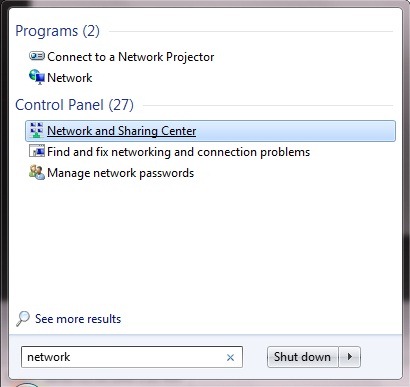
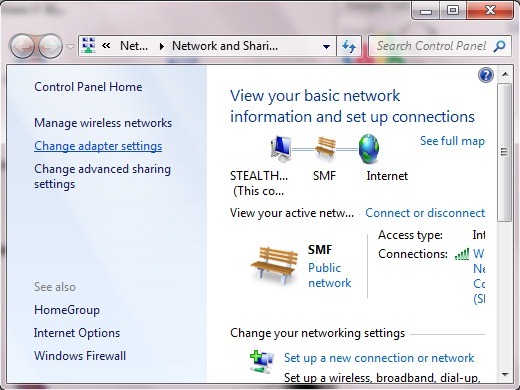
1. taste network in Search box-ul FROM Start Menu and select Network and Sharing Center, then, in the opened window, click on Change adapter settings (on the right side).
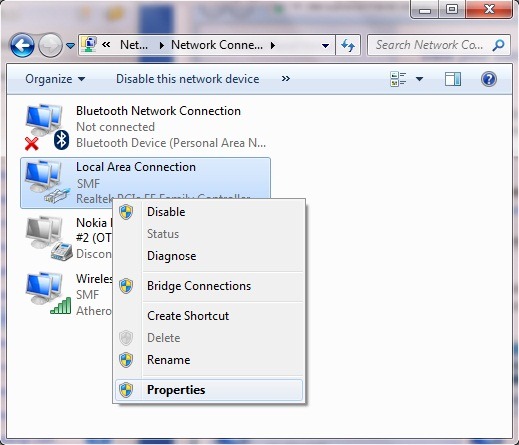
2. right-click on Local Area Connection and select Properties
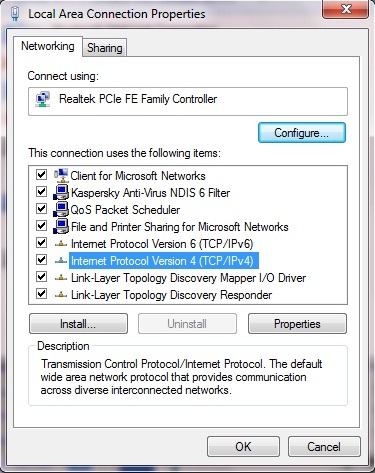
3. in Local Area Connection Properties select (and tick, if it is not already) Internet Protocol Version 4 (TCP/IPv4), Then click on the button Properties
4. at the bottom of the open window you have the option to manually set the DNS you want to use. Select Use the following DNS server addresses and type the following for the primary and secondary DNS (you can change the addresses between them, but do not use the same address for both DNS):
- Preferred DNS Server: 8.8.8.8
- Alternate DNS Server: 8.8.4.4
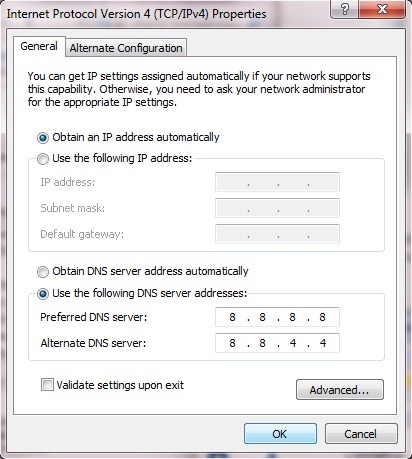
5. click OK, then restart the system. After restart, you will notice the difference ;)
Enjoy browsing the Internet!


You may also be interested in...

7 thoughts on “Increases Internet browsing speed with Google Public DNS”