


After the release of the Windows 7 operating system, many users preferred to install it in dual-boot cu Windows Vista or with Windows XP. Two operating systems on the same PC.
O “problem” of operating systems is the lack of the button “uninstall”. An operating system cannot be uninstalled like a normal application, and most users prefer partition formatting of HDD on which the operating system is installed.
If you have installed Windows Vista ca basic system on the primary partition, and Windows 7 on secondary partition, after you give up Windows 7 via partition formatting on which it is installed, in Boot menu (when you start the PC) both operating systems will appear, although Windows 7 can no longer be launched.
If you encounter this problem, there is a very simple solution by which you can remove an operating system from the boot menu.
How to delete a system from the boot menu (dual boot) – valid for Windows Vista, Windows 7 and Windows XP.
1. Run … -> msconfig -> OK 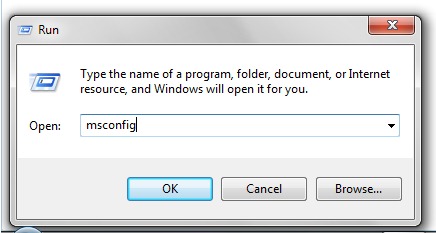 2. In the panel that opens “System Configuration“, click on the tab boot. Select the system you want to remove and press the button “Delete”.
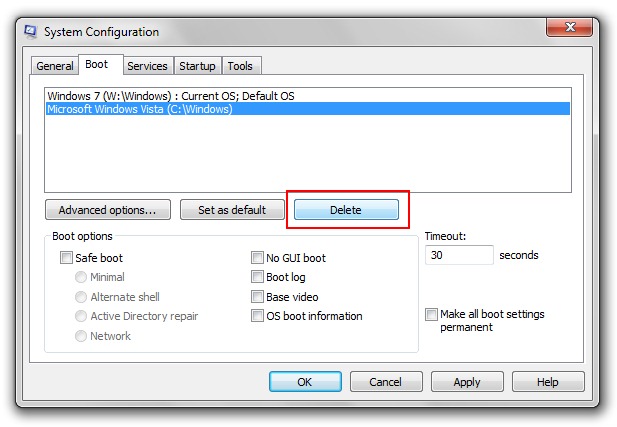 Apply & OK.
After restarting the PC, the operating system saved by you will automatically load.
This method is valid for Windows XP, Vista operating systems & Windows 7.


You may also be interested in...

14 thoughts on “Remove Dual-Boot [Windows 7, Windows Vista & XP]”