

” Cum aflu pe cati biti este sistemul? 32-bit? 64-bit? “
Initial am crezut ca un asemenea “Tutorial” nu poate fi publicat, pentru ca este o banalitate pentru multi utilizatori de PC. Trebuie sa fim intelegatori si sa realizam ca exista foarte multi novice (asa cum am fost si noi) care nu stiu cum sa afle pe cati biti este un sistem.
Se usi Windows 7, puteti urma cativa pasi foarte simpli pe a afla pe cati biti este sistemul dvs.
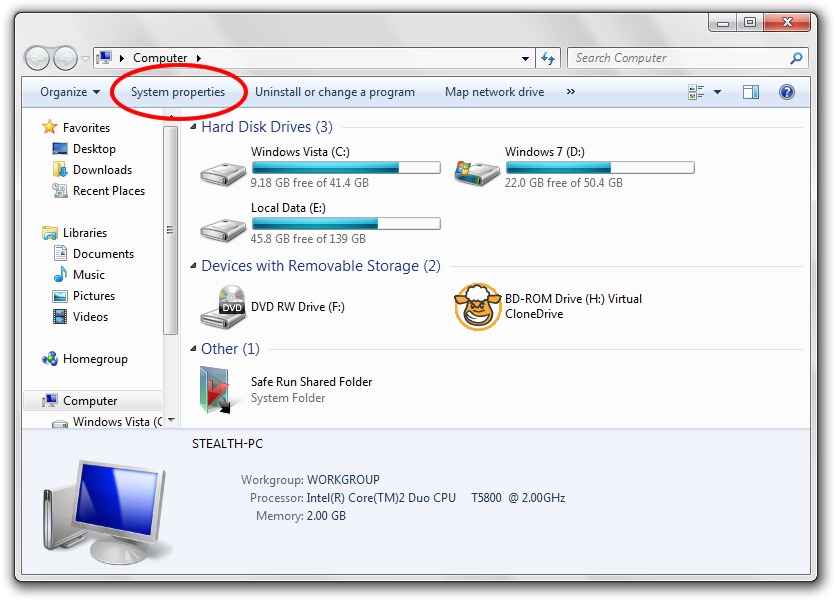
1. Intrati in Computer si undeva in partea de sus-stanga aveti un link / buton “System Propertie“.
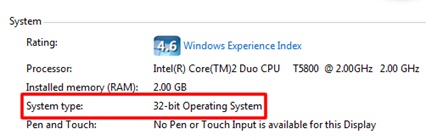
2. In “Proprietà del sistema” o sa vedeti o linie unde scrie pe cati biti este sistemul dvs. de operare. Un sistem de operare poate fi pe 32 bit O 64 bit.
O alta metoda pentru a afla pe cati biti este sistemul de operare:
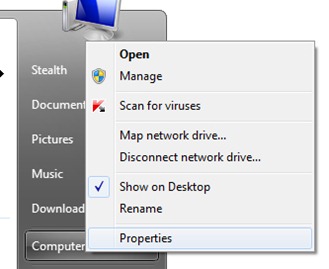
Clic “Inizio” -> fare clic con il tasto destro su “computer” -> clic “Proprietà”.
Prin cea de a doua metoda puteti afla si proprietatile sistemelor de operare Windows XP si Windows Vista.


Potrebbe interessarti anche...

6 pensieri su “Come facciamo a sapere quanti bit è un sistema? [32 bit & 64 bit]”