

” Hvordan finner jeg ut hvor mange bits systemet er? 32-bit? 64-bit? “
Først trodde jeg det var sånn “opplæringen” kan ikke publiseres, fordi det er vanlig for mange PC-brukere. Vi må være forståelsesfulle og innse at det er mange nybegynnere (som oss) som ikke vet hvordan de skal finne ut hvor mange bits et system er.
Hvis du bruker Windows 7, kan du følge noen veldig enkle trinn for å finne ut på hvor mange bits systemet er DVS.
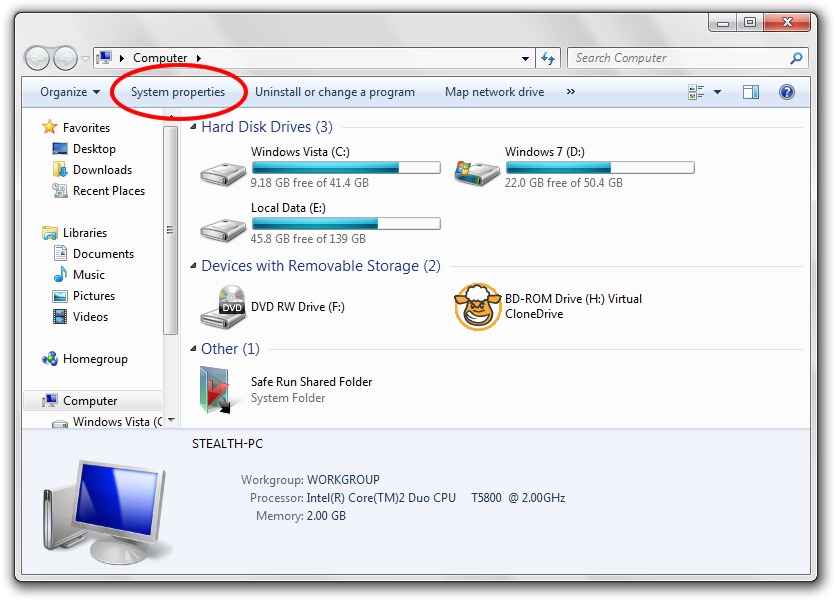
1. Skriv inn Computer og et sted i øvre venstre del har du en lenke / knapp “Systemegenskaper“.
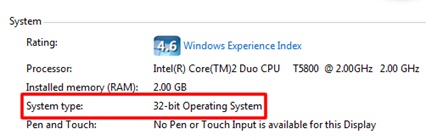
2. in “Systemegenskaper” du vil se en linje der det står hvor mange biter operativsystemet ditt er. Et operativsystem kan være på 32-bit eller 64-bit.
En annen metode for å finne ut hvor mange biter operativsystemet er:
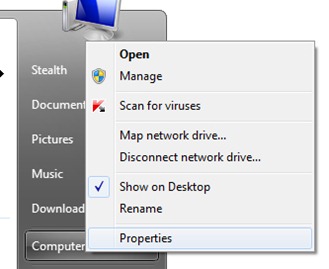
Klikk “Start” -> høyreklikk på “computer” -> Klikk “Egenskaper”.
Gjennom den andre metoden kan du også finne ut egenskapene til operativsystemene Windows XP og Windows Vista.


Du kan også være interessert i...

6 tanker om “Hvordan finner vi ut hvor mange bits et system er? [32-bit & 64-bit]”